06
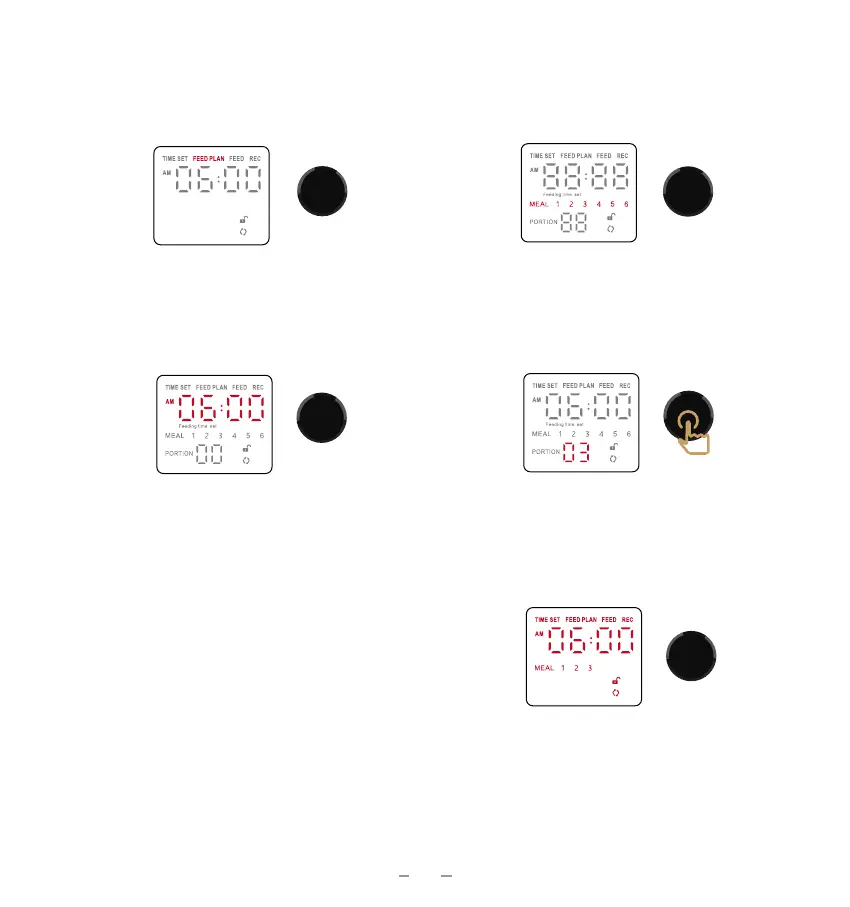
Feed Plan Settings
1. Rotate the dial to select the FEED
PLAN menu. Click to enter the feed
settings.
2. Turn the dial to select the feed serial
number.and click the dial to confirm it.
3. Turn the dial to adjust the hour and
minute numbers. Click to confirm them.
4. Turn the dial to adjust the portion
number. Click the dial to confirm it.
5. Repeat 2-4 if you need to set up the
next meal.
6. To return to the main menu, DO
NOT touch the dial and wait for 10
seconds.
Tips:
1. The PORTION number shown on the display means the amount for each bowl.
2. It Does Not support to deliver different portions to each bowl.


 To Next Page