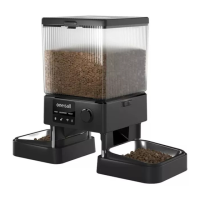
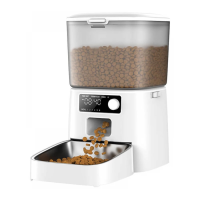
This document provides a comprehensive guide for the oneisall PFD-002 Pro Automatic Pet Feeder with WiFi, covering its features, assembly, operation, and maintenance.
Function Description
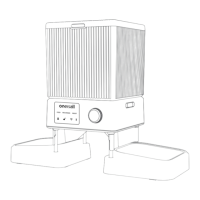
The oneisall PFD-002 Pro is an automatic pet feeder designed to provide scheduled meals for your pets, offering convenience and peace of mind. It features WiFi connectivity, allowing for remote control and monitoring via a smartphone application. The feeder supports both 2.4GHz and 5GHz WiFi networks and is compatible with iOS 10.0 or later and Android 5.0 or later devices. The core function is to dispense dry pet food according to a pre-set schedule or manual command. It includes a desiccant box to keep food fresh and a battery compartment for backup power during outages. The feeder is equipped with an LED display that provides visual feedback on its status, including manual feed, record message, reset, locked/unlocked status, WiFi indicator, and battery icon.
Usage Features
Assembly and Setup:
The feeder requires initial assembly, which involves installing 4 AA backup batteries (not included), connecting the Type-C charging cord, inserting two food slides, and attaching the stainless steel bowls with their holders using four metal posts. After assembly, a desiccant bag should be placed in the desiccant box to maintain food freshness. The food tank can then be filled with dry pet food. The feeder is designed for kibble sizes between 4-12mm (0.2-0.5 inches) in diameter and is not suitable for canned or wet food. It is recommended to use the provided 5V/1A adapter for daily power.
App Connection and Control:
To connect the feeder to the app, users need to download and install the "Smart Life" app. The process involves registering an account, enabling Bluetooth and GPS location services on the mobile phone, and connecting to a Wi-Fi network. The feeder is activated by turning it on, unlocking it by pressing and holding the dial button for 3 seconds, then rotating the dial to the RESET icon and holding for 5 seconds until the WiFi icon flashes red. Within the app, users can add the "PFD-002 Pro" device. Once connected, the WiFi icon on the device will turn white and stop blinking. The app allows for manual feeding, where users can select the desired number of portions (up to 5 portions in manual mode) to be dispensed immediately.
Feeding Schedule Settings:
The app enables users to set up a detailed feeding schedule. By accessing the "Meal Plan" option, users can add new schedules, selecting specific days of the week, feeding times, and the number of portions for each feeding. The system allows for up to 10 meals in total, with a maximum of 60 portions per meal. This flexibility ensures that pets receive consistent and appropriate amounts of food throughout the day.
Feeding Log and Slow Feed:
The "Feed Record" option in the app allows users to view a log of all completed feeding sessions for the current week. This feature helps track the pet's eating habits. The feeder also includes a "Slow Feed" setting, which can be enabled via the app's settings icon. When activated, this feature adjusts the grain interval to 10 seconds per portion, promoting slower eating and better digestion for pets.
Device Sharing and Management:
The app allows users to share control of the feeder with family and friends by tapping on the pencil icon in the upper right corner of the feeding interface and selecting "Share Device." Devices can also be removed from the account by pressing and holding the desired device on the device list screen and selecting "Remove Device."
Recording a Message:
The feeder has a unique feature to record a personalized calling message for your pet. While in the unlock state, users can turn the dial to select the "RECORDER" icon. The icon will flash, and pressing and holding the dial button will initiate recording after two beeps. The message can be up to 10 seconds long. Releasing the dial completes the recording, which then plays back for confirmation. This message will play at scheduled feeding times to call your pet.
Battery and WiFi Indicators:
The LED display includes a battery icon that is white when fully charged and turns red and blinks when the battery level is low, indicating a need for replacement. The WiFi indicator shows the network status: red and flashing for connecting, white and steady for connected, white and flashing quickly for disconnected but retaining memory of the last mobile phone, and white and flashing slowly for disconnected with no memory of the last mobile phone.
Maintenance Features
Cleaning:
Regular cleaning is essential for hygiene and proper functioning. Before cleaning, the charging cord must be unplugged. The food tank can be unlocked and removed, and any remaining food should be poured out. The lid, food tank, stainless steel bowls, and bowl holder should be washed with mild soap and warm water, rinsed thoroughly, and air-dried or wiped with a clean cloth. It is crucial to note that the main machine and tank base are not detachable or waterproof and should only be cleaned with a soft, dry cloth to prevent damage from water or other liquids.
Troubleshooting:
The manual provides a troubleshooting guide for common issues. For instance, if the feeder is not working, users should check the cord connection, try a different charging cord, or use new batteries. For desiccant replacement, users are advised to contact support. If the dial is unresponsive, pressing and holding it for 3 seconds should unlock the feeder. Issues with food getting stuck or an "E-01" error code require checking kibble size (must be less than 0.5 inches), ensuring the tank and food outlet are dry, and cleaning the food outlet if food is jammed. If the LED display is off while using battery power, it is a normal power-saving feature, and the feeder will still operate.
Connection Issues:
The manual addresses various connection problems. If the feeder fails to connect to the network, users should ensure they are not in tourist mode, the feeder is powered, the WiFi account and password are correct, the WiFi signal is strong (within 10 meters of the router), and the red WiFi icon is blinking slowly. If the device cannot be found, users should verify that WiFi and Bluetooth are enabled on their phone and perform a device reset by turning the dial to RESET and holding for 5 seconds until the WiFi indicator flashes. If the feeder display is offline, users should check their mobile phone's network connection, ensure the feeder is within 10 meters of the router without obstructions, and verify the home network is functioning correctly. The feeder will continue to operate according to its schedule even if the network is disconnected.


 To Next Page
 General