1
UniCredit Hungary Bank Zrt. – user guide for PSD2 compliant token
version DP310
First steps
1.
button to turn the token on.
Welcome
Hold it for at least 1 second.
2.
4-digit-long PIN then press
OK.
New PIN?
3.
press OK.
then continue from step 2
with another PIN.
<OK>
is too weak, therefore it
cannot be used. The codes 1234, 5555,
8765 and alike are not allowed.
4.
<OK>
The new PIN has successfully changed.
Press the green OK button
then continue from step 2.
<OK>
The repeated PIN differs from the initially
entered PIN, so the process restarts.
Login to UniCredit’s Internet Banking applications
1.
button to turn the token on.
Welcome
Hold it for at least 1 second.
2.
4-digit-long PIN then press
OK.
PIN?
3.
<OK>
You have entered the correct PIN.
Press the green OK button
twice then continue from
step 2.
Wrong PIN
<OK>
Incorrect PIN was entered, therefore the
login was not successful.
4.
Press the green OK button
to generate a password.
Menu
1. Password
The one time login password can be
generated here.
5.
into the appropriate pass-
word field in the application
Token code:
******
The password can be enlarged by
pressing the green OK button.
Delete / Back button
Power on / off and
Enter button
Move right button
Move left button

 Need help?
 General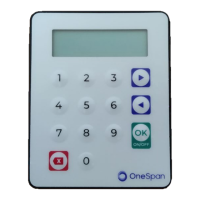

 To Next Page