5
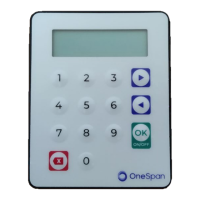
Press the green OK button
twice then continue from
step 2.
Wrong PIN
<OK>
Incorrect PIN was entered, therefore the
login was not successful.
4.
Press the purple right
arrow button twice.
1. Password
5.
Press the green OK
button.
3. Settings
6.
Press the purple right
arrow button.
1. Change PIN
7.
Press the green OK
button.
2. Language
8.
Press the purple right
arrow button.
1. English
9.
Press the purple OK
button.
2. Magyar
The device will display the texts in
Hungarian from now on.
10.
<OK>
11.
2. Nyelv
12.
3. Beállítások
13.
1. Jelszó
Token settings
1.
button to turn the token on.
Welcome
Hold it for at least 1 second.
2.
4-digit-long PIN then OK.
PIN?
3.
<OK>
You have entered the correct PIN.
Press the green OK button
twice then continue from
step 2.
Wrong PIN
<OK>
Incorrect PIN was entered, therefore the
login was not successful.
4.
Press the purple left arrow
button.
1. Password
5. Press the green OK button
4. Info
6.
Press the green OK button
to view the details.
Info
1. Need help?
The token displays the address of the
website of the Bank, the phone number
and the e-mail address.
7.
Press the green OK button
to view the details.
2.Battery level
The token displays the current battery
level.
8.
Press the green OK button
to view the details.
Info
3. Serial numb.
The token displays the serial number,
which can also be seen on the back of the
device.
9.
Press the green OK button
to view the details.
4. Date / Time
The token displays the date and time by
the internal clock of the device.
10.
Press the green OK button
to view the details.
5. FW version
The token displays the firmware number.


 To Previous Page