1300 886 649 Model: AAC-114 Product Code: 48463 12/2014
www.tempo.org
AUS
Recording video
• Slide the MODE switch to the middle setting to enter standby status in
video mode.
• Press the SHUTTER button to start recording video.
• While recording, press the SHUTTER button to stop recording. (Video
recording will stop automatically if there is no space left on the memory
card, or if the battery is flat.)
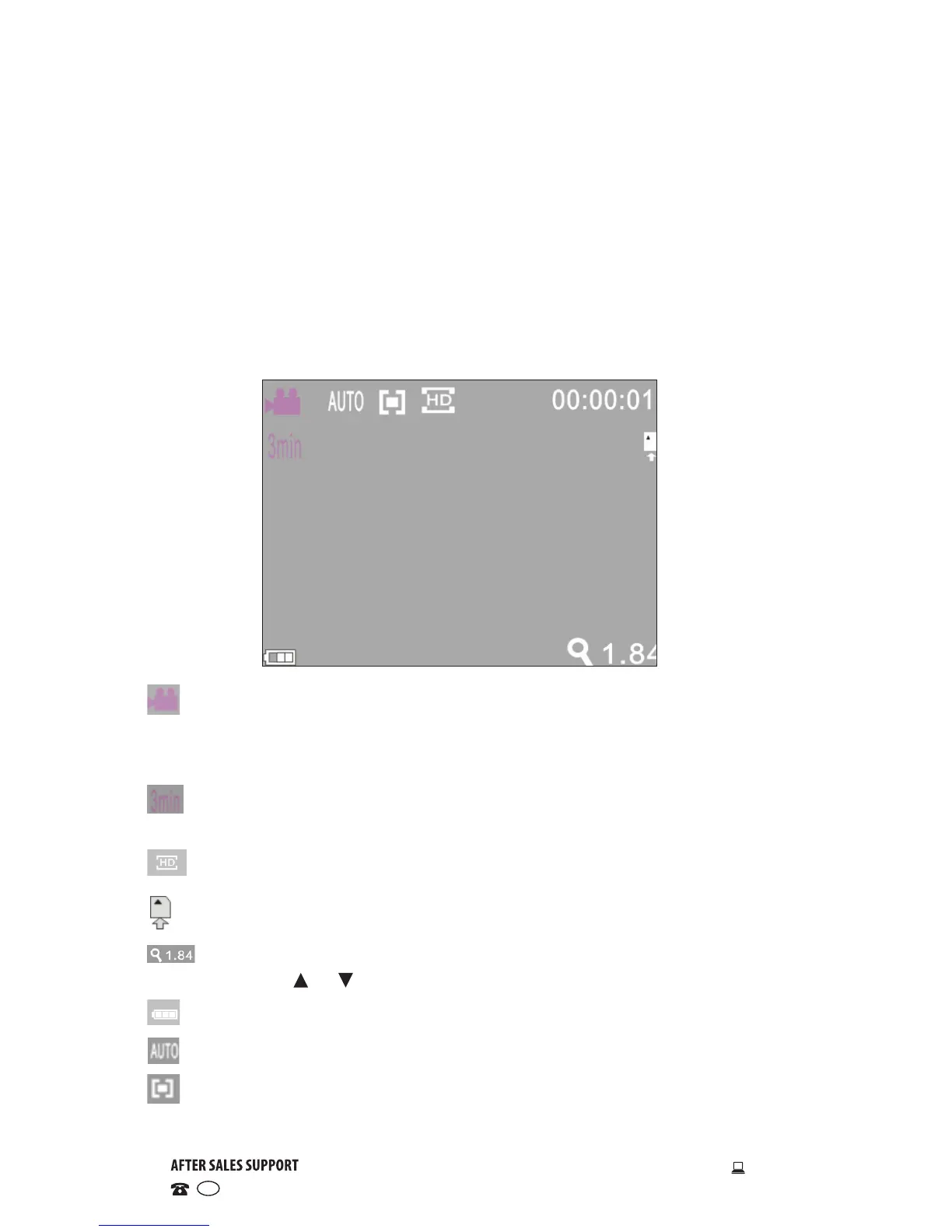
• In video mode the LCD displays the following icons:
Mode: Indicates that the current mode is video recording.
00:00:01 Time meter: Indicates that 1 second of video footage has been
recorded.
Timed loop video recording: Indicates that the currently set video
recording time is 3 minutes.
Movie size: Indicates that the current movie size is 720P.
SD card: Indicates that a memory card is currently inserted.
Digital zoom: Indicates that the current zoom magnification is 1.84.
Press the or buttons to adjust the zoom from 1x to 4x.
Battery: Indicates the current battery level.
White balance: Indicates that white balance is set to automatic.
Metering: Indicates that the metering perspective is set to multi-
points.
Instructions (Cont.)


 To Next Page