1300 886 649 Model: AAC-114 Product Code: 48463 12/2014
www.tempo.org
AUS
Instructions (Cont.)
Taking pictures
• Slide the MODE switch to the top setting to enter standby status in image
capture mode.
• Press the SHUTTER button to take a still picture.
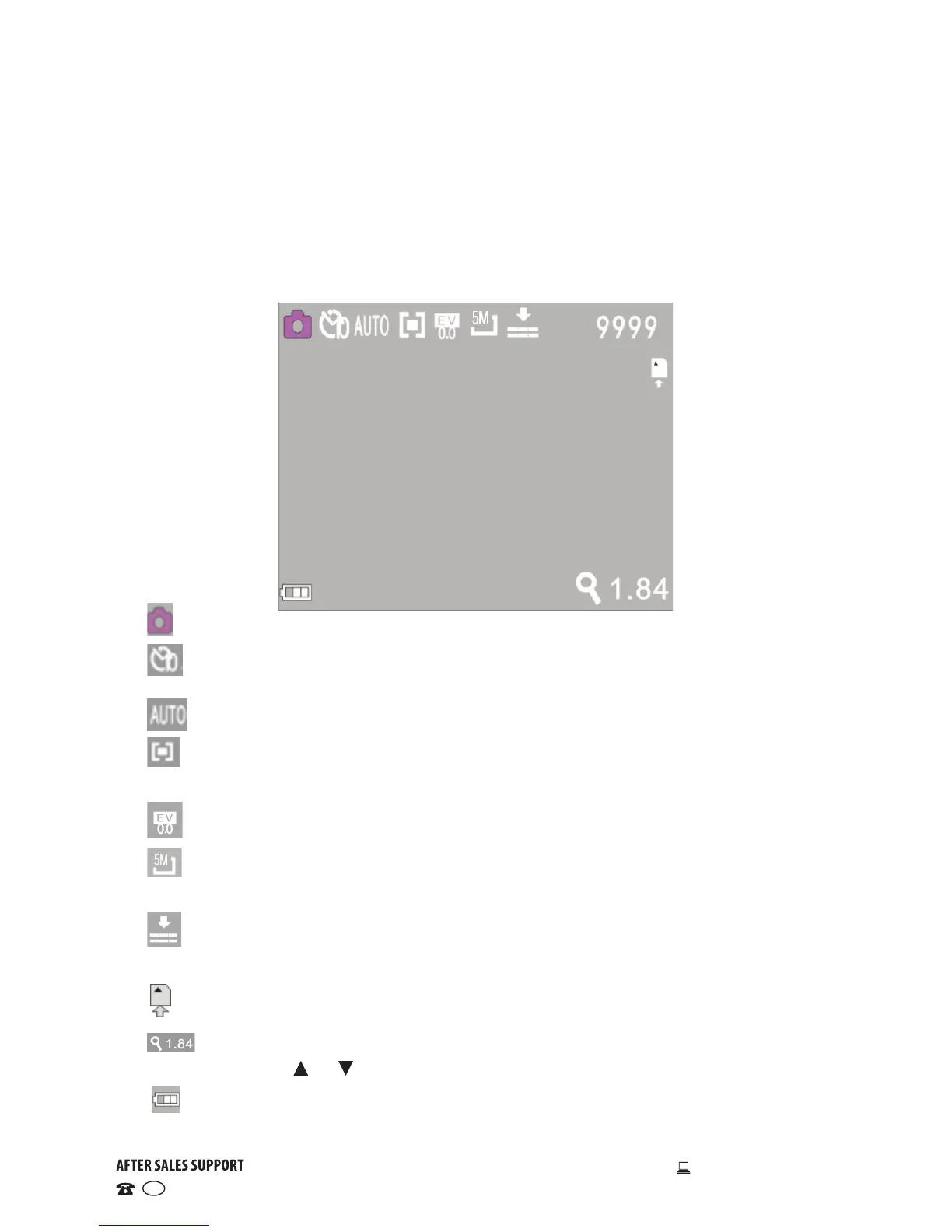
• In image capture mode the LCD displays the following icons:
Mode: Indicates that the current mode is image capture.
Self-timer: Indicates that the current self-timer mode is set to 10
seconds.
White balance: Indicates that white balance is set to automatic.
Metering: Indicates that the metering perspective is set to multi-
points.
Exposure: Indicates that the current exposure has been set to 0.0.
Image resolution: Indicates that the current image resolution is set
to 5MP.
Quality: Indicates picture quality level.
9999 Counter: Indicates the number of pictures available to be taken.
SD card: Indicates that a memory card is currently inserted.
Digital zoom: Indicates that the current zoom magnification is 1.84.
Press the or buttons to adjust the zoom from 1x to 4x.
Battery: Indicates the current battery level.


 To Next Page