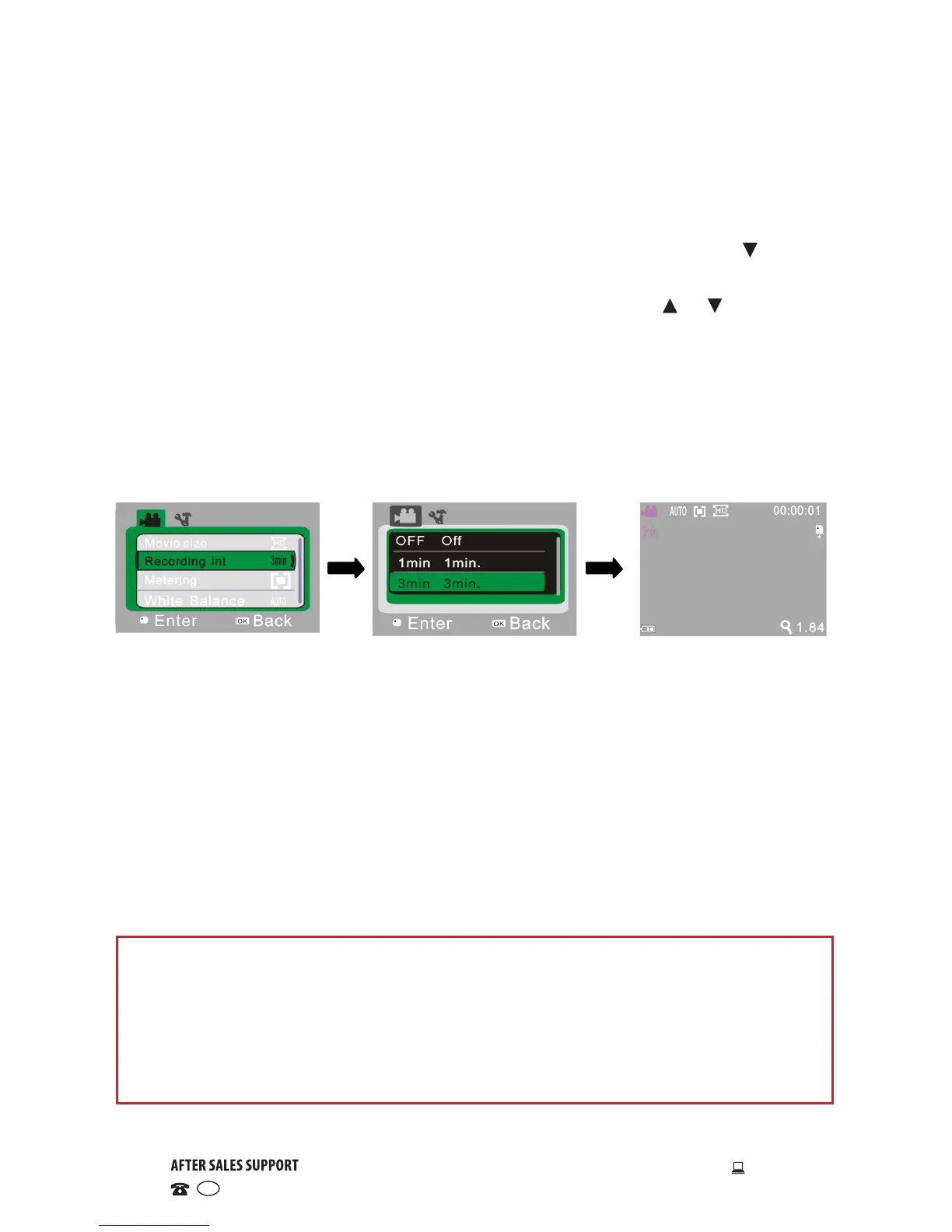
Open video recording
menu
Select recording time
and press OK to confirm
Exit from menu and
press SHUTTER to start
timed video recording
Timed video recording
• Slide the MODE switch to the middle setting to enter standby status in
video mode.
• Press the OK button to open the video mode menu, then use the button
to select the “REC Interval” menu.
• Press the OK button to enter the submenu, then use the or buttons to
choose the desired option from the following: “1min”, “3min”, 5min”
• After pressing OK for confirmation, press the SHUTTER button to exit from
the menu.
• Press the SHUTTER button to start the timed video recording. The camera
will automatically stop recording video after the set time (1min, 3min, 5min)
and immediately start the next section of video recording.
Important information about loop coverage
When the memory card is full, the earliest recorded section of the video
le will be deleted automatically to make room for further recordings. As
new recordings automatically cover older ones, make sure to save all
recordings you want to keep when the message “Full memory” appears on
the screen, otherwise the latest footage will erase the oldest.
NOTE: After selecting OFF in the “REC interval” menu, the camera returns to
normal video recording, and it will not stop recording until the memory
card is full.


 To Next Page