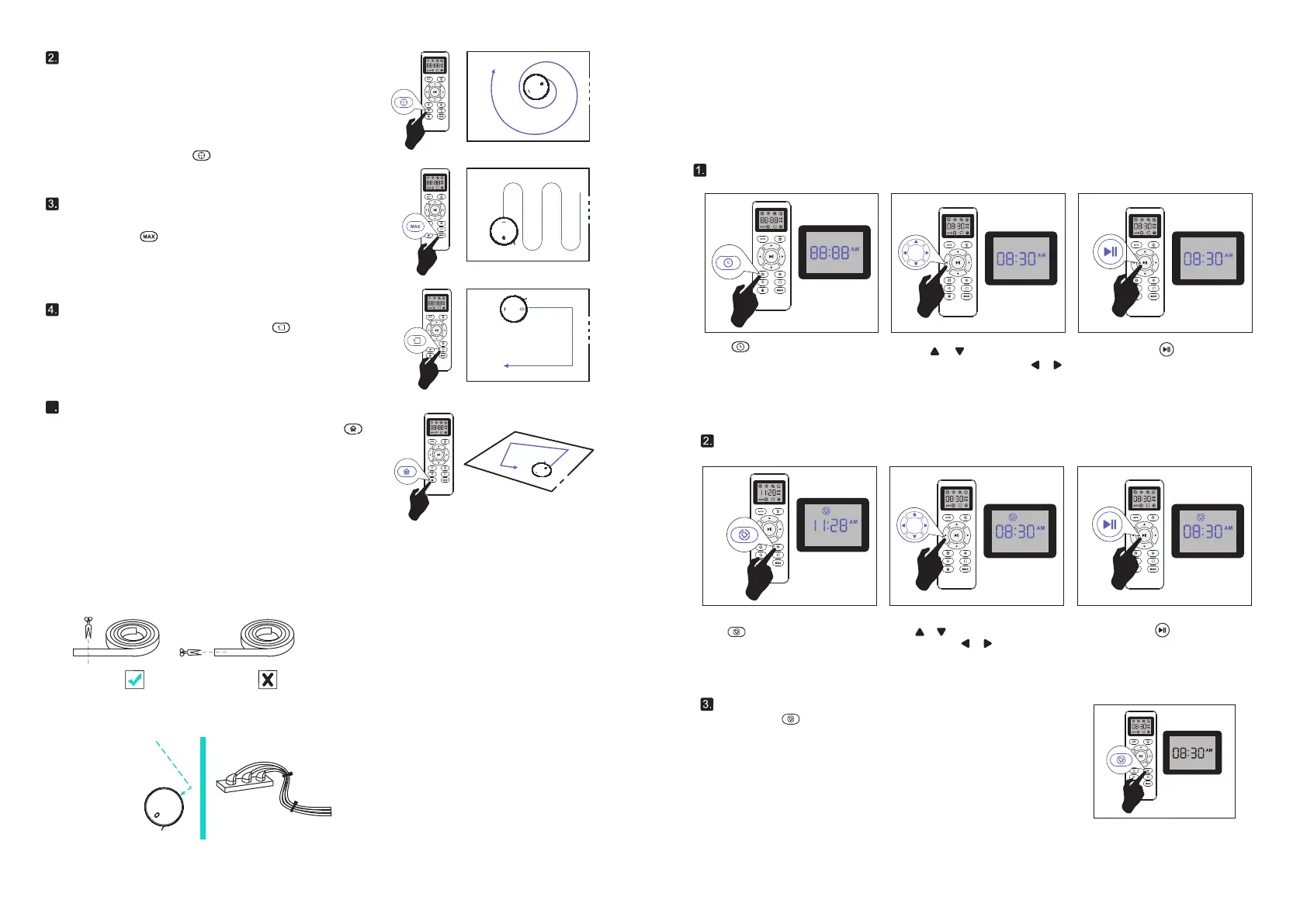
2.3 Time and appointment are scheduled
The cleaning time can be set on the cleaning time of the cleaner. The appointment timing function can be
realized by the remote control. Before making the appointment, please make sure that the time of the
remote control is consistent with your local time.
Set the remote control to display time
Fixed point cleaning
Border cleaning
Suction adjustment
Press on the remote controller.
The Settings on the Settings screen
start flashing.
Press the button on the remote controller and sweep along the
edges to make sure you sweep along the walls and legs of the
furniture.
5
Random sweep mode
When the machine is in random mode, press the button on the
remote control.
Fixed point sweep the fixed point sweep mode is selected. The
cleaner concentrates on sweeping the partially local area by
rotating outwardly in a spiral with a diameter of about 1m, and
then spirals inwards to the starting point.Under this mode, the
cleaner increases suction, giving you the best cleaning of the
desired location.Please put the cleaner in a dirty place and
press the remote control .
In operation mode, the suction can be adjusted by pressing the
remote control
09 10
Press or button to select the
desired figures. Press the or
button to select the minute or hour
section
And then press the button. the Robot
will "BEEP" when the clock setting completed.
Cancel the Cleaning Schedule
Press and hold button approximately 4 seconds on Remote Control, the Robot
will "BEEP" when the Cleaning Schedule process cancel completed.
Setting Cleaning Schedule
Press or button to select the desired
figures. Press the or button to select
the minute or hour section
And then press the button. the Robot
will "BEEP" when the Cleaning Schedule
setting completed.
Press button on Remote Control, and
then the hour section begins to Hash in the
Cleaning Schedule display setting window.
Note:When setting Cleaning Schedule,ensure the time on Remote Control iscorrect.
Use the Boundary Strip
With the Boundary Strip, you can keep RoboVac away from any area or item you do not want RoboVac
to clean. RoboVac will recognize the Boundary Strip and will not cross into the blocked-off area.
1. Identify the area or item you do not want RoboVac to get close to.
2. If necessary, use scissors to cut the Boundary Strip to a shorter length. Be sure to correctly
measure the length before cutting.
3. Apply the supplied strips of adhesive tape to lay the Boundary Strip flat on the floor. Make sure the
strip is placed FLAT on the floor or under an area rug.


 To Next Page
 Loading...