Product Maintenance
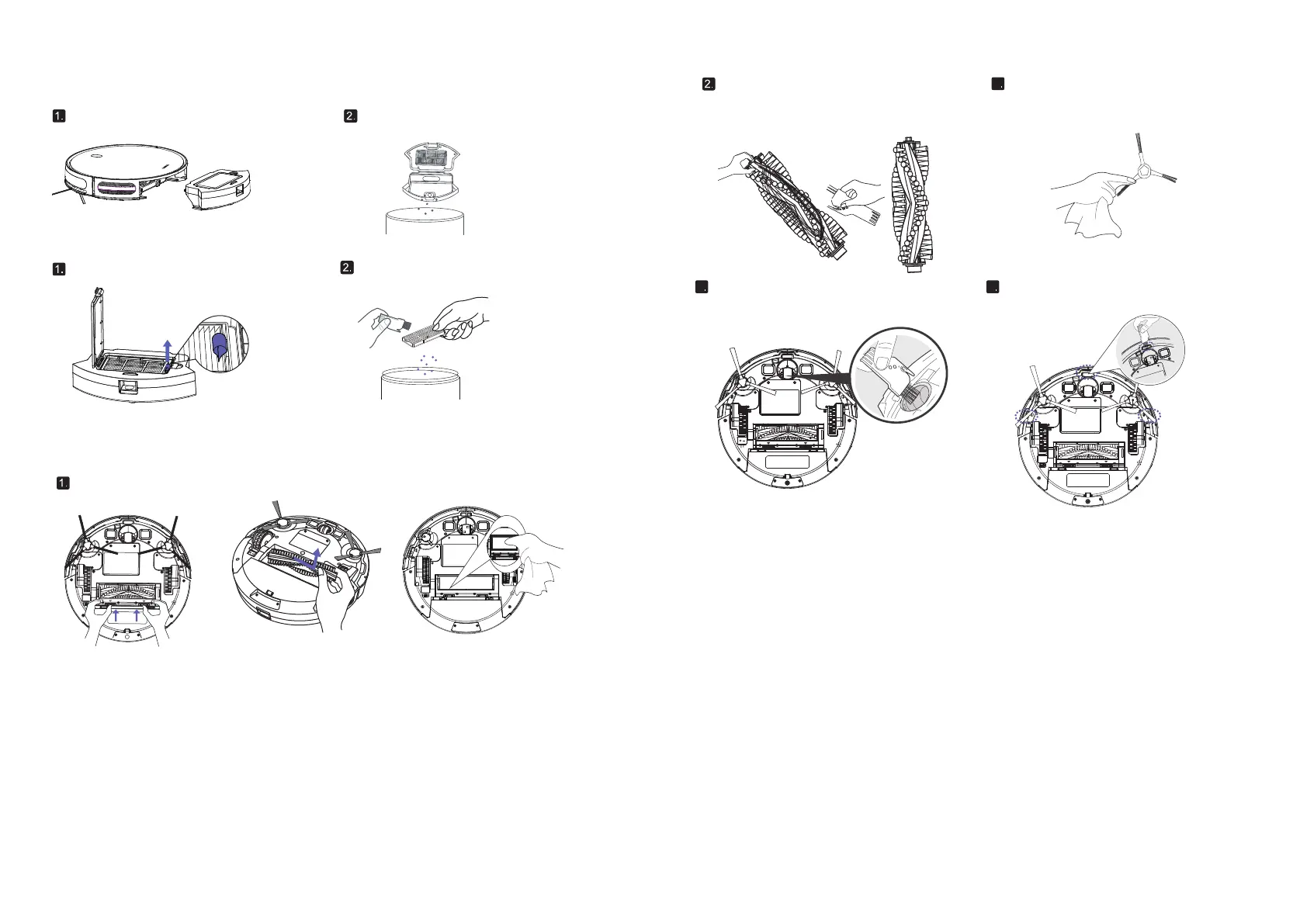
3.1Empty dust box
3.2 Cleaning filter
2. Remove the cover of the dust box
and empty it.
Press the dust box Release button
to remove it.
Shake the garbage off the filter.Pull on the white label and remove the filter
Clean roller brush. Remove the hair from
the roller brush with the provided cleaning
tool knife.
Take the side brush. Clean the
side brush with a cloth brush.
3
11 12
3.
Troubleshooting
Alarm Notice
When the cleaner fails, the red light of the cleaner AUTO button flashes or is
always on, and it will emit a "tick" with different length. Please refer to the
following table to inquire the cause of the failure:
Red lights blinking:
Note: please pay attention when cleaning the cleaner. If there is too much dust or oil on the optical
flow sensor sleeve, do not wipe it with your finger.
3.3 Cleaning Robot 's Rolling Brush,Side Brush, Swivel Wheel and Sensors.
Take out the rolling brush,clean the vacuuming aisle by a cloth.
Pull out the swivel wheel, then clean the Swivel
Wheel with the cleaning tool.
4 5
Dust off the cliff sensors to maintain the best
performance.


 To Next Page