6
b. For NiCd and NiMH batteries, refer to the chart here for
recommended currents, based on the size of your battery
shown in the left column. NOTE: if applying a slow charge
to the battery as shown in the chart at right, it will be
necessary to set the S_TIMER function to “off” (see below).
c. To change the setting, press CHANGE to cause the setting
to ash, then press (+) or (–) to nd the proper capacity
value. Press CHANGE to con rm the new setting. Do not
exceed the maximum rated charge current for the battery.
7. Press to nd the S_TIMER screen. This is a backup safety
timer designed to automatically stop fast charge if the battery
has not reached full charge in a reasonable amount of time.
The charger will automatically calculate and set this time
in minutes based on the values entered in the current and
capacity screens above.
To manually adjust this value, press CHANGE to cause the
setting to ash. Press (+) or (–) to adjust the value. Press
CHANGE again to con rm the setting. Do not increase this
value so far that the charger no longer offers overcharge
protection.
8. Press to nd the DELTA PEAK V screen (NiCd and NiMH
batteries only). This “peak sensitivity” function determines
how well the peak detection circuit will ll the battery. Settings
of 8-10mV for NiCd batteries, and 3–7mV for NiMH batteries
are recommended. Lower values usually result in more precise
peak detection, but unstable input power sources could cause
the charger to errantly stop peak charge too early. Larger
values could cause the battery to generate a little extra heat
during charge, and result in slightly less accurate peak charges.
9. Press to nd the TRICKLE charge current screen. This is
the amount of trickle charge current that will be applied only
to NiCd or NiMH batteries after peak charge has ended. The
charger will automatically set this value based on the fast
charge current setting divided by 20. This setting can be
manually changed if desired. Setting this to “0mA” effectively
turns this feature off. For “A”, “AA”, “AAA” size Tx or Rx
batteries, it is not recommended to set the trickle current to
larger than 50mA. Trickle charge is never applied to lithium
batteries.
Once you’ve customized a memory to match your battery, the
charger will memorize these settings until changed again manually.
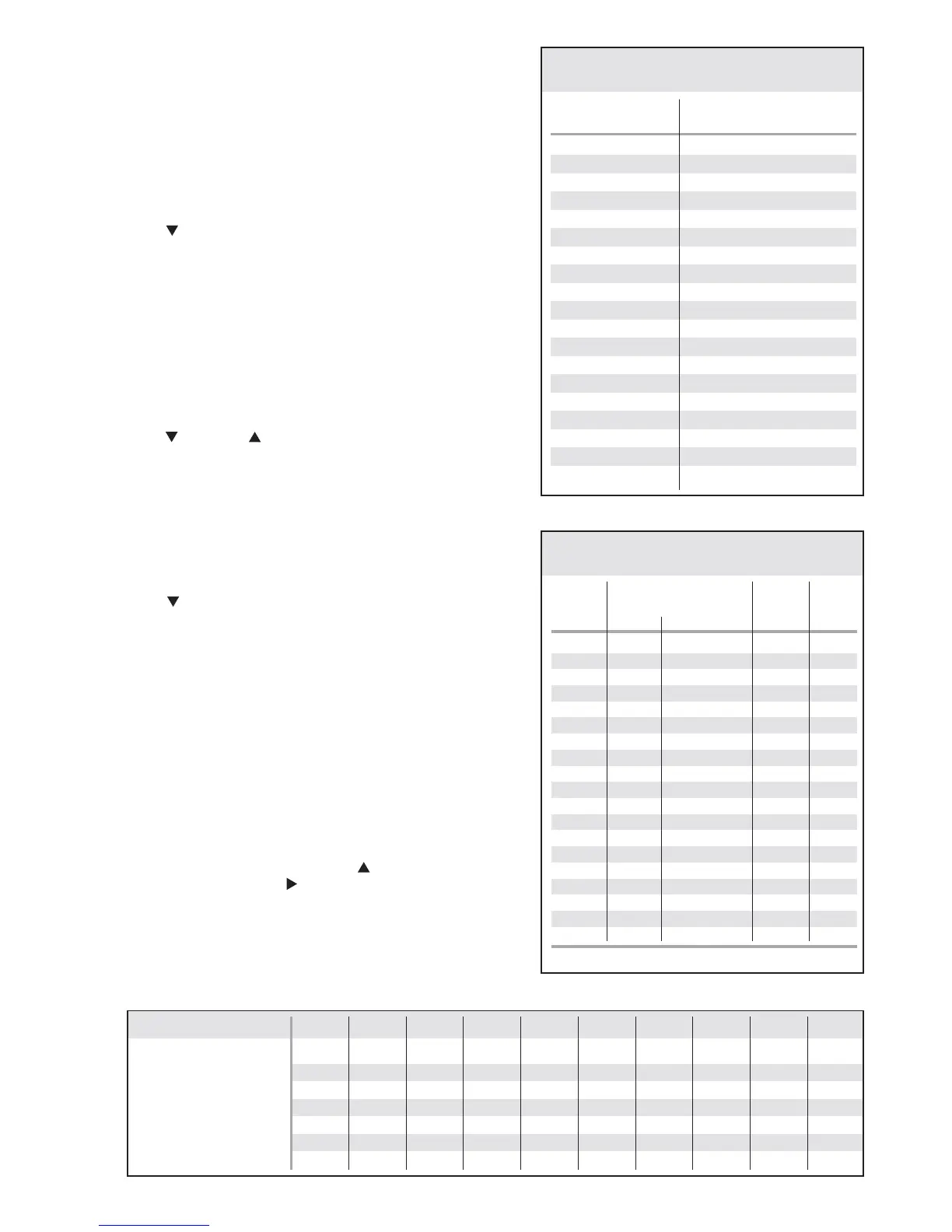
For easy reference, record your settings for each memory in the
blank chart below.
After settings have been adjusted, press repeatedly to nd the
BATT SETUP screen, or press to nd the START screen.
Blank Memory Chart
MEMORY NUMBER0123456789
Battery type
Cell count
Capacity (mAh)
Current
Safety time (minutes)
Delta peak (mV/C)
Trickle current (mA)
700
1000
1100
1200
1500
1600
1700
1800
1900
2000
2100
2500
3000
3300
3600
3800
4200
4600
5000
800
1100
1250
1350
1650
1750
1900
2000
2100
2200
2350
2750
3300
3650
3950
4200
4650
5050
5500
900
1300
1450
1550
1950
2100
2200
2350
2450
2600
2750
3250
3900
4300
4700
4950
5450
6000
6500
NiCd & NiMH Only
Max. Charge Capacity Chart
Battery's Rated
Capacity (mAh)
110%
Setting
130%
Setting
NiCd and NiMH
Battery Charge Current Chart
Battery's
rated
mAh
Slow Charge
1 Hour
Charge
Quick
Charge
current current currentcharge time
Note: Turn S_TIMER "off" for slow charges.
700
1000
1100
1200
1500
1600
1700
1800
1900
2000
2100
2500
3000
3300
3600
3800
4200
4600
5000
0.1A
0.1A
0.1A
0.1A
0.2A
0.2A
0.2A
0.2A
0.2A
0.2A
0.2A
0.3A
0.3A
0.3A
0.4A
0.4A
0.4A
0.4A
0.5A
0.7A
1.0A
1.1A
1.2A
1.5A
1.6A
1.7A
1.8A
1.9A
2.0A
2.1A
2.5A
3.0A
3.3A
3.6A
3.8A
4.2A
4.6A
5.0A
1.0A
1.2A
1.3A
1.4A
3.0A
3.2A
3.4A
3.6A
3.8A
4.0A
4.2A
4.5A
5.0A
5.0A
5.0A
5.0A
5.0A
5.0A
5.0A
9−10 hours
13−15 hours
14−16 hours
16−18 hours
9−11 hours
10−12 hours
11−13 hours
12−13 hours
12−14 hours
13−15 hours
14−16 hours
11−12 hours
13−15 hours
14−16 hours
11−13 hours
12−14 hours
14−16 hours
15−17 hours
13−15 hours


 To Next Page
 Loading...