8
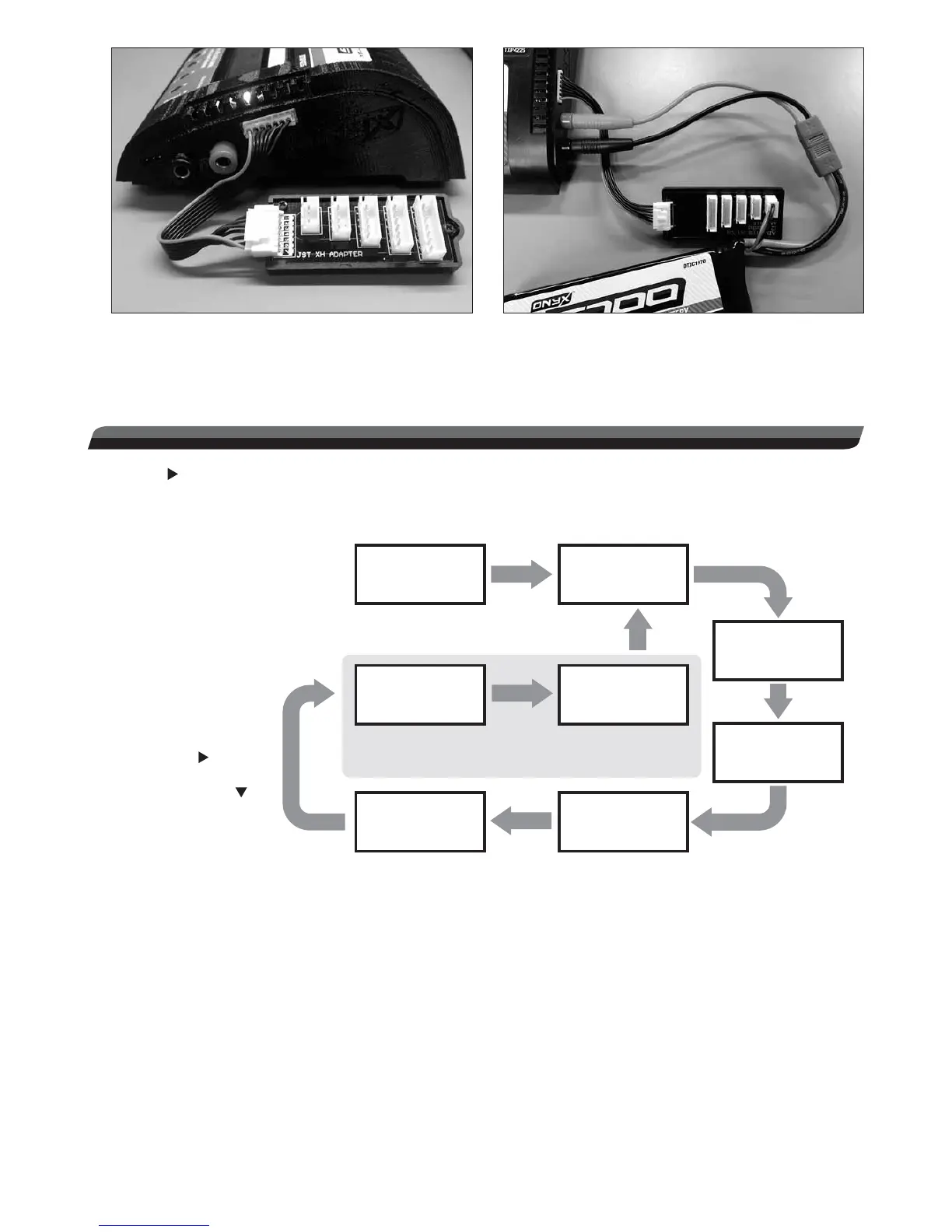
4. To balance a LiPo battery during charge, connect the balance board adapter that matches your battery’s balance
connector to the charger’s balancing jack (above left). The red wire will always be on the left. Then connect the
battery’s balance lead to the balancing board. Lastly, connect the battery’s main power lead to the adapter connected
to the charger’s banana jacks (note proper polarity, shown above right).
STARTING CHARGE
1. Press until the CHARGE START screen is found. This screen must be showing in order to start a charge.
2. Press and hold START for 3 seconds to start charging the battery. The charger will then display several types of
information during the charge process like shown below:
Press START again
for manually stop.
These screens are only shown
for lithium based batteries.
CHARGE
START…
CHARGE TIME
0:09
CHARGE VOLTAGE
5.45 Vo
INPUT VOLTAGE
15.13 Vi
1:4.19V 2:4.19V
3:4.19V 4:4.19V
CHARGE CURRENT
5.0A
CHARGE CAPACITY
13mAh
5:4.19V 6:4.19V
When charge
has started, the
LCD will rotate
through these
screens every
2 seconds.
Press will show
the previous screen
and press will
show the
next screen.
For NiCd and NiMH batteries, a linear charge current will be delivered to the battery. The peak detection method will be
used to accurately look for the highest battery voltage during charge. Once this is detected, the charger will automatically
stop fast charge and go to trickle charge mode.
CAUTION: Make sure the charge current setting is safe for your battery to prevent overheating of the cells. “AAA”, “AA”,
“A”, and “2/3A” size batteries generate heat more quickly than large sub-C batteries. Most radio batteries should NOT
be charged at currents greater than 1.5A. Failure to follow this recommendation could permanently damage your battery.
Lithium batteries are charged using the “constant current/constant voltage” method (cc/cv). Constant current is delivered
during the rst part of fast charge. When the battery reaches a pre-set voltage, constant current is no longer delivered, and
a constant voltage is applied to the battery. As the battery’s voltage becomes equalized to the voltage on the charger’s
output, charge current will steadily begin to drop. This is normal. When current reaches an approximate value of 1/10C,
the charge process will end completely.
When the “CHARGE VOLTAGE” screen shows the voltage of the battery during charge, the loading affect of the charger
will skew the voltage reading of the battery, which is normal. A higher current will skew the reading more than a smaller
current. Voltage readings taken when charge is nished will more accurately show the true voltage of the battery.
To manually stop a charge while in progress, either disconnect the battery from the charger or press START.



 To Next Page