10
1
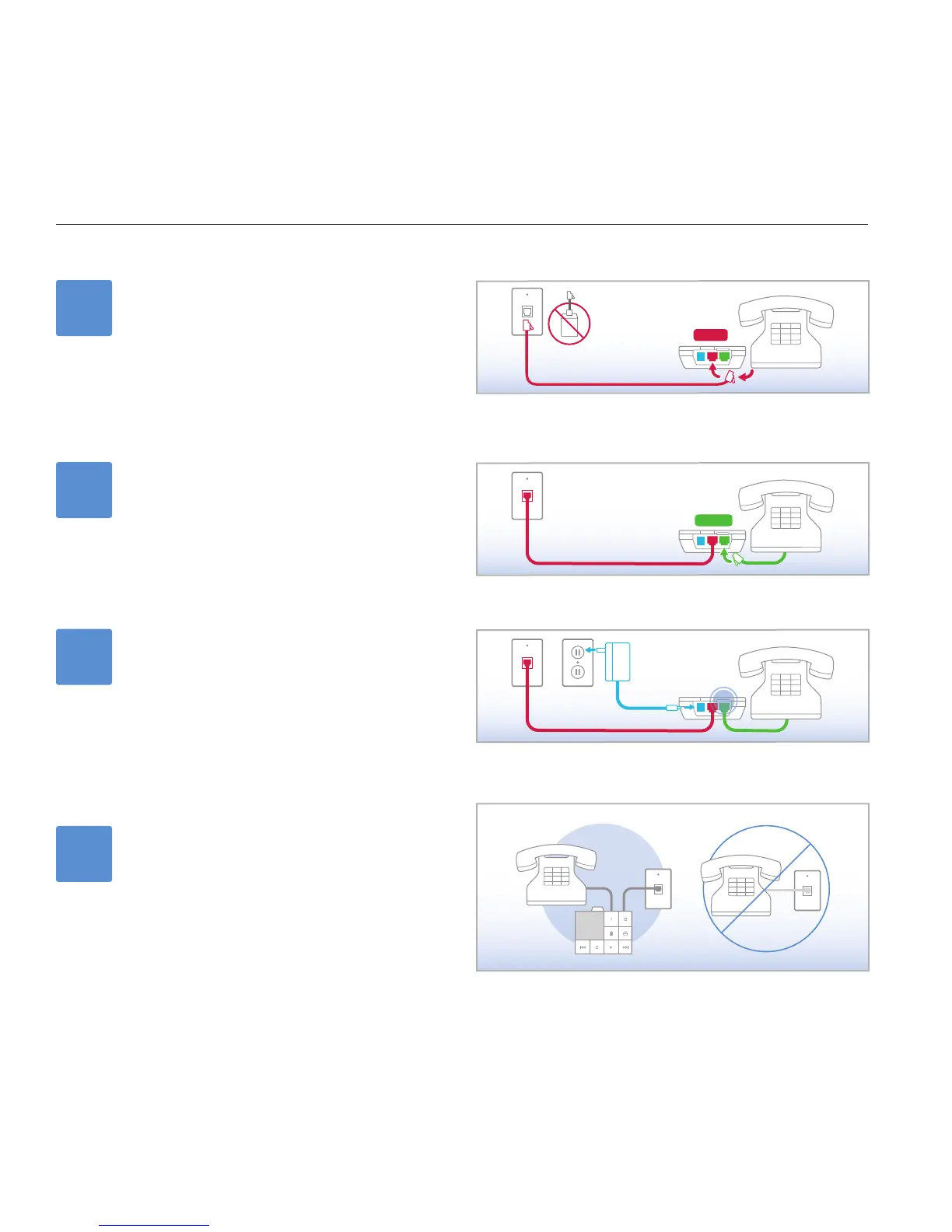
Connect the phone line
If you have DSL, trace the phone cable to the wall.
UNPLUG and REMOVE any existing DSL lters or
splitters.
Unplug the phone cable from your phone and plug it
in the port labeled WALL on the ooma Scout.
2
Connect your phone
Use a phone cable to plug your phone into the port
labeled PHONE on the ooma Scout (a short phone
cable is provided).
3
Connect the power
Plug one end of the AC adaptor into the port labeled
POWER on the ooma Scout and the other end into a
power outlet.
After 30 seconds, the clear ooma Tab at the top left
corner should turn BLUE.
installing the ooma scout
Install more ooma Scout devices
Locate other phones that share the same phone line or
phone number as the ooma Hub. Repeat steps 1-3 for
each phone.
If you do not have an ooma Scout for each phone,
you must DISCONNECT those phones or your ooma
service will be disrupted. Additional ooma Scout
devices can be purchased in the online ooma Lounge.
4



 To Next Page