EasyManua.ls Logo

OpenMesh OM5P-AC - 4.2 Configuring Microsoft Windows Vista

OpenMesh OM5P-AC
97 pages
To Next Page IconTo Next Page
To Previous Page IconTo Previous Page
Loading...
5.
Click
the
OK
button to
save your changes and close
the
dialog
box.
6.
Click
the
OK
button
again
to
save your
c
h
a
nge
s
.
4.2
C
on
fi
g
u
r
i
n
g
M
i
c
r
o
s
o
ft
Windows
V
i
s
t
a
Use
the
following procedure
to
configure a
computer running Microsoft
W
i
nd
ow
s
V
i
s
t
a
with the
default
i
n
t
e
r
f
a
c
e.
If
you use
the
Cl
a
ss
i
c
i
n
t
e
r
f
a
c
e,
where
the
icons and menus resemble
previous
W
i
ndow
s
versions, perform
the
procedure
in
s
e
c
t
i
on
4.4.
1.
On
the
Windows
t
a
s
k
ba
r
,
click
S
t
a
r
t
,
click
Co
n
t
r
o
l
Pa
n
e
l
,
and then
s
e
l
e
c
t
the Network
and
Internet icon.
2.
Click View
N
e
t
w
o
r
k
s
S
t
a
t
u
s
and
t
a
s
k
s
and then
click
M
a
n
a
g
e
m
e
n
t
N
e
t
w
o
r
k
s
Co
nn
e
c
t
i
on
s
.
3.
R
i
g
ht
-
c
li
c
k
the
L
o
c
a
l
Area
Co
nn
e
c
t
i
on
icon and click
Pr
op
e
r
t
i
e
s
.
4.
Click
Co
n
t
i
nu
e.
The Local Area
Co
nne
c
t
i
on
P
r
ope
r
t
i
e
s
dialog box
a
ppe
a
r
s
.
5. In the
Local Area
Con
ne
c
t
i
on
P
r
o
pe
r
t
i
e
s
dialog box, verify
that Internet Protocol
(TCP/IPv4) is checked. Then
s
e
l
e
c
t
Internet
P
r
o
t
o
c
o
l
(TCP/IPv4) and click
the
Pr
op
e
r
t
i
e
s
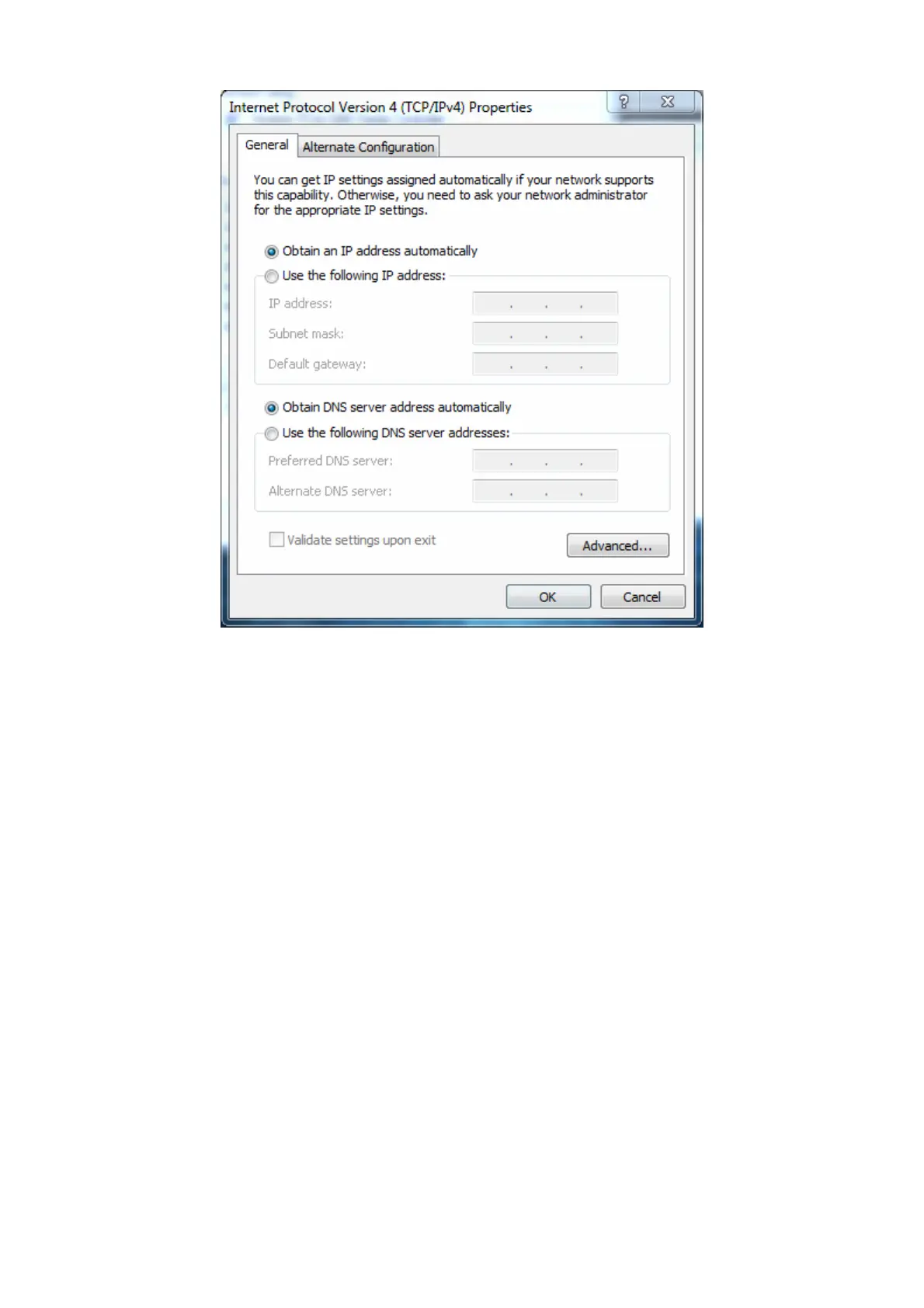
button.
The
Internet
P
r
o
t
oc
ol
Version
4
P
r
o
pe
r
t
i
e
s
dialog box
a
pp
e
a
r
s
.

Table of Contents