EasyManua.ls Logo

OpenMesh OM5P-AC - Snmp Settings

OpenMesh OM5P-AC
97 pages
Print Icon
To Next Page IconTo Next Page
To Previous Page IconTo Previous Page
Loading...
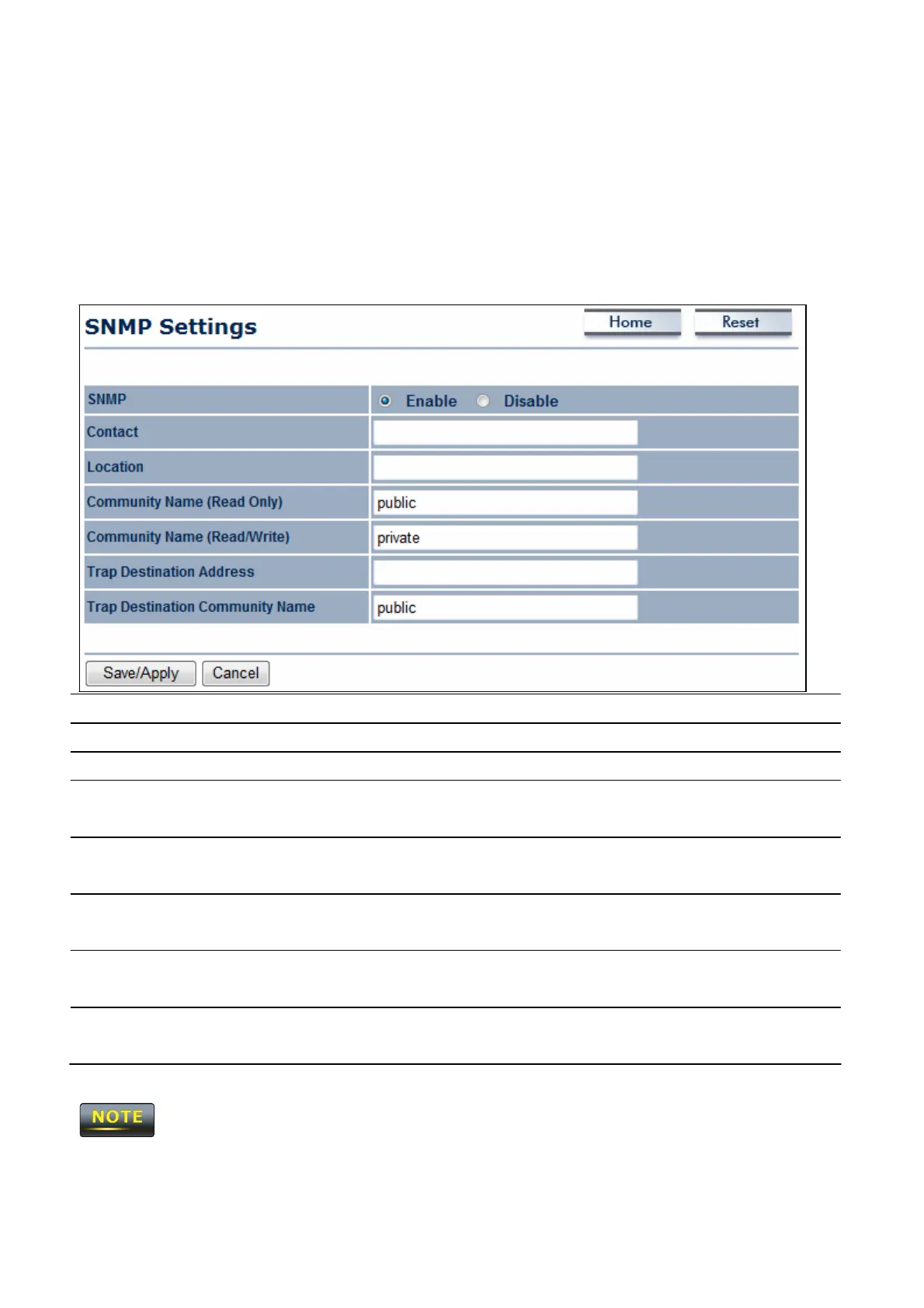
11.3 SNMP
Se
tt
i
n
gs
Click
the
S
N
M
P
S
e
tt
i
n
g
s
link under the
M
a
n
a
g
e
m
e
n
t
menu to monitor
ne
t
w
or
k
-
a
tt
ac
he
d
devices
using the Simple Network Management
P
r
ot
oc
ol
(SNMP). SNMP
allows messages
(called “protocol data unit’s) to be sent to various parts of a
ne
t
w
or
k
.
Upon receiving these
messages,
SNMP-compatible devices
(called agents) return data stored in their
M
a
na
ge
m
e
nt
Information
Ba
s
e
s
.
S
N
M
P
En
a
b
l
e
/
D
i
s
a
b
l
e
E
na
bl
e
or disable the
OM5P-AC SNMP
f
unc
t
i
on.
C
on
t
a
c
t
E
nt
e
r
the contact details of the
de
v
i
c
e
.
L
oc
a
t
i
on
E
nt
e
r
the location of the
de
v
i
c
e
.
C
omm
un
i
t
y
Name
E
nt
e
r
the
password
for
accessing
the
SNMP
community
f
or
read-only
acc
e
ss
.
C
omm
un
i
t
y
Name
E
nt
e
r
the
password
for
accessing
the
SNMP
community for read
and write
acc
e
ss
.
Trap
D
e
s
t
i
n
a
t
i
on
IP
A
dd
r
e
ss
Trap
D
e
s
t
i
n
a
t
i
on
C
omm
un
i
t
y
N
a
m
e
E
nt
e
r
the
IP address
where
SNMP
traps are to be
s
e
nt
.
E
nt
e
r
the
password
of the
SNMP
trap
c
om
muni
t
y
.
S
a
v
e
/
A
pp
l
y
/
C
a
n
c
e
l
Click
S
a
v
e
/
A
pp
l
y
to apply the
changes
or
C
a
n
c
e
l
to
r
e
t
ur
n
previous
s
e
tt
i
ngs
.
Clicking
S
a
v
e
/
A
pp
l
y
change the setting
i
mm
e
di
a
t
e
l
y
.
You
cannot undo the action.

Table of Contents