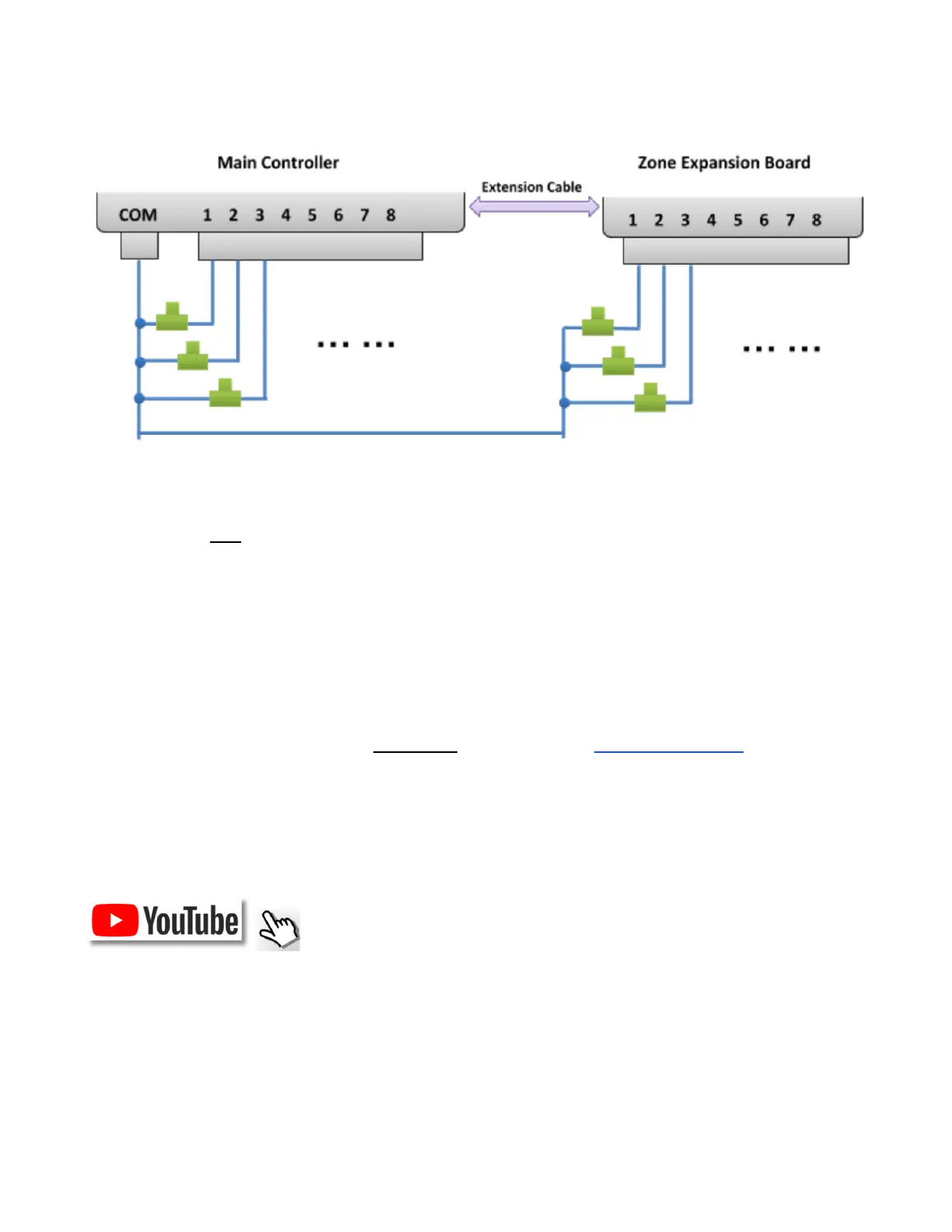
Zone Wire Connection Diagrams
● Each valve has two wires. Typically, one wire from each valve (regardless of whether it's on the main controller
or an expander) is connected together into a COM (common) wire, and that COM wire should go to the COM
terminal port (NOT GND!!!) on OpenSprinkler.
● OpenSprinkler has two COM ports: you can use either -- they are internally wired together so are the same.
● The other wire of each valve goes to an individual zone port.
● If you have a master or pump start relay wire, you can insert it into any zone port -- OpenSprinkler uses
software defined master / pump zone so you can dedicate any zone as a master zone.
Installation
Important Notes
● OpenSprinkler is NOT waterproof. For outdoor use, please purchase a waterproof enclosure.
● International customers: for the OpenSprinkler AC-powered version, please find a 24VAC transformer
compatible with your country’s powerline voltage standard. Failure to observe the powerline voltage standard
can result in damage to your controller. If you cannot find a 24VAC transformer, you may consider the
OpenSprinkler DC-powered version, which uses a low-voltage (7.5~12VDC) adapter.
Wiring and Installation Tutorial Video (video is based on version 2.3):
OpenSprinkler Firmware 2.1.9 User Manual 4



 To Next Page