Use Introduction
Warning: Please switch off the device before
removing the battery.
Warning: To avoid card data loss and damage,
please avoid touching the metal plane area of
the SIM card. Keep the SIM card away from
electricity and magnet.
Service network will be unable to access once
the SIM card is damaged.
The SIM card can be removed from your device
and placed in any other device in support of
corresponding network service, and the device
will automatically reads data on the card.
Basic steps for phone operation
SIM card Information
When subscribing for network access, you will get a
plug-type SIM card, which carries your information,
such as PIN code and available service options.
Install the SIM card
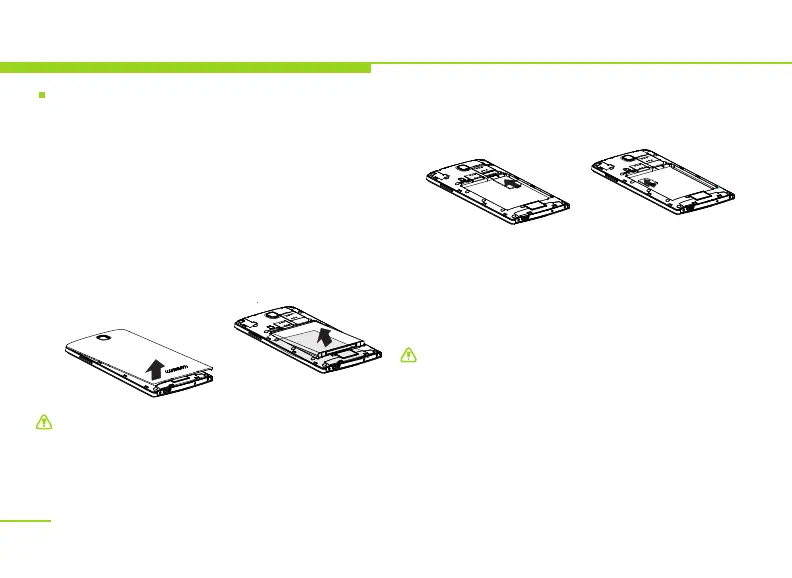
Remove the battery
Switch off the device, open the battery cover from
the finger-clasping slot on its top, and remove the
battery as shown below.
Install SIM card and memory card
SIM card is generally placed in a card holder.
Please take it out carefully before installation.
Place the SIM card and the memory card into
the respective slots as shown below.
All information in relation to network
connection, as well as your call log initialization,
contacts stored in the SIM card phonebook,
communication logs and some SMS messages
are all saved in the metal plane area of the SIM
card.
10


 To Next Page