PowerPath ARC Rails provide a protective, snag-free cable management solution for NVG cables.
CABLE INTEGRATION
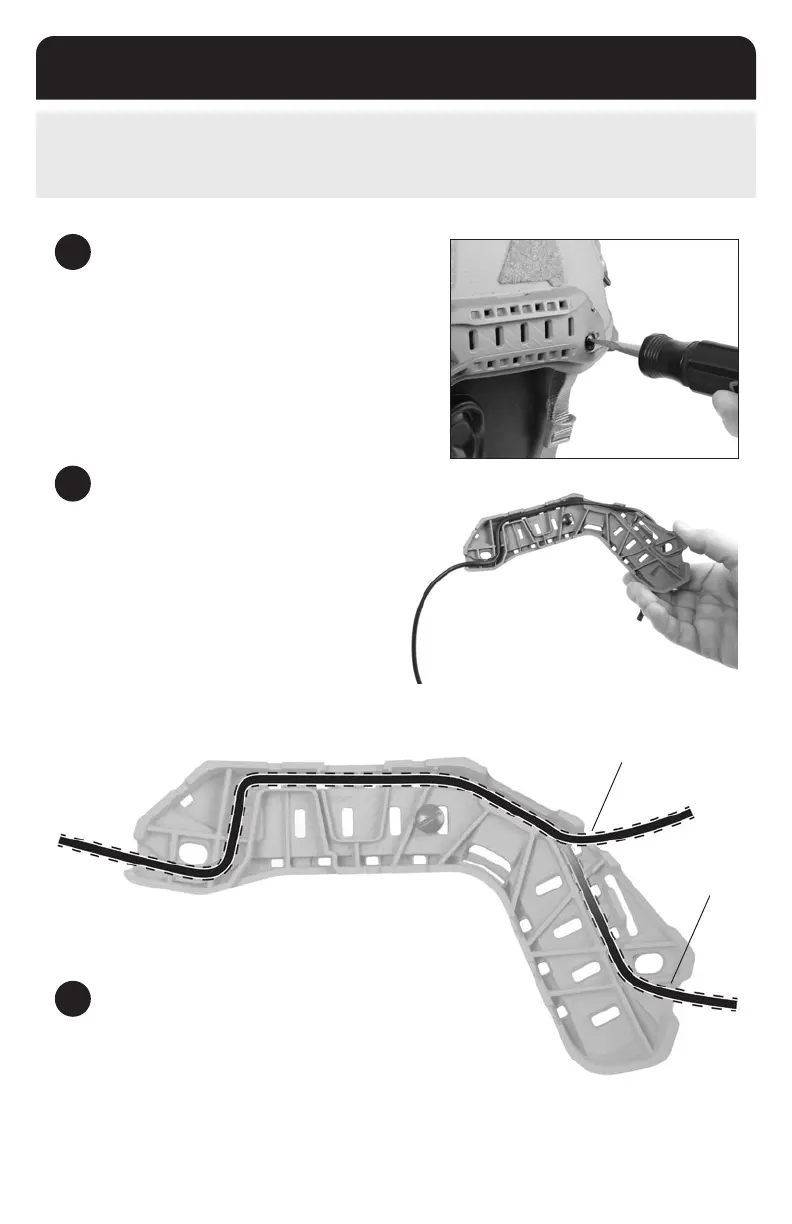
Upper Rear
Routing Option
Lower Rear
Routing Option
1
REMOVE POWERPATH ARCS
Use a screwdriver to remove the PowerPath ARC Rail from
the helmet as shown.
3
REATTACH THE RAIL
Reattach the rail to the helmet making sure the cable stays
seated in the routing channels.
2
ROUTE THE CABLE
Following the diagram below, route the cable through the
underside of the PowerPath ARC Rail. The back of the rail
has two options for exiting the cable from the rail (upper
and lower).
11


 To Next Page