4
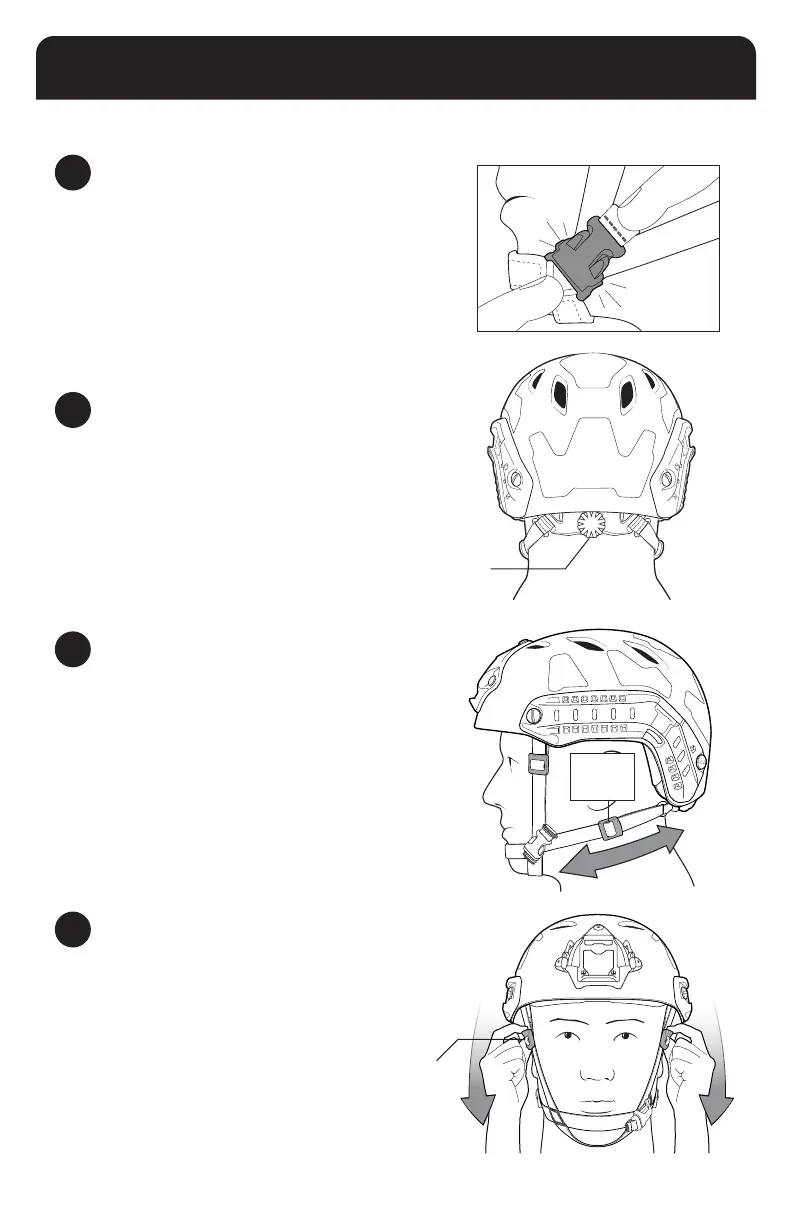
ADJUST FRONT HEAD-LOC SLIDERS
With both hands, pull the two Front Head-Loc Sliders on the
webbing straps that come from the front temples of the helmet
toward your chin until snug.
Occ-Dial
Adjustment Knob
RETENTION SYSTEM OPERATION
1
FASTEN THE CHINSTRAP
Put the helmet on and fasten the chinstrap buckle.
Rear
Head-Loc
Slider
3
ADJUST REAR HEAD-LOC SLIDERS
With both hands, pull the two Rear Head-Loc Sliders on the
lower webbing straps toward your chin until snug.
NOTE: THE TECHNIQUE WORKS BEST IF YOU ONLY HOLD
THE PLASTIC SLIDERS AND DON’T TOUCH THE WEBBING.
2
ADJUST THE OCC-DIAL
Use your thumb to rotate the Occ-Dial Adjustment Knob to
tighten the tband until it is comfortably snug.
Front Head-Loc Slider
7


 To Next Page