EasyManua.ls Logo

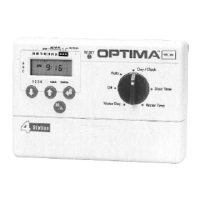
Optima PC-306 - User Manual

Optima PC-306
14 pages
Print Icon
To Next Page IconTo Next Page
Loading...
1
AUTOMATIC
SPRINKLER TIMER
Owner’s Manual PC-306/PC-406PS
For use with standard 24 VAC automatic sprinkler valves. These timers are designed for use in any 110
VAC /60 Hz ±10% AC outlet (240 VAC, 50 HZ for international version). The PC Sprinkler Series
Timers provide simple programming and flexible schedules to meet your landscape watering needs.
We recommend you read this Owner's Manual completely before installing the timer to ensure proper
operation and safety.
Thank you for choosing the OPTIMA PC-306, PC-406PS Timer. Several innovative features allow you
the flexibility to tailor your program to fit a variety of watering requirements; and, best of all, it is easy to
program!
• Simple to use dials and buttons.
• Three available start times for each program to give you maximum flexibility.
• Off feature allows you to keep all your program settings while turning off your system when you want!
Just in case, if you have questions, please call us toll free at 1-800-742-9922. (U.S.A., Canada & Mex-
ico only).
ABOUT YOUR LAWN
Optima's PC Series Sprinkler Timer is the central unit that controls watering times for your automatic
sprinkler system. The following infromation provides an overview of how the timer works.
Stations
To meet the different watering requirements of your lawn, trees, flowers, and other landscaping, you
can divide your yard into separate areas called "stations" or "zones".* Each "station" has one valve that
controls multiple spray heads or sprinklers. For example, if you have 4 valves, you can divide your lawn
into 4 "stations". See the figure below. (You cannot link more than one valve to one "station.") You can
however, select a different length of watering time for each "station".
* In the sprinkler industry, the terms "stations” and “zones” have the same meaning.
"Legend" for this manual is located on the next page.
Station
3
Station
2
Station
1
Station
4
House
Question and Answer IconNeed help?

Do you have a question about the Optima PC-306 and is the answer not in the manual?

Summary

LEGEND

Watering Schedule (Days)

Explains the three ways to choose how often to water your lawn: specific days, day intervals, or preset schedules.

Start Times

Details how to program up to three watering start times per day for maximum flexibility.

Watering Duration

Describes how to set a different watering time for each station, from 1 to 99 minutes.

TOOLS YOU NEED

Lists the necessary tools and materials for installing the sprinkler timer.

HOW TO INSTALL

STEP 1: CHOOSE TIMER LOCATION

Guidance on selecting a suitable indoor location for the timer, avoiding moisture and extreme temperatures.

STEP 3: WIRE VALVES

Instructions for connecting sprinkler valves to the timer terminals, including common and hot wires.

STEP 4: CONNECT TRANSFORMER

Procedure for connecting the timer's power transformer to an electrical socket.

STEP 5: CONNECT BATTERY

Instructions for installing a 9-volt battery for memory backup during power outages.

PROGRAMMING THE PC-306

STEP 1: SETTING CURRENT DAY AND TIME

Guides users through setting the current day and time on the sprinkler timer.

STEP 2: SET THE WATERING DAYS

Explains how to select specific days, intervals, or preset schedules for watering.

STEP 3: SET THE WATERING START TIMES

Details on programming up to three start times per day for the watering cycles.

STEP 4: SET THE WATER TIME FOR EACH ZONE

Instructions for setting the duration of watering for each individual station.

PROGRAMMING THE PC-406 PS

STEP 1: SETTING CURRENT DAY AND TIME

Guides users through setting the current day and time for the dual program timer.

STEP 2: SET THE WATERING DAYS FOR DUAL PROGRAM TIMER

Instructions for setting watering days for Program A, Program B, or both.

STEP 3: SET THE WATERING START TIMES

Details on programming start times for Program A or Program B.

STEP 4: THE WATER TIME FOR EACH ZONE IN A OR B PROGRAM

Instructions for setting watering duration for each zone within Program A or Program B.

STEP 5: MANUAL START FOR CYCLES OR ZONES FOR A OR B PROGRAM

Procedure for manually starting watering cycles or specific zones for Program A or B.

MAINTAINING YOUR SYSTEM

Winterize System

Guidance on preserving programmed schedules and protecting the system during winter.

Battery Back-UP

Recommendation for annual battery replacement to ensure continuous operation.

TROUBLESHOOTING

Summary

LEGEND

Watering Schedule (Days)

Explains the three ways to choose how often to water your lawn: specific days, day intervals, or preset schedules.

Start Times

Details how to program up to three watering start times per day for maximum flexibility.

Watering Duration

Describes how to set a different watering time for each station, from 1 to 99 minutes.

TOOLS YOU NEED

Lists the necessary tools and materials for installing the sprinkler timer.

HOW TO INSTALL

STEP 1: CHOOSE TIMER LOCATION

Guidance on selecting a suitable indoor location for the timer, avoiding moisture and extreme temperatures.

STEP 3: WIRE VALVES

Instructions for connecting sprinkler valves to the timer terminals, including common and hot wires.

STEP 4: CONNECT TRANSFORMER

Procedure for connecting the timer's power transformer to an electrical socket.

STEP 5: CONNECT BATTERY

Instructions for installing a 9-volt battery for memory backup during power outages.

PROGRAMMING THE PC-306

STEP 1: SETTING CURRENT DAY AND TIME

Guides users through setting the current day and time on the sprinkler timer.

STEP 2: SET THE WATERING DAYS

Explains how to select specific days, intervals, or preset schedules for watering.

STEP 3: SET THE WATERING START TIMES

Details on programming up to three start times per day for the watering cycles.

STEP 4: SET THE WATER TIME FOR EACH ZONE

Instructions for setting the duration of watering for each individual station.

PROGRAMMING THE PC-406 PS

STEP 1: SETTING CURRENT DAY AND TIME

Guides users through setting the current day and time for the dual program timer.

STEP 2: SET THE WATERING DAYS FOR DUAL PROGRAM TIMER

Instructions for setting watering days for Program A, Program B, or both.

STEP 3: SET THE WATERING START TIMES

Details on programming start times for Program A or Program B.

STEP 4: THE WATER TIME FOR EACH ZONE IN A OR B PROGRAM

Instructions for setting watering duration for each zone within Program A or Program B.

STEP 5: MANUAL START FOR CYCLES OR ZONES FOR A OR B PROGRAM

Procedure for manually starting watering cycles or specific zones for Program A or B.

MAINTAINING YOUR SYSTEM

Winterize System

Guidance on preserving programmed schedules and protecting the system during winter.

Battery Back-UP

Recommendation for annual battery replacement to ensure continuous operation.

TROUBLESHOOTING

Optima PC-306 Specifications

General IconGeneral
BrandOptima
ModelPC-306
CategoryTimer
LanguageEnglish

Related product manuals