EasyManua.ls Logo

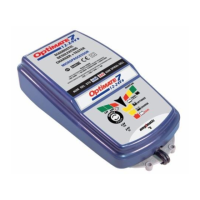
Optimate 7 Select - User Manual

Optimate 7 Select
6 pages
Print Icon
To Next Page IconTo Next Page
Loading...
3
12-24V
IMPORTANT SAFETY
INSTRUCTIONS FOR CANADA & USA
THIS PORTION OF THE MANUAL CONTAINS IMPORTANT SAFETY INSTRUCTIONS FOR
THE OPTIMATE 7 12V-24V BATTERY CHARGER. IT IS OF THE UTMOST IMPORTANCE
THAT EACH TIME, BEFORE USING THE CHARGER, YOU READ AND EXACTLY FOLLOW
THESE INSTRUCTIONS. SAVE THESE INSTRUCTIONS.
Automatic charger for 12 & 24V lead-acid batteries
DO NOT USE FOR NiCd, NiMH, Li-Ion OR NON-RECHARGEABLE BATTERIES.
1. CAUTION : CLASS II APPLIANCE. DO NOT CONNECT TO GROUND.
2. Do not expose charger to rain or snow.
3. Use of an attachment not recommended or sold by the battery charger manufacturer may result in a risk of fire, electric shock, or injury
to persons.
4. To reduce risk of damage to electric plug and cord, pull by plug rather than cord when disconnecting charger.
5. An extension cord should not be used unless absolutely necessary. Use of improper extension cord could result
in a risk of fire and electric shock. If extension cord must be used make sure that :
a) pins on plug of extension cord are the same number, size and shape as those of plug on charger.
b) the extension cord is properly wired and in good electrical condition, and
c) the conductor wire size is large enough for the AC ampere rating of the charger as specified in the table below.
AC INPUT RATING IN AMPERES
Equal to or greater than But less than
LENGTH OF CORD,
FEET (m)
AWG SIZE
OF CORD
2A 3A 25 (17.6)
50 (15.2)
100 (30.5)
18
18
14
6. Do not operate charger with damaged cord or plug – replace the cord or plug immediately.
7. Do not operate charger if it has received a sharp blow, been dropped, or otherwise damaged in any way;
take it to a qualified serviceman.
8. Do not disassemble charger; take it to a qualified serviceman when service or repair is required.
Incorrect reassembly may result in a risk of electric shock or fire.
9. To reduce risk of electric shock, unplug the charger from outlet before attempting any maintenance or cleaning.
Turning off controls will not reduce this risk. Clean only with slightly moist, not wet, cloth. Do not use solvents.
10. WARNING - RISK OF EXPLOSIVE GASES.
a) WORKING IN VICINITY OF A LEAD-ACID BATTERY IS DANGEROUS. BATTERIES GENERATE EXPLOSIVE GASES
DURING NORMAL BATTERY OPERATION. FOR THIS REASON, IT IS OF UTMOST IMPORTANCE THAT YOU FOLLOW THE
INSTRUCTIONS EACH TIME YOU USE THE CHARGER.
b) To reduce risk of battery explosion, follow these instructions and those published by the battery manufacturer
and manufacturer of any equipment you intend to use in vicinity of the battery. Review cautionary marking on
these products and on engine.
11. PERSONAL PRECAUTIONS.
a) Someone should be within range of your voice OR close enough to come to your aid when you work near a lead-acid battery.
b) Have plenty of fresh water and soap nearby in case battery acid contacts skin, clothing or eyes.
c) Wear complete eye protection and clothing protection. Avoid touching eyes while working near battery.
d) If battery acid contacts or enters eye, flood eye with cold running water for at least 10 minutes and get medical
attention immediately. If battery acid contacts skin or clothing, wash immediately with soap and water. If acid enters
an eye, immediately flood eye with running cold water for at least 10 minutes and get medical attention immediately.
e) NEVER smoke or allow a spark or flame in vicinity of battery or engine.
f) Be extra cautious to reduce risk of dropping a metal tool onto battery. It might spark or short-circuit battery or other electrical
part that may cause explosion.
g) Remove personal metal items such as rings, bracelets, necklaces, and watches when working with a lead-acid
battery. A lead-acid battery can produce a short-circuit current high enough to weld a ring or the like to metal,
causing a severe burn.
i) NEVER charge a frozen battery.
SAFETY US & CAN
Question and Answer IconNeed help?

Do you have a question about the Optimate 7 Select and is the answer not in the manual?

Summary

OptiMate 7 Safety Instructions

General Safety Precautions

Essential safety guidelines for using the OptiMate 7 charger, covering electrical safety, handling, and environmental considerations.

Explosive Gas Warning

Crucial warnings about the risk of explosive gases generated by lead-acid batteries during operation.

Personal Safety Precautions

Personal protective measures and precautions to take when working near lead-acid batteries.

Battery Charging Preparation

Preparing Battery for Charging

Steps for preparing a battery before charging, including ventilation and cleaning terminals.

Charger Location Guidelines

Recommendations for safely positioning the battery charger during operation.

DC Connection Precautions

Important precautions to follow when connecting and disconnecting the charger's DC clips.

Connecting Battery Inside Vehicle

Step-by-step instructions for connecting the charger to a battery installed in a vehicle.

Connecting Battery Outside Vehicle

Detailed instructions for connecting the charger to a battery removed from a vehicle.

Charger Operation and Charging Process

Connecting Charger to Battery

Procedure for attaching the charger clips to the battery terminals safely.

Deep Discharged Battery Inspection

Guidelines for inspecting deeply discharged batteries before attempting a recovery charge.

Charging Time Information

Details on expected charging times for different battery conditions and types.

OptiMate 7 Charging Steps

STEP 1: Voltage Selection

Procedure to select the correct battery voltage (12V or 24V) for the charger.

STEP 2: Protection & Safety Checks

Automatic safety checks for reverse polarity and voltage compatibility.

STEP 3: Test Before Charge

Diagnostic test to assess battery condition and state of charge before charging.

STEP 4: Save Mode

Engages for deeply discharged or sulphated batteries, initiating a reconditioning charge.

OptiMate 7 Charging Modes

STEP 5: Charge Mode

Automatic charging mode that optimizes current based on battery state and capacity.

STEP 6: Optimize Mode

Mode for equalizing cells and optimizing charge level using current pulses.

STEP 7: Test After Charge

Tests the battery's ability to retain charge after the main charging process.

STEP 8: Smart Maintain Mode

Maintains battery charge and health over extended periods with intermittent charging.

Extended Use and Warranty

Notes on Test Results

Interpreting test results and diagnosing potential battery or system issues.

Maintaining Battery for Extended Periods

Guidelines for long-term battery maintenance and checks.

Eco Power Saving Mode

Information on the charger's low power consumption mode when not connected to a battery.

Limited Warranty Information

Details of the product's limited warranty and terms for Canada, USA, Central America, and South America.

Optimate 7 Select Specifications

General IconGeneral
Output Voltage12V / 24V
Input Voltage100-240V AC
Battery Types SupportedAGM, Lithium
Protection FeaturesReverse polarity, Short-circuit
DisplayLED Indication

Related product manuals