10 Manual
QUICK START
1. Place your Optimum ThermoCook on a clean, stable and even surface. Do not position it too close to the edge of the surface
2. Thoroughly clean the appliance before using it (See the Cleaning and Maintenance section)
3. Plug the unit in, and turn on the switch at the back of the machine.
4. Firmly press the bowl down onto the unit with the handle pointing to the front.
5. Place the lid on top, and secure it by turning it clockwise until it clicks and locks intoplace.
NOTE: The Lock Failure icon will flash on the screen if the bowl and/or lid is not fixed properly. The Lock icon will display on the
screen when the bowl and lid are fixedproperly.
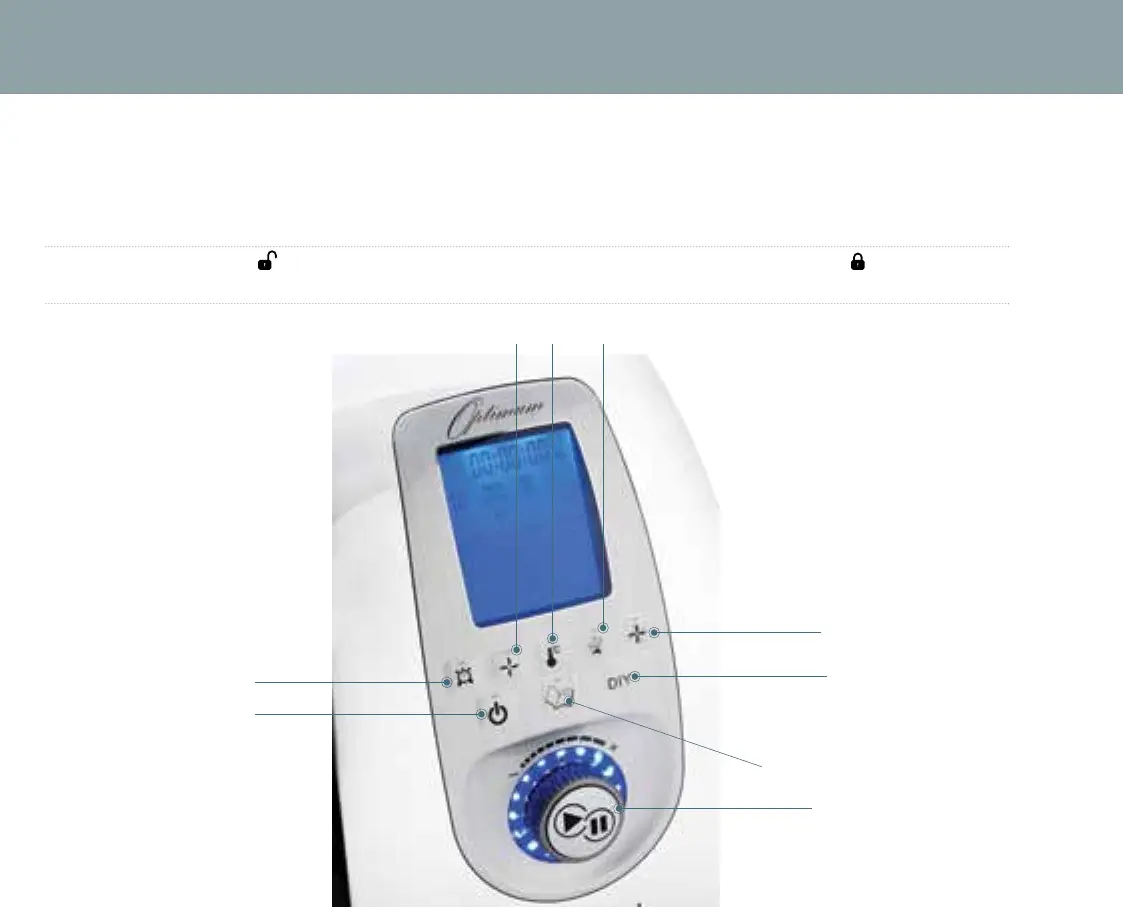
A. Stop/Cancel
B. Start/Pause knob
C. Timer
D. Speed
E. Temperature
F. Heat Power
G. DIY
I. Pulse
J. Menu
C
A
G
B
J
I
D E F


 To Next Page