12
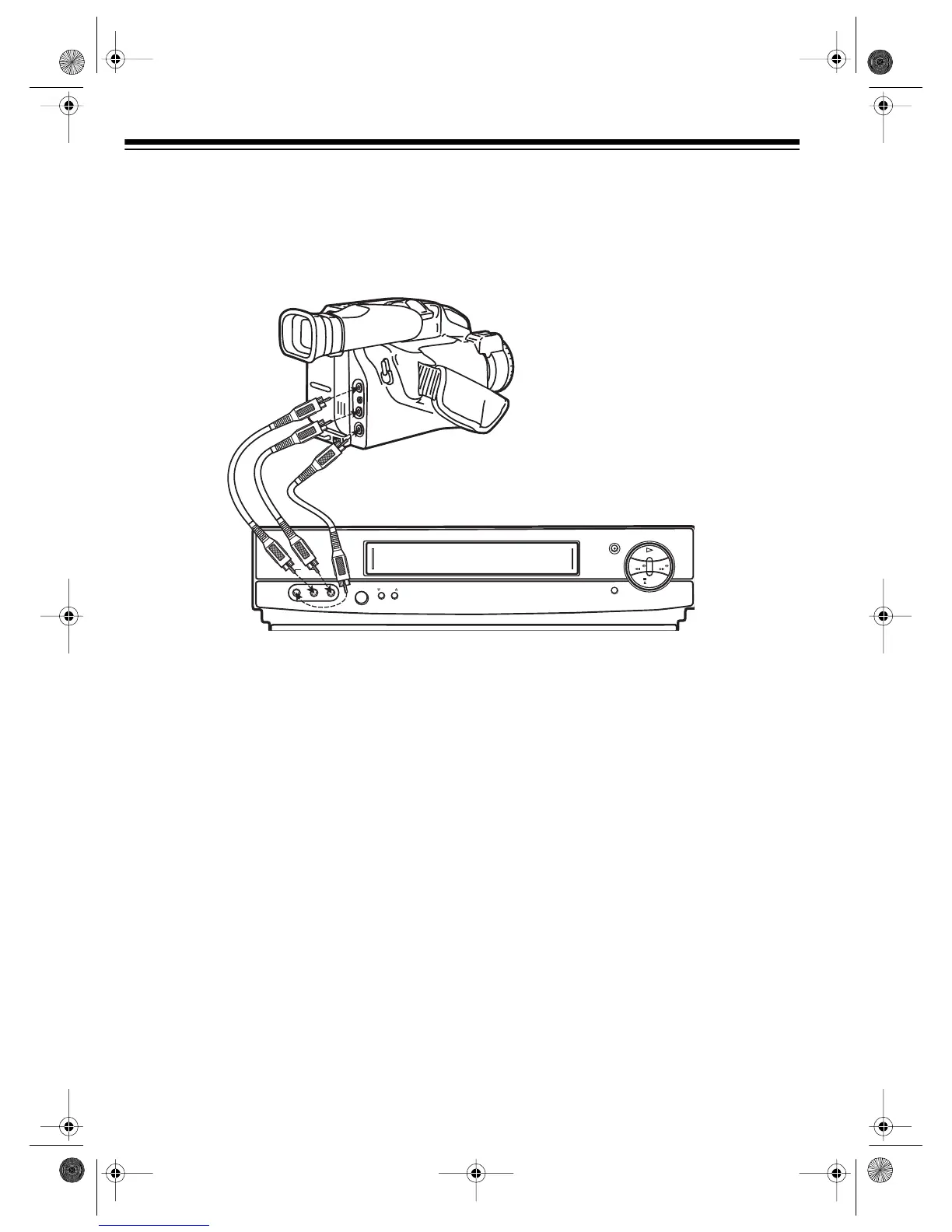
CAMCORDER CONNECTIONS (MODEL 60 ONLY)
Your Model 60 VCR has jacks on its front panel that let you easily connect a camcorder or other
video source.
You need a stereo A/V cable for this connection.
1. Insert the plugs at one end of the cable into the
AV 2 AUDIO
and
VIDEO IN
jacks on the Model
60’s front panel.
2. Insert the plugs at the other end of the cable into the AUDIO/VIDEO OUT jacks on your cam-
corder or other video source. Be sure to connect Video to Video and Audio to Audio (use the
plug’s color codes as a guide).
CONNECTING POWER
To power the VCR, plug its power cord into a standard AC outlet. --:-- appears on the display.
Note:
When you plug in the VCR for the first time or when you unplug the VCR and reconnect it
(within 24 hours) or after a power failure (of less than 24 hours), the VCR starts to search for a
channel that has an Extended Data Service (EDS) signal (see “Turning On Auto Clock Set” on
Page 17).
REWIND
STOP
EJECT
PLAY
FAST-F
RECORD/TIME
TV/VCR
CHANNEL
POWER
MEMORY SENTINEL
VIDEO IN L – AUDIO IN – R
AV 2
16-547.fm Page 12 Tuesday, July 20, 1999 4:45 PM



 To Next Page