Repeat Shuffle Back
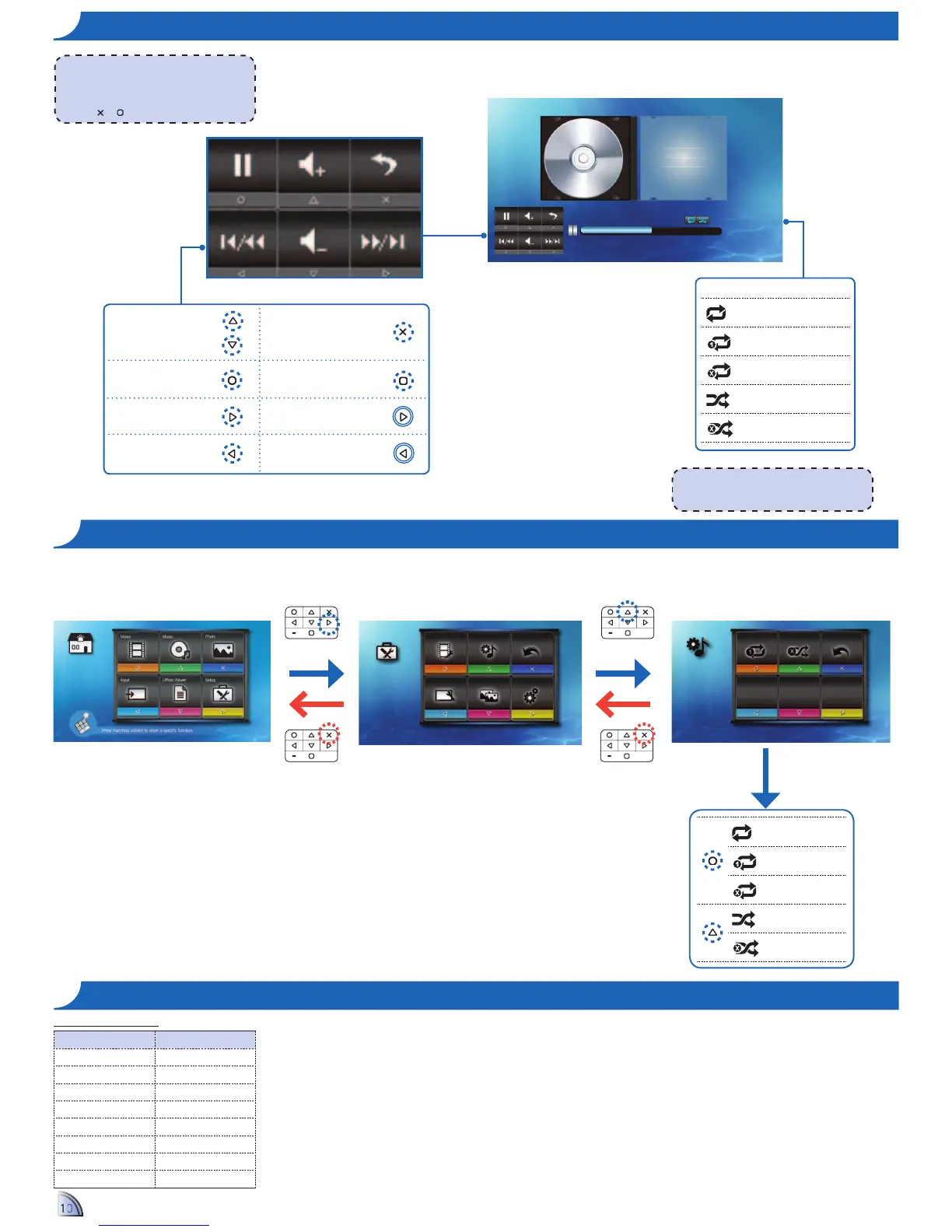
Music Setting
Video Setting Music Setting Back
Display Setting Slideshow System
Setup
B&3&?%"C"D:0)A&"E+2$8
Repeat all
Repeat one
Repeat off
D:0)A&"2$
D:0)A&"2))
<Note>
12"+:?$F&"'&3&?%"2'"8:0)A&"8&%%-$F89"8&&"
Music Settings below.
Compatible Audio Format
File Format Audio Decoder
.aac HE-AAC
.asf WMA9
@A?+ FLAC
.mp3 MP3
.ogg Vorbis
.ra RA 6, 9, 10
.wma WMA9
.wav PCM
Repeat all
Repeat one
Repeat off
D:0)A&"2$
D:0)A&"2))
<Note>
The button guide disappears when the
keypad is not used for 3 seconds.
To display the button guide, press any key
except
or .
Adjust volume
Pause/Play
Next track
Previous track
Return to Home menu
Back to previous
screen
Fast forward (press and hold)
Rewind (press and hold)
1.
Select "Setup"
2.
Select "Music Setting"
3.
Adjust Settings


 To Next Page
 Loading...