Language Information Back
Firmware Update Reset
System
Video Setting Music Setting Back
Display Setting Slideshow System
Setup
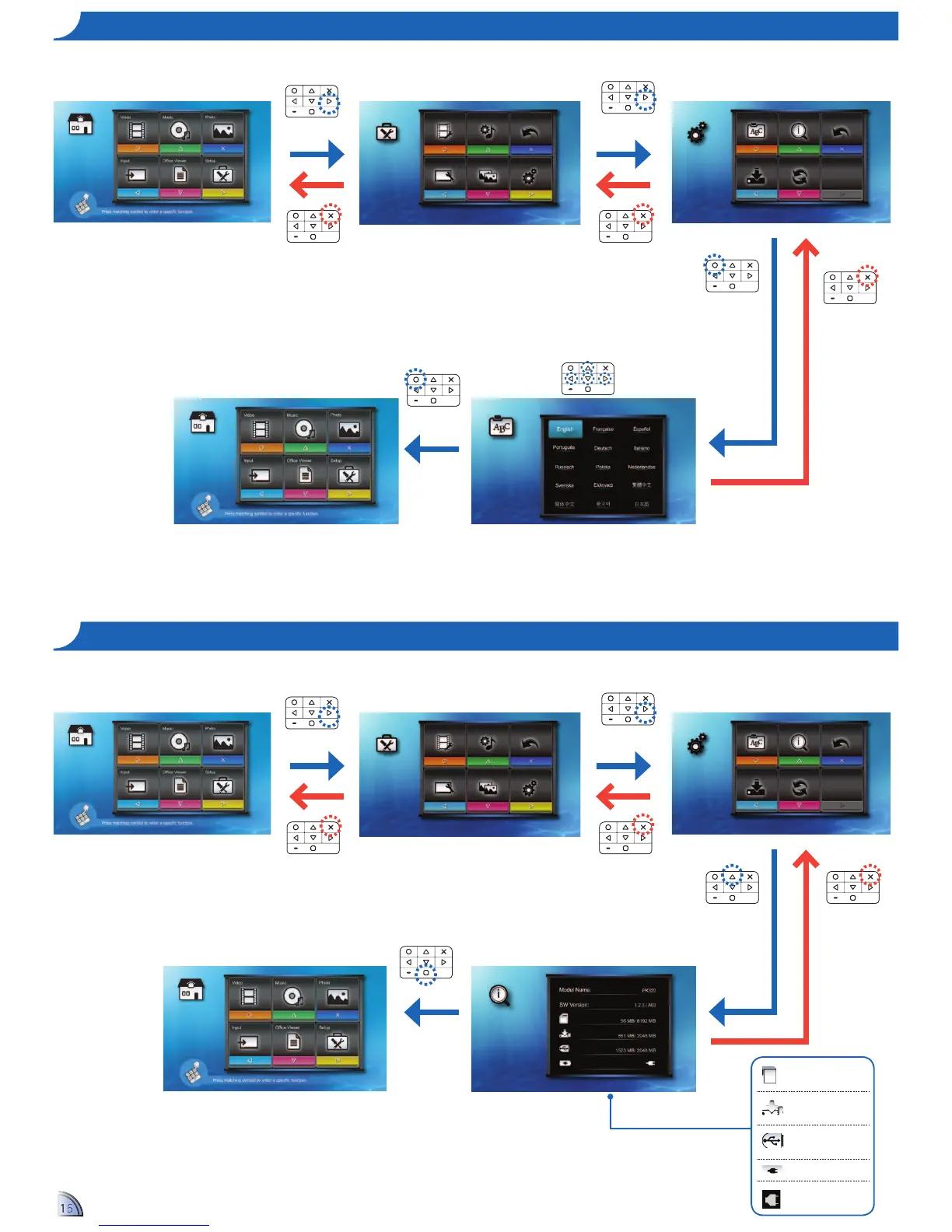
Select your preferred menu language.
Options are: English, French, Spanish, Portuguese
(Brazilian), German, Italian, Russian, Polish, Dutch,
D.&6-8:9">'&&X9"1'?6-%-2$?7"W:-$&8&9"D-/37-*&6"
Chinese, Korean, Japanese
Language Information Back
Firmware Update Reset
System
Video Setting Music Setting Back
Display Setting Slideshow System
Setup
MicroSD card
capacity
Internal memory
capacity
External memory
(USB) capacity
Battery charging
Power adapter
connected
1.
Select "Setup"
2.
Select "System"
3.
Select "Language"
4.
Select Language
1.
Select "Setup"
2.
Select "System"
3.
Select "Information"
4.
View Information
5.
Return to Home Menu
5.
Confirm language /
Return to Home menu


 To Next Page
 Loading...