8
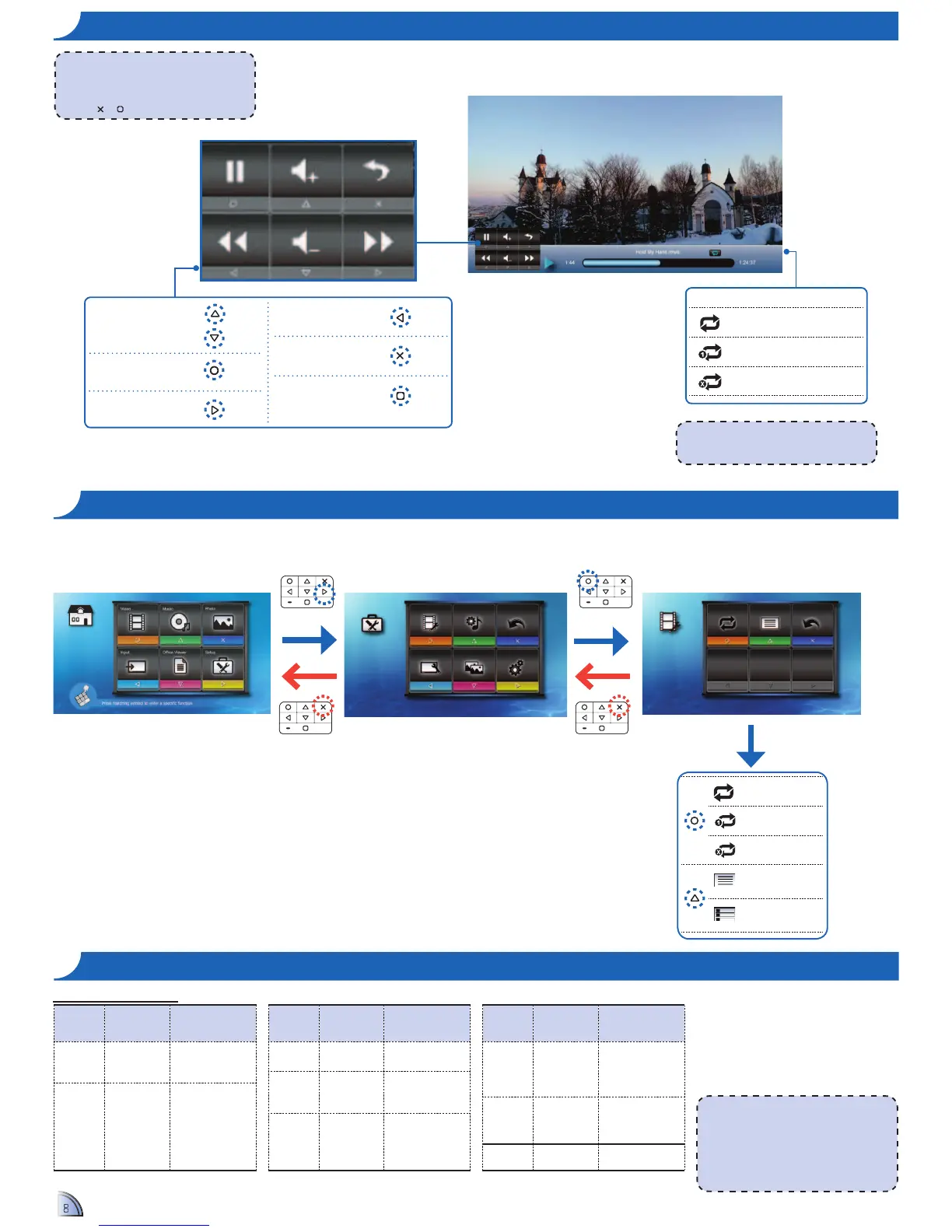
Repeat Icons
Repeat all
Repeat one
Repeat off
<Note>
To change repeat settings, see Video
Settings below.
<Note>
!" 12"+234"5-6&2"*7&89"%:&"5-6&2"*7&"8-;&"
/08%"$2%"&<+&&6"=>"?$6"%:&"5-6&2"*7&"
being copied is from a computer or an
SD card with FAT32 format.
!" Video format does not support content
with B-Frame function.
File Format Video Decoder
Audio or Speech
Decoder
.3gp
H.263
H.264
HE-AAC
.avi
H.263
H.264
MPEG4
Xvid
MP3
HE-AAC
PCM/G.711
File Format Video Decoder
Audio or Speech
Decoder
.cmb
H.264 HE-AAC
@A5
Soreson Spark MP3
.mp4
H.263
H.264
MPEG4
MP3
HE-AAC
File Format Video Decoder
Audio or Speech
Decoder
.mov
H.263
H.264
MPEG4
MP3
HE-AAC
PCM/G.711
.wmv
.asf
MPEG4 SP
VC-1 (WMV9)
WMA
.ts
MPEG2 MP3
Compatible Video Format
HOW TO PLAY VIDEOS - VIDEO PLAYBACK MODE
VIDEO SETTINGS
Repeat all
Repeat one
Repeat off
Browser display:
list view
Browser display:
thumbnail view
Repeat Browser Display Back
Video Setting
Video Setting Music Setting Back
Display Setting Slideshow System
Setup
<Note>
The button guide disappears when the
keypad is not used for 3 seconds.
To display the button guide, press any key
except
or .
Adjust volume
Pause/Play
Fast forward
Rewind
Return to Home menu
Back to previous
screen
1.
Select "Setup"
2.
Select "Video Setting"
3.
Adjust Settings


 To Next Page
 Loading...