4 English
SAFETY
SAFETY
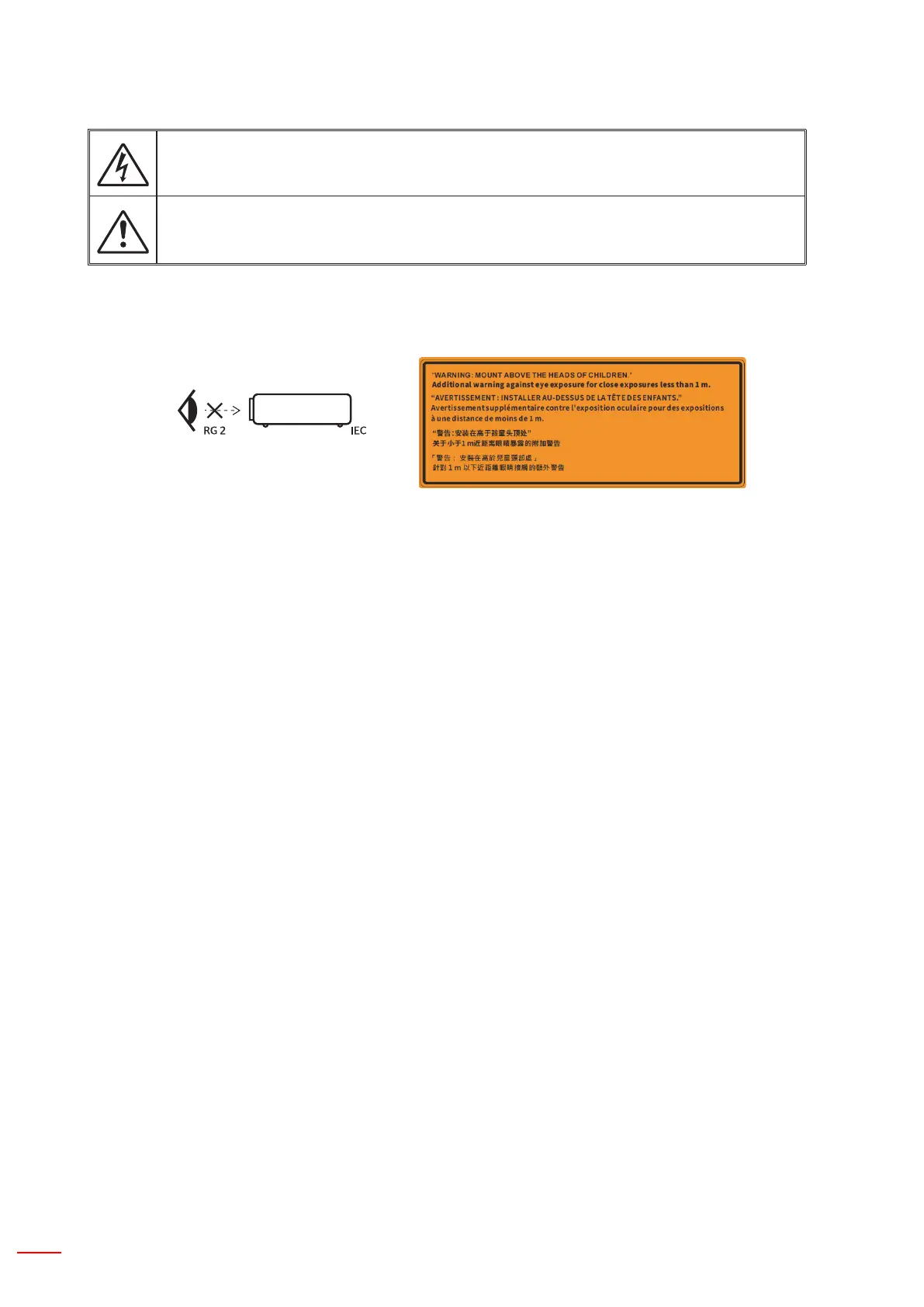
The lightning ash with arrow head within an equilateral triangle is intended to alert the user
to the presence of uninsulated “dangerous voltage” within the product’s enclosure that may be
of sufcient agnitude to constitute a risk of electric shock to persons.
The exclamation point within an equilateral triangle is intended to alert the user to the pres-
ence of important operating and maintenance (servicing) instructions in the literature accom-
panying the appliance.
Please follow all warnings, precautions and maintenance as recommended in this user’s guide.
Important Safety Instructions
• Do not stare into the beam, RG2.
As with any bright source, do not stare into the direct beam, RG2 IEC 62471-5:2015.
• This projector is class 1 laser product of IEC 60825-1:2014 and risk group 2 with the requirements of IEC
62471-5:2015.
• Notice is given to supervise children and to never allow them to stare into the projector beam at any dis-
tance from the projector.
• Notice is given to use caution when using the remote control for starting the projector while in front of the
projection lens.
• Notice is given to the user to avoid the use of optical aids such as binoculars or telescopes inside the beam.
• Do not block any ventilation openings. To ensure reliable operation of the projector and to protect from
overheating, it is recommended to install the projector in a location that does not block ventilation. As an
example, do not place the projector on a crowded surface. Do not put the projector in an enclosure such as
a book case or a cabinet that restricts air ow.
• To reduce the risk of re and/or electric shock, do not expose the projector to rain or moisture. Do not install
near heat sources such as radiators, heaters, stoves or any other apparatus such as ampliers that emits
heat.
• Do not let objects or liquids enter the projector. They may touch dangerous voltage points and short out
parts that could result in re or electric shock.
• Do not use under the following conditions:
– In extremely hot, cold or humid environments.
(i) Ensure that the ambient room temperature is within 5°C ~ 40°C (41°F ~ 104°F)
(ii) Relative humidity is 10% ~ 85%
– In areas susceptible to excessive dust and dirt.
– Near any appliance generating a strong magnetic eld.
– In direct sunlight.
• Do not use the unit if it has been physically damaged or abused. Physical damage/abuse would be (but not
limited to):
– Unit has been dropped.
– Power supply cord or plug has been damaged.
– Liquid has been spilled on to the projector.
– Projector has been exposed to rain or moisture.
– Something has fallen in the projector or something is loose inside.
• Do not place the projector on an unstable surface. The projector may fall over resulting in injury or the pro-
jector may become damaged.


 To Next Page