34 | ORBEA TECHNICAL MANUAL
1. CHANGING THE WHEEL CIRCUMFERENCE.
WARNING. Modifying this value will only affect the speed reading if an ANT+ speed sen-
sor has been paired to the head unit. If a speed sensor is connected, the current speed
reading will depend on the value given by the speed sensor depending on the selected
wheel circumference. If no speed sensor is connected, the current speed eld will show
by default the speed value given by the X35 system, and the circumference value will be
irrelevant.
STEPS:
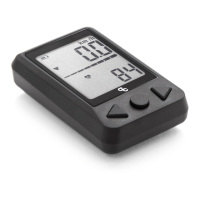
1. Press the center button (B) until the Distance travelled/Odometry is shown.
2. Press and hold for 2 seconds the center button (B) until the Clear Distance (Clr dist)
message is shown.
3. Press again the center button (B) until the text Length (Len) is shown.
4. Press and hold for 2 second the center button (B) until “Set” is visible on the screen.
5. Use the left and right arrow button (A and C) to adjust the value to the desired circum-
ference.
6. Wait until the head unit automatically goes back to the main screen.
8.7. SETTINGS. CHANGING THE WHEEL CIRCUMFERENCE,
MEASURING UNITS AND DISTANCE
— Change the wheel circumference.
2 seg. 2 seg.
2. RESET THE ACTIVITY DISTANCE TO ZERO
1. Press the center button (B) to reach the distance
travelled/odometry screen.
2. Press and hold the center button (B) for 2 seconds until
the text Clear Distance (Clr dist) is shown.
1. Press the center button (B) to reach the distance
travelled/odometry screen.
2. Press and hold the center button (B) for 2 seconds until
the text Clear Distance (Clr dist) is shown.
3. Press twice the center button (B) until the text Unit is
shown.
4. Press and hold for two seconds the center button (B)
until the text Set is shown.
— Reset the distance.
— Changing the measuring units.
2 seg. 2 seg.
5. Press the center button (B) to change between meters
(m) and inches (in).
6. Once the desired measuring unit is selected, do not
press any other button. After 2 seconds the unit will au-
tomatically go back to the main screen and the changes
will be visible on the top right hand corner of the screen.
3. Press and hold the center button (B) for 2 seconds until
the distance travelled is reset to zero.
This method also resets the activity time.
4. Wait until the unit automatically goes back to the main
screen.
3. CHANGING THE MEASURING UNITS (Km/h>Mi/h)
2 sec.
2 sec. 2 sec.
2 sec.
2 sec. 2 sec.


 To Next Page