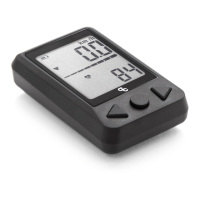
OC ANT+ LEV DISPLAY32 | ORBEA ORBEA | 33 TECHNICAL MANUAL
Once the bicycle and/or other sensors are paired, you can
navigate between data elds in the display by pressing re-
peatedly the center button (B). The data is shown in the
following order:
1. TIME IN MOTION DURING THE ACTIVITY
The display starts counting the activity time automatically
as soon as it receives a speed reading from the X35 system
or an ANT+ speed sensor. The time will pause when the
speed is 0 km/h, and will automatically resume when there
is a speed reading again.
The activity time can be reset by pressing and holding the
left button (A) for 3 seconds while the display is showing
the activity time eld. This method does not reset the dis-
tance travelled in the activity.
2. HEART RATE
If an ANT+ heart rate sensor has been connected, the data
from that sensor will be visible in this eld.
This eld will only be visible if there is a sensor connected.
— Press button B to navigate between elds.
1. Activity time 2. Heart rate 3. Cadence 4. Battery level 5. Distance/Odometry
1. Time in motion during the activity.
2. Heart rate (if a sensor has been paired)
3. Cadence (if a sensor has been paired)
4. X35 battery charge level (in %)
5. Distance travelled in the activity / Total odometry of the
bicycle..
3. CADENCE
If an ANT+ cadence sensor has been connected, the data
from that sensor will be visible in this eld.
This eld will only be visible if there is a sensor connected.
4. X35 BATTERY CHARGE LEVEL (%)
Besides the battery charge level bar, that will be always
visible across the center of the screen, in this eld a more
accurate reading of the battery level will be shown as a
percentage.
5. DISTANCE TRAVELLED IN THE ACTIVITY / TOTAL
ODOMETRY OF THE BICYCLE
On this screen, the head unit will alternately show the
distance travelled from the moment the activity is being
recorded and, if an X35 equipped ebike is connected, the
total odometry of the system.
The distance travelled can be reset to zero (together with
the activity time). See the Setting section of this manual.
8.5. NAVIGATION BETWEEN DATA FIELDS
If an ebike equipped with the X35 system is connected, the assist levels can be changed
from the OC ANT+ LEV display by pressing on the left and right arrow button (A) (C). Press
the right button (C) to change to a more powerful assist level until level 3 is reached (L3).
Press the left button (A) to change to a less powerful assist level until the no assist level is
reached (L0). The available assist levels, and their visualization on the screen are:
Nivel 0. No assist (L0)
Nivel 1. Eco (L1)
Nivel 2. Medium (L2)
Nivel 3. Turbo (L3)
After a few seconds from the moment the assist level was selected, the system will remain
on the selected level and the screen will go back to show the current speed. The selected
assist level will be displayed on the left part of the screen by a symbol:
Nivel 0. No symbol
Nivel 1. Bottom pointing arrow
Nivel 2. Horizontal line
Nivel 3. Top pointing arrow
— Assist levels
8.6. CHANGING BETWEEN ASSIST LEVELS


 To Next Page