38 39
Common Problems and Solutions (cont’d)
I forgot my Mobile Hotspot Admin website Password.
I cannot connect to my Mobile Hotspot.
• Your Mobile Hotspot Admin website Password is the same as your Wi-Fi Password.
• Make sure the Network Signal Strength indicator displays at least one bar
and that the type of network is displayed on the Mobile Hotspot Home screen.
• Make sure your Windows Wi-Fi is turned on the device you want to connect.
(Refer to your computer’s Help if you need assistance.)
Open your wireless network connection list:
The Speed Mobile Hotspot SSID will be listed as “Verizon-RC400L-XX”
WINDOWS: Right-click icon and select View Available Networks.
MAC: Pull down list from AirPort icon.
WINDOWS: Click Connect.
MAC: Select the network name.
When your device is connected to the network, the Connected Devices
icon in the status bar will show a connected device.
1
2
How do I disconnect from the network?
From the Mobile Hotspot device:
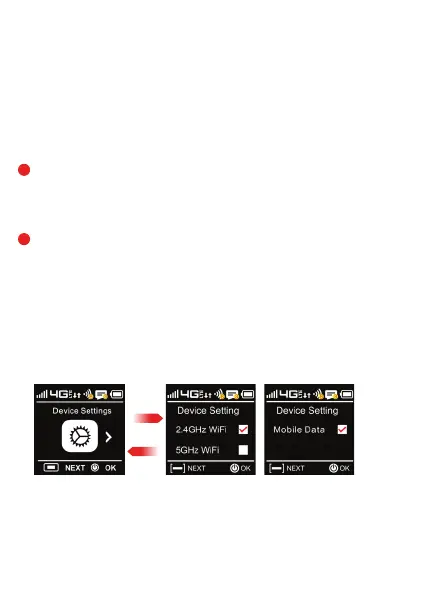
• Press the Menu button until Device Settings screen is displayed. Press Next/Menu button
again to get the next screen. You can then turn off Mobile data by checking or unchecking
the box by selecting the OK/Pwr button again. Press the Next/Menu button to exit out.
From the WEB UI:
• You can turn mobile data off from the WEB UI by selecting
Settings > Internet > Mobile Connections > Mobile Data then select Off.
OK/Power
Menu



 To Next Page