English
- 83 -
User Manual - Thermo X
• Press to confi rm all the remaining Advanced Programming parameters, or else
allow 45 seconds and return to normal operation
As for how to send the commands switching the device on or off, refer to the
instructions for the X.CODE WAVE, X.CODE BUS or relevant phone dialer.
OTHER AVAILABLE FUNCTIONS
SETTINGS GUARD (PASSWORD)
When enabled, this function inhibits keyboard operation.
Changing any parameter is only allowed after a special confi guration area has
been accessed and the correct password has been entered (number from 000 to 999).
The password is selected in parameter “PAS” of the Advanced Programming area (cfr.
pages 87 and 90).
The default password is 123.
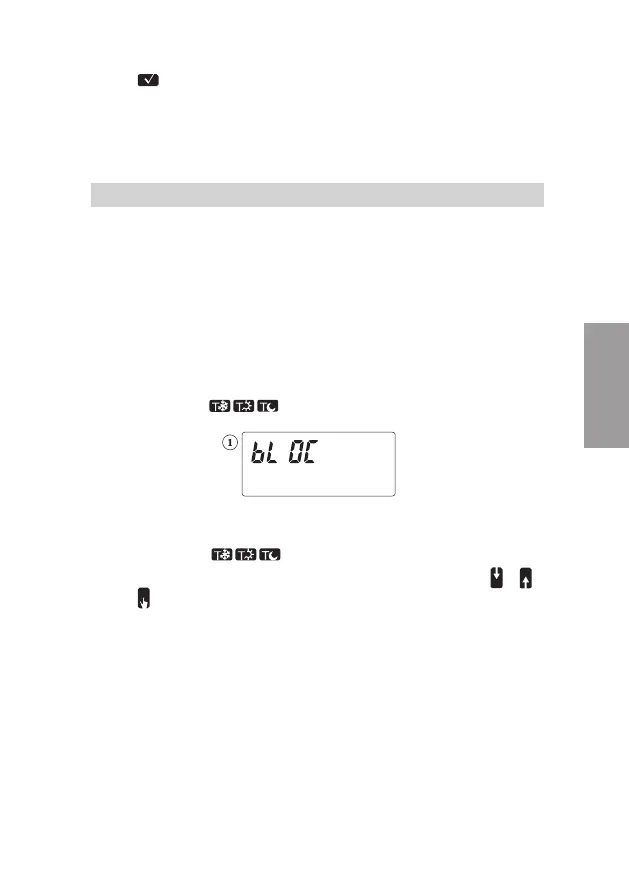
To enable the settings guard
• From the Automatic, Manual or OFF operating modes:
hold down the keys
simultaneously for a few seconds;
the display will read
and will resume the previous operation mode (Automatic, Manual or off)
To disable the settings guard
• Hold down the keys
simultaneously for a few seconds
• To select the password (parameter “PAS” – Advanced Programming), press
or
• Press
to confi rm
AUTOMATIC SOLAR/DAYLIGHT TIME SWITCHING
Thermo X changes the time from daylight saving to solar on the last Sunday
in March at 02:00; from solar to daylight saving on the last Sunday in October
at 03:00.
This function too can be disabled, or else the date and hour in which the time switch
occurs can be changed.


 To Next Page