English
- 84 -
User Manual - Thermo X
To alter the solar-daylight saving time switch
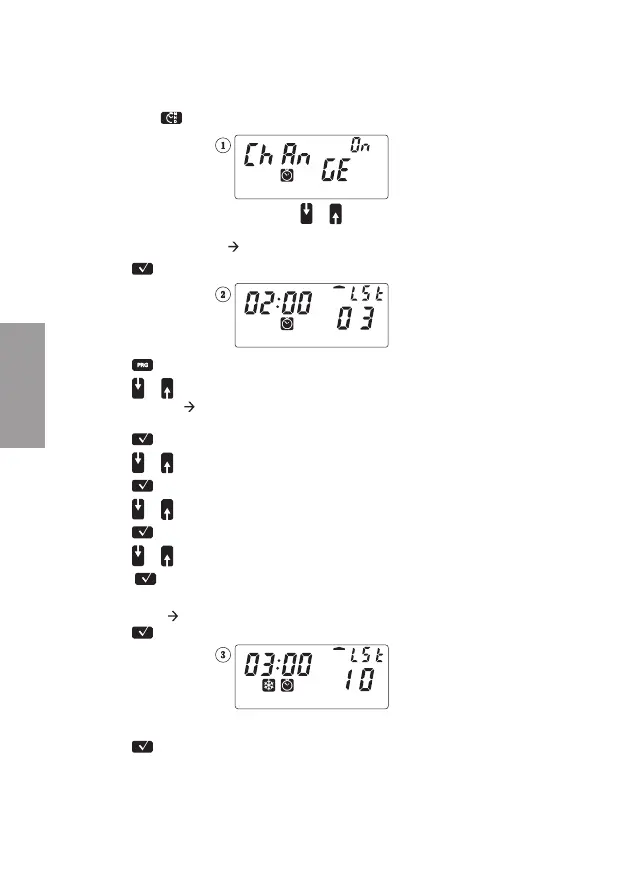
Hold down
for approximately 3 seconds: the following reading will appear
(If the reading is “[hange 0FF” press or to switch it to “0N”)
• Daylight saving time
solar time switching
1) Press
to confi rm: the following reading will appear
2) Press to change the settings: “LST” will fl ash
3) Press
or to select the week of the month in which the
Daylight saving
Solar time switch is to take place (“1ST” for fi rst, “2ND” for
second, “3RD” for third, “4TH” for fourth, “LST” for last)
4) Press
to confi rm: the Sunday segment will fl ash
5) Press
or to select a day of the week
6) Press
to confi rm: “03” will fl ash
7) Press
or to select a month
8) Press
to confi rm: “02:00” will fl ash
9) Press or to select the time
10) Press
to confi rm: All segments will be continuously lit
• Solar time
daylight saving time switching
Press
: the following reading will appear
Follow the instructions from step 2) to 9)
Press
to confi rm and exit the settings


 To Next Page