Product Overview
1. Material: high-end aluminum alloy
2. Biological semiconductor recognition fingerprint head
3. Support password unlock, 16-bit virtual password
4. Support card unlock
5. Support phone bluetooth app unlock
6. Supprt touch lock unlock
7. Support unlock remotely (permanent,Timed,one-time,Erase,
Custom,cyclic)
8. Support password remotely (permanent,Timed,one-time,Erase,
Custom,cyclic)
9. Unlocking record query
10.Company attendance function
1-1: Appearance
1-2: Features
1-3: Technical Specifications
1-4: Safety Precautions
1-5: Charging Safety
1-6: Precautions for Use
1:Product Overview
1
2
3
4
5
6
1 2
2-1: Product List
2-2: Installation Instructions
2-3: Installation Precautions
2-4: Installation Steps
2-5: Installation Diagrams
2:Product Installation
5
5
6
6
8
1: Add Bluetooth Administrator to the lock
2: eKey
3: User password
4: IC card
5: Fingerprint
6: Auto lock
7: Low power warning
8: Keypad lock out
9: Delete Bluetooth Administrator/Restore
to default factory setting
3:Operating Guide (operate with the app)
9
9
10
11
12
13
13
13
13
(As the product is constantly updated, the actual shape of
the product should be subject to the actual product.)
WEB management login
14
TABLE OF CONTENTS
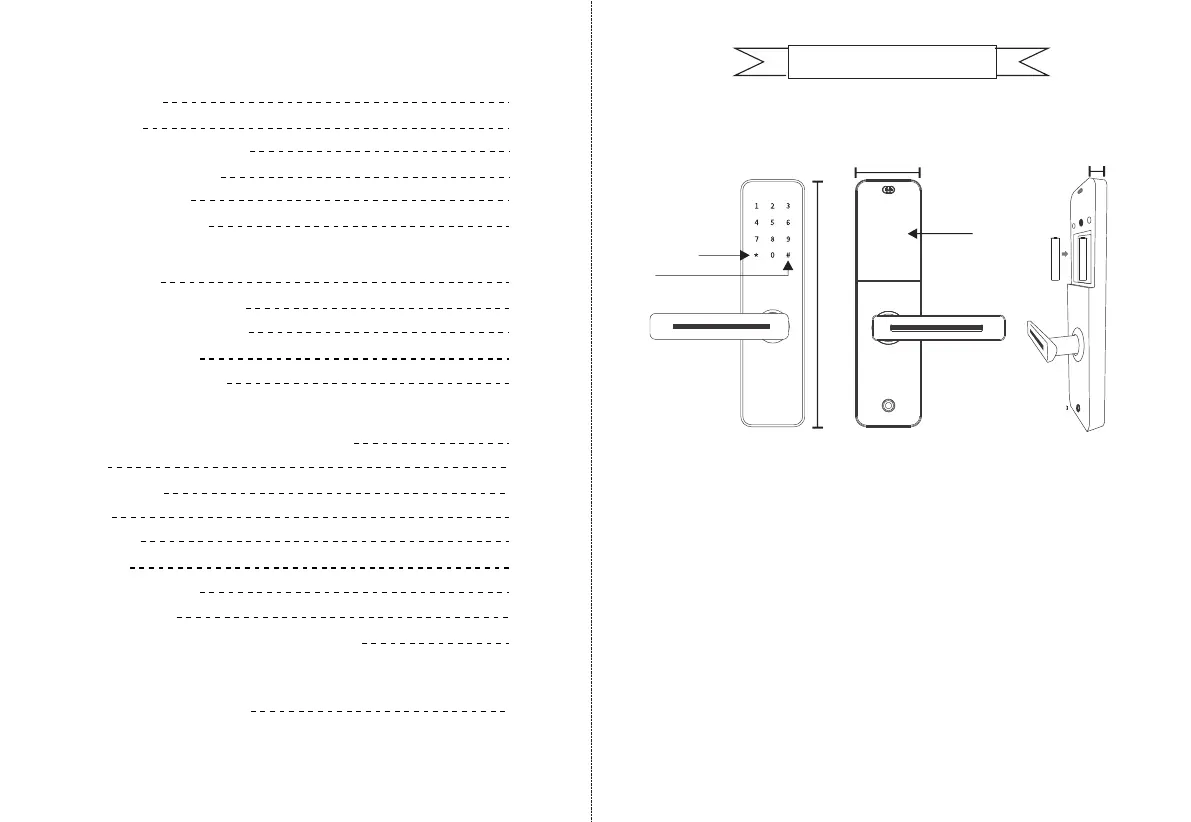
1-1:Appearance
1-2:Features
front panel
Delete exit key
Enter
300mm
70mm
battery cover
25mm
sideback panel


 To Next Page