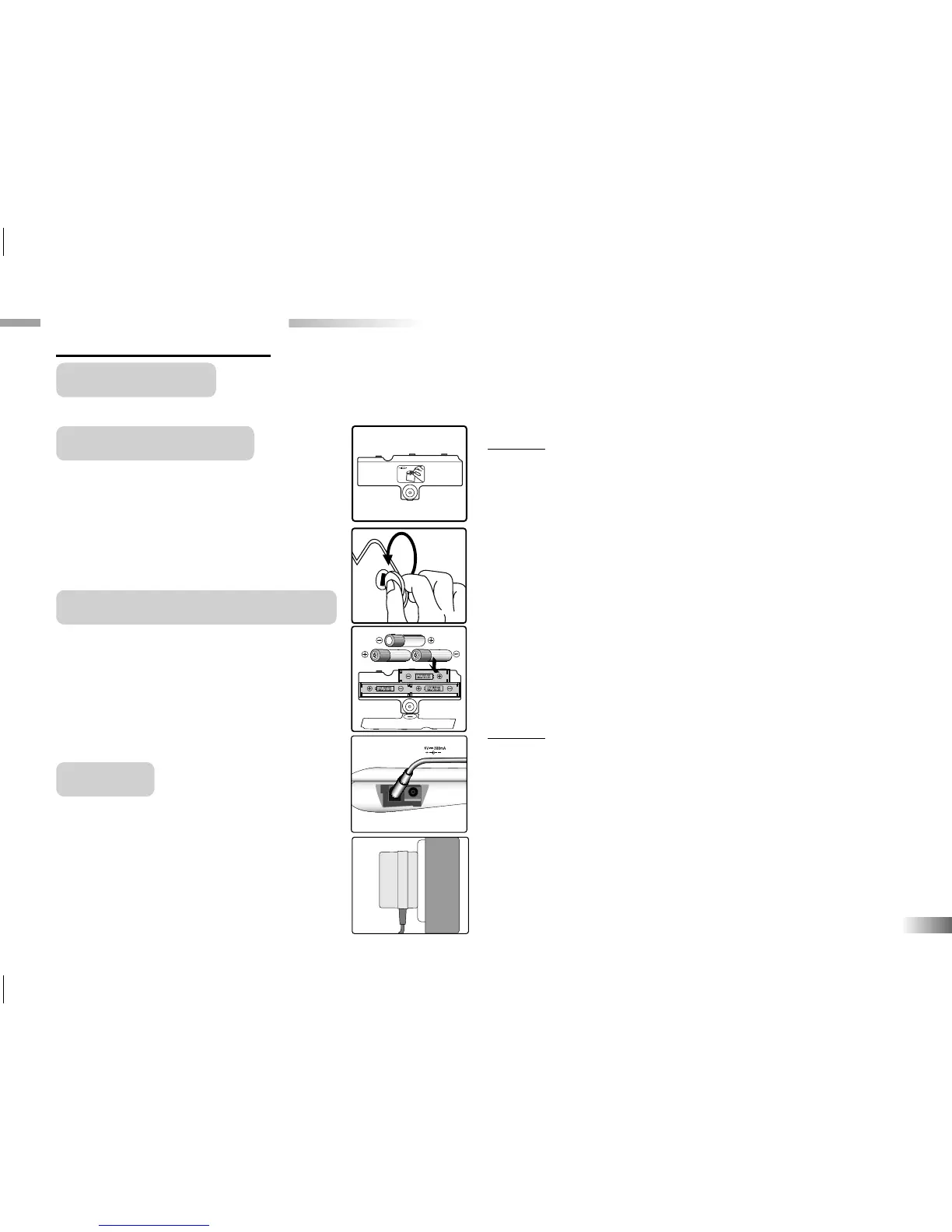
at the back of the unit.
3. Insert 3 AA-size batteries.
(Note the correct polarity: +, - ).
4. Replace the cover.
AC/DC Adaptor Connection
Please turn off the unit before plugging
in the AC/DC adaptor. Otherwise the
unit may be damaged.
Slide back the adaptor cable at the rear
of the unit and plug the AC/DC adaptor
into the the jack.
Auto-off
If there is no input on the unit for a cou-
ple of minutes, the unit says "Bye-bye!
See you soon!" and automatically turns
itself off to conserve power.
3
Caution
• Do not mix different types of batteries or old and new
batteries.
• Only use batteries of the same or equivalent type as
recommended.
• Remove all batteries when replacing.
• Remove batteries from the unit if the unit is not going to be
used for long periods of time.
• Do not dispose of batteries in fire.
• Do not recharge non-rechargeable batteries.
• Rechargeable batteries are to be removed from the toy
before being charged.
• Rechargeable batteries are only to be charged under adult
supervision.
• Remove exhausted batteries from the toy.
• Do not short-circuit the supply terminals.
Caution
• The unit must not be connected to a power supply greater than 6V.
• Only use the recommended adaptor.
• The adaptor is not a toy.
• Do not short-circuit the supply terminals.
• Toys should be disconnected from the power source before cleaning.
• Due to AC/DC Adaptor Connection - Not suitable for children under 3
years, and must be operated under adult supervi.
• In an environment prone to static discharge, the unit may malfunction.
• To reset, remove batteries or disconnecting the adaptor for at least 10
seconds before connecting the power supply again.
Chapter 2
Chapter 2
Getting Started
Your
Accelerator PC Trainer 5 Learning Laptop
operates on 3 AA-size batteries or a 6V AC/DC adaptor.
Battery Installation
1. Make sure the unit is turned off.
2. Using a coin, open the battery cover


 To Next Page