EN
2
OVERVIEW
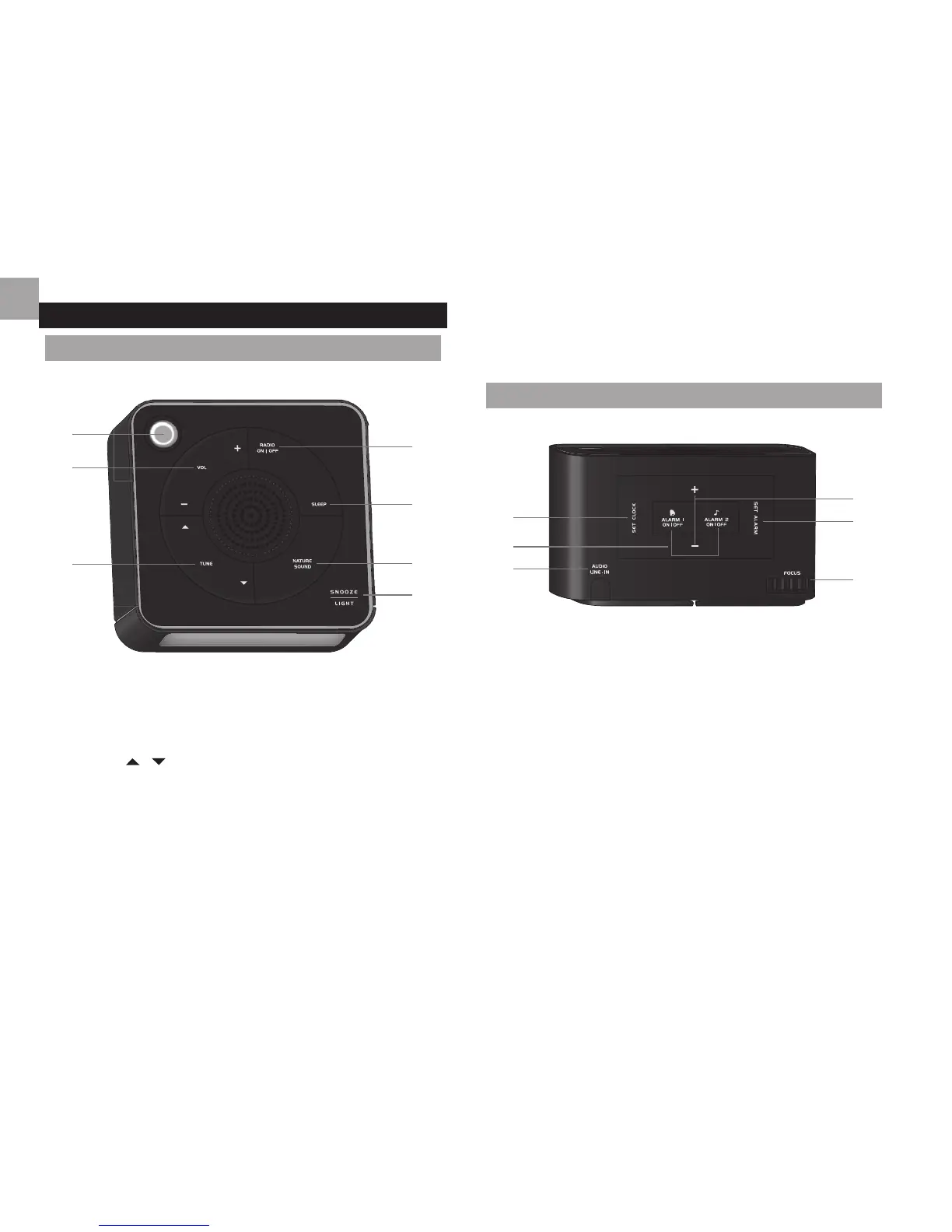
FRONT VIEW
1. Projector
2. VOL +/-: increase / decrease volume when in radio /
soothing sound mode
3. TUNE
/ : auto search / adjust radio frequency
when in radio mode
4. RADIO ON/OFF: turn radio on / off
5. SLEEP: activate sleep timer; adjust timer settings (120,
90, 60, 30, 15, 0)
6. NATURE SOUND: turn soothing sound on/off; select
soothing sound
7. SNOOZE – LIGHT: activate backlight and projection;
activate snooze alarm
BACK VIEW
1. SET CLOCK: set time; conrm setting
2. ALARM 1/2 ON / OFF: enable / disable alarm 1/2
3. Socket for audio line-in
4. + / - : increase / decrease value of the clock / alarm
setting; toggle setting options
5. SET ALARM: display alarm time; set alarm
6. FOCUS wheel: adjust projection focus
1
2
3
4
5
6
7
1
2
3
4
5
6







 To Next Page