page 08
Operation controls
and functions
1 2
3 4 5
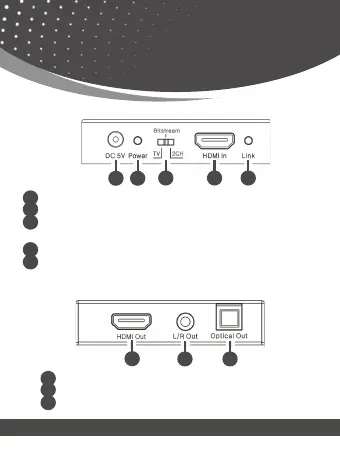
DC 5V: Connect 5V/1A adaptor to AC wall outlet for power supply.
Power LED: System power indicator.
TV / Bit Stream / 2CH: This allows users to select audio format according to TV, Bit
Stream or LPCM 2CH.
HDMI In: Connect this to HDMI source devices such as Blu-ray or PS4 player
Link LED: The LED will illuminate when detected HDMI input signal.
1
2
3
4
5
5.1 Front Panel
5.2 Rear Panel
1
2 3
HDMI Out: Connect to HDMI display devices such as TV/Projector.
L/R Out: Connect to audio amplifier or TV L/R audio input port.
Optical Out: Connect to audio amplifier optical audio input port.
1
2
3


 To Next Page