page
08
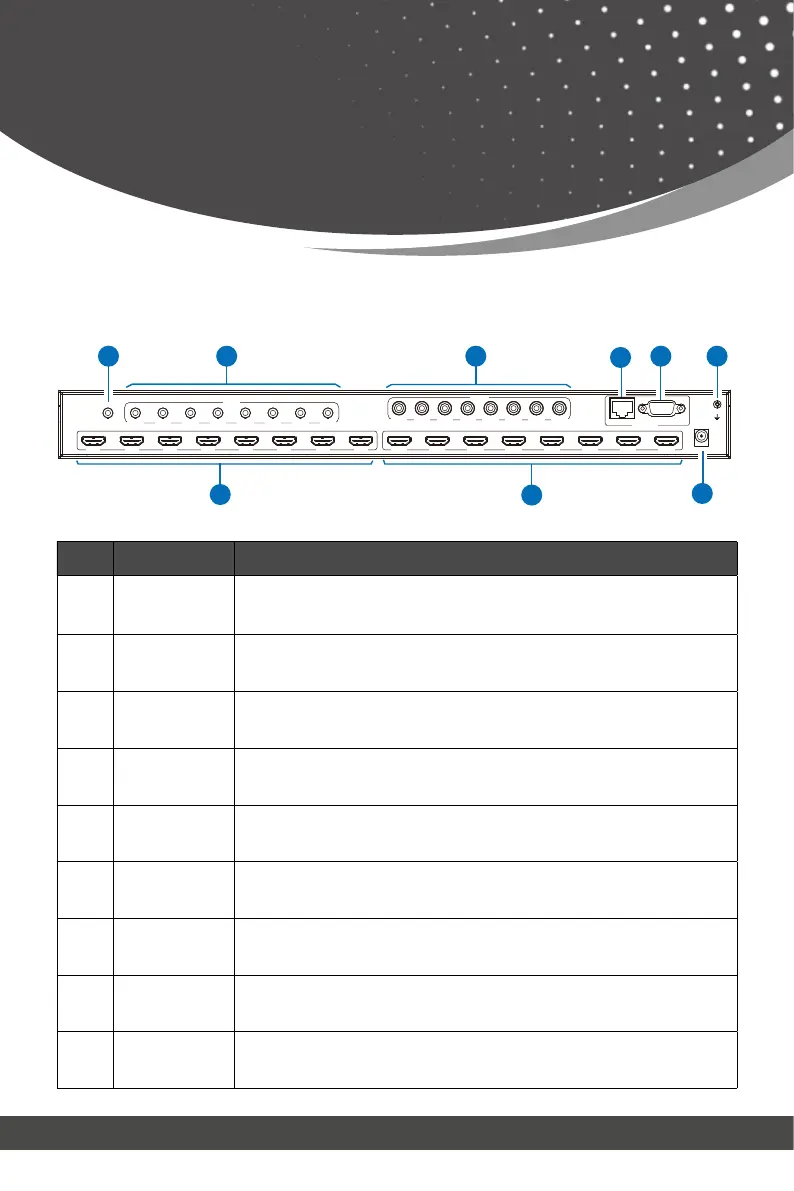
No. Name Function Description
1 IR EXT
If the IR receiver window of the unit is blocked or the unit is installed
in a closed area out of infrared line of sight, the IR receiver cable can
be inserted to the “IR EXT” port to receive the IR remote signal.
2. L/R OUT(1-8)
Analog audio output port, connected to an amplifier or speaker via a
3.5mm audio cable.
3.
COAX OUT
(1-8)
Coaxial audio output port, connected to an audio output device such
as audio amplifier via a coaxial cable.
4. TCP/IP port TCP/IP control port, connected to a PC or router with an RJ45 cable.
5. RS-232 port
Connected to a PC or control system by D-Sub 9-pin cable to transmit RS-
232 command.
6. GND Connected the housing to the ground.
7.
INPUT ports
(1-8)
HDMI input ports, connected to HDMI source devices such as DVD or
set-top box with an HDMI cable.
8.
OUTPUT ports
(1-8)
HDMI output ports, connect to HDMI display devices such as TV or
monitor with an HDMI cable.
9. DC 12V Connect to 12V/5A power adapter.
2
7 8
CONTROL
TCP/IP
DC 12V
RS-232
IR EXT
OUT 1 OUT 2 OUT 3 OUT 4 OUT 5 OUT 6 OUT 7 OUT 8IN 1 IN 2 IN 3 IN 4 IN 5 IN 6 IN 7 IN 8
L/R
OUT 1 OUT 2 OUT 3 OUT 4 OUT 5 OUT 6 OUT 7 OUT 8
COAX
OUT 1 OUT 2 OUT 3 OUT 4 OUT 5 OUT 6 OUT 7 OUT 8
3
6
4
5
9
1
Rear Panel
Operation Controls
and Functions



 To Next Page