page
07
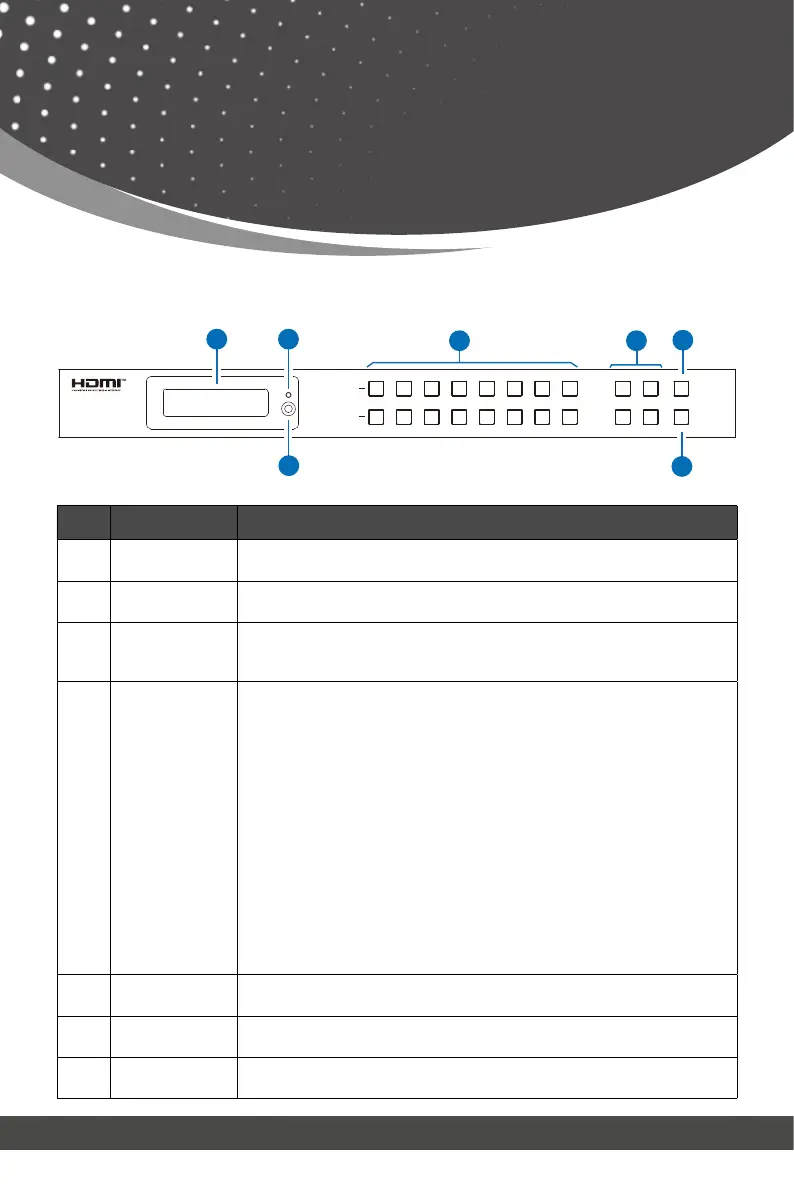
No. Name Function Description
1. OLED screen
Display matrix switching status, input / output port, EDID, Baud rate,
IP Address.
2. Power LED
The LED will light up green when the product is connected to power
supply, and red when the product is on standby.
3.
Input / Output
buttons
You need to press an output button (1~8) firstly, and then press an
input button (1~8) to select the corresponding input source for the
output port.
4.
MENU / ENTER
/ UP / DOWN
EDID Check: On the initial OLED display screen, press “MENU” button
to enter the Matrix switching state interface, then press “UP/DOWN”
button to check the current EDID information of each HDMI input port.
② EDID Setting: On the initial OLED display screen, press “MENU”
button to enter the EDID setting interface, press “UP/DOWN” button to
select the required EDID, and press the “ENTER” button. A prompt “copy
to input :” will appear. Then press “UP/DOWN” button to select the input
port you need to set, and press “ENTER” button again to confirm.
③ Baud Rate Setting: On the initial OLED display screen, press
“MENU” button to enter the Baud rate interface, and press “UP/DOWN”
button to select the required Baud rate, finally press the “ENTER” but-
ton to confirm the setting.
④ IP Address Check: On the initial OLED display screen, press “MENU”
button to enter the IP interface, then press “UP/DOWN” button to
check the current IP address. Pressing the “MENU” button again will
return to the initial OLED display status.
5. POWER button
Long press the POWER button for 3 seconds to enter the standby
mode, then short press it to wake up the device.
6. IR window
IR receiver window. It only receives the IR remote signal from this
product.
7. LOCK button
Short press the LOCK button to lock front panel buttons (Except the
power button); Press it again to unlock.
3
4
1 2 3 4 5 6 7 8
1 2 3 4 5 6 7 8
INPUT
OUTPUT
MENU
ENTER
18Gbps 8x8
HDMI Matrix
POWER
LOCK
DOWN
UP
1
2
6
7
5
Front Panel
Operation Controls
and Functions



 To Next Page