1
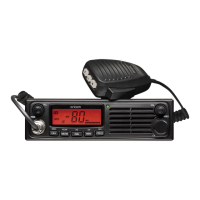
UHF400R Quick Start Guide
For the full product user guide, please scan QR code
or visit www.oricom.com.au
Pack contents
•DINSizeUHFCBRadioTransceiver
•HeavyDutyMicrophone
•Microphonemountingbracket
•Transceivermountingbracket
•Packofsuppliedmountingscrews
•QuickStartUserGuide
Please read before installing or operating your Oricom radio
TheoperationofyourUHFradioinAustraliaandNewZealandissubjectto
conditionsinthefollowinglicenses:InAustralia,theACMARadiocommunications
(CitizenBandRadioStations)andinNewZealandbyMEDtheGeneralUserRadio
LicenseforCitizenBandRadio.
Whenanewnarrowbandradioreceivesatransmissionfromanolderwidebandradiothespeechmaysoundloud
anddistorted–simplyadjustyourradiovolumeforthebestlisteningperformance.Whenanolderwideband
radioreceivesasignalfromanewnarrowbandradiothespeechmaysoundquieter-simplyadjustyourradio
volumeforbestlisteningperformance.WhenoperatinganarrowbandradioorChannel41-80interferenceis
possiblefromwidebandradiostransmittingonhighpoweroronadjacentfrequency.
Theissuesdescribedabovearenotafaultoftheradiobutaconsequenceofmixeduseofwidebandand
narrowbandradios.
ThisunitcomplieswithallrelevantAustralianandNewZealandapprovalrequirements
AS/NZS4365:2011
Need help? Contact Oricom Support
IfyouneedassistancesettinguporusingyourOricomproductnoworinthefuture,
callOricomSupport.
Australia (02)45748888
www.oricom.com.au
Mon-Fri8am–6pmAEST
NewZealand 0800674266
Mon-Fri10am–8pmNZST



 To Next Page