EN - 13
4.2 Sections
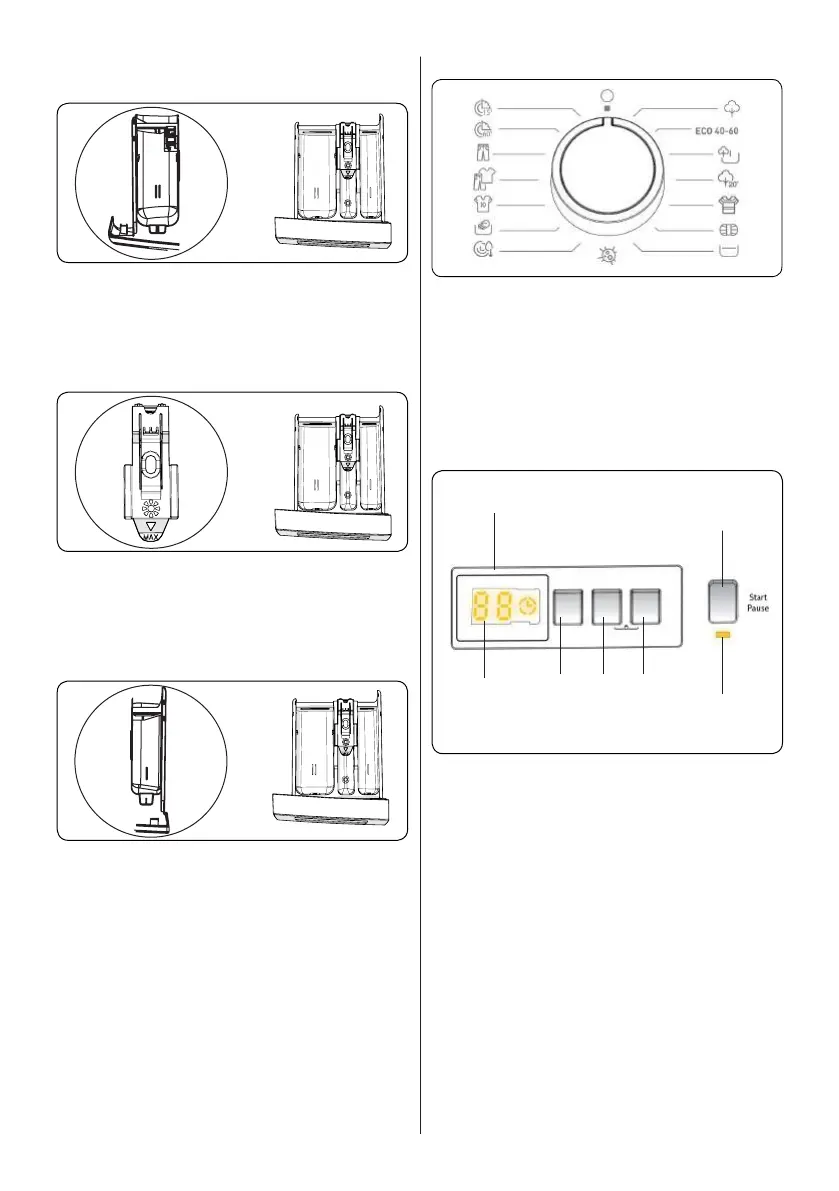
Main wash detergent compartment:
Thiscompartmentisforliquidorpowder
detergentsorlimescaleremover.Thefluid
detergentlevelplatewillbesuppliedinside
yourmachine.(*)
Fabric conditioner, starch, detergent
compartment:
Thiscompartmentisforsofteners,
conditionersorstarch.Followthe
instructionsonthepackaging.Ifsofteners
leaveresidueafteruse,trydilutingthemor
usingaliquidsoftener.
Pre-wash detergent compartment:
Thiscompartmentshouldbeusedonly
whenthepre-washfeatureisselected.We
recommendthatthepre-washfeatureis
usedonlyforverydirtylaundry.
(*)Specificationsmayvarydependingon
themachinepurchased.
4.3 Program Dial
• Toselectthedesiredprogramme,turn
theprogrammedialeitherclockwiseor
anti-clockwiseuntilthemarkeronthe
programmedialpointstothechosen
programme.
• Makesurethattheprogrammedialis
set exactly to the programme you want.
4.4 Electronic Display
1
6
7
2
3 4
5
1. ElectronicDisplay
2. DigitalDisplay
3. Water Temperature Adjustment Button
4. RPM Speed Adjustment Button
5. DelayedStartAdditionalFunction
6. Start/Pause Button
7. Start/Pause Button Lamp
Thedisplaypanelshowsthewashingdelay
timer(ifset),temperatureselection,spin
speed. The display panel shows “--” when
the selected programme is complete. The
display panel also indicates if a fault has
occurred with your machine.


 To Next Page