8
The set up routine is entered by simultaneously pressing and holding the Mode
(10)
, Step Left
(6)
and
Value Decrease
(9)
, Push buttons for a minimum of three seconds. Press the Step Right
(8)
and Step Left
(6)
pushbuttonstomoveforwardsandbackwardsthroughthesequence.PresstheValue Increase
(7)
or Value Decrease
(9)
pushbuttonstoalterthevalueshowninthedisplay.PressandholdtheMode
(10)
pushbuttonfor3secondstoexitthesetuproutine.
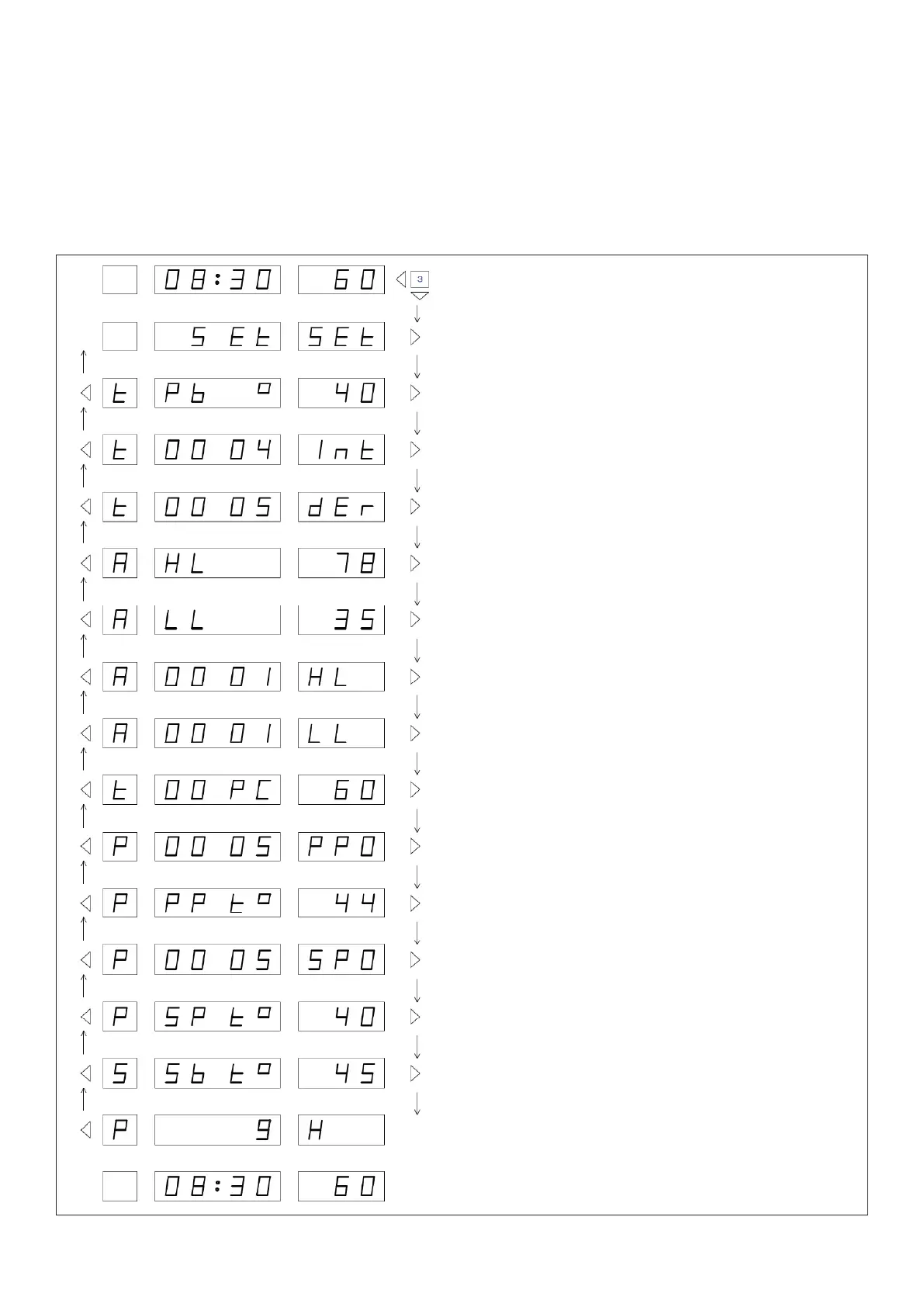
Figure 3 - Advanced Set Up
Press and hold for a minimum of 3 seconds to enter
Advanced Set Up routine.
Press Step Rightpushbuttontomovetotherst
setting value.
Press Value Increase or Value Decrease push
buttons to alter Proportional Band.
Press Value Increase or Value Decrease push
buttons to alter Integral Time.
Press Value Increase or Value Decrease push
buttons to alter Derivative time.
Press Value Increase or Value Decrease push
buttons to alter First level High temperature limit.
Press Value Increase or Value Decrease push
buttonstoalterLowTemperatureLimit.
Press Value Increase or Value Decrease push
buttons to alter High Temperature Limit Time Delay.
Press Value Increase or Value Decrease push
buttonstoalterLowerTemperatureLimitTimeDelay.
Press Value Increase or Value Decrease push
buttonstovaryvalveposition.Figureshows
percentage open. See Manual Control.
Press Value Increase or Value Decrease push
buttons to alter Primary Pump over-run time.
Press Value Increase or Value Decrease push
buttons to alter Primary Pump over-run temperature.
Press Value Increase or Value Decrease push
buttons to alter Secondary Pump over-run time.
Press Value Increase or Value Decrease push
buttons to alter Secondary Pump over-run temperature.
Press Value Increase or Value Decrease push buttons to
alter the Night Set-back/Pasteurisation temperature.
Press Value Increase or Value Decrease push
buttons to alter Primary Pump duty - standby time.
Press and hold Modepushbuttonfor3secondstoexit
Set Up routine.



 To Next Page