6
Set Up
TheBreezecontrolunitisfactoryprogrammedwithtemperatureandcontrolsettingsthatwillsuit most
applications.Howeverwewouldrecommendthattheunitiscommissionedtoensurecorrectoperation
andmaximumefciency.ContactourServiceDepartmentfordetails.
Allthevaluesareadjustablesothatyoucancustomisetheunittoexactlymatchyoursystem.
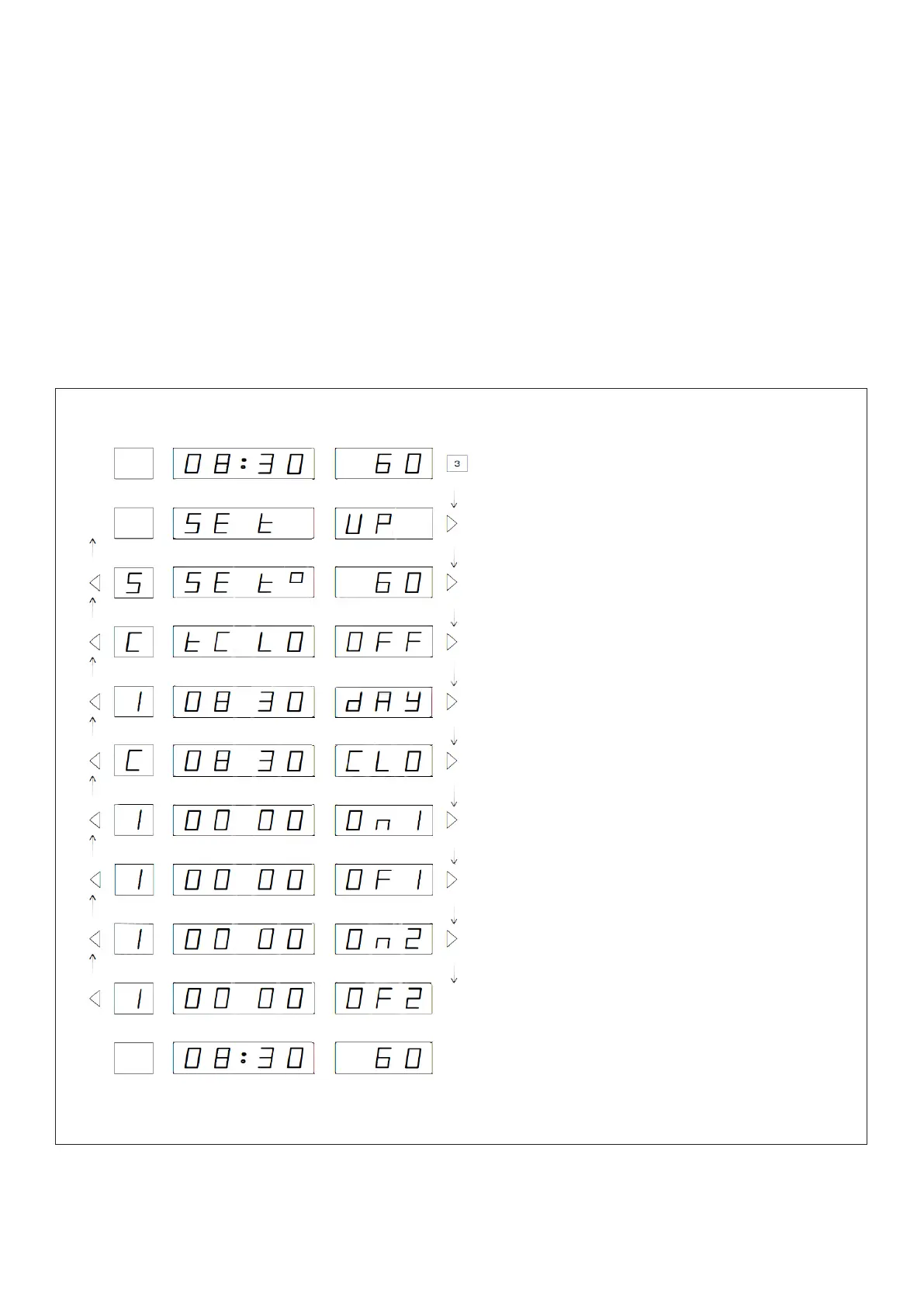
The set up routine is entered by pressing and holding the Mode
(10)
push button for three seconds.
Press the Step Right
(8)
and Step left
(6)
pushbuttonstomoveforwardsandbackwardsthroughthe
sequence.PresstheValue Increase
(7)
or Value Decrease
(9)
pushbuttonstoalterthevalueshownin
the display. Press and hold the Mode
(10)
pushbuttonfor3secondstoexitthesetuproutine.
Thesystemcontinuestocontrolwhenthecontrollerisinthesetuproutine,allowingadjustmentsto
bemadeonthey
Figure 1 - Set Up Sequence
Press and hold for a minimum of 3 seconds
to enter Set Up routine.
Press Step Righttomovetorstvalue.
Press Value Increase or Value Decrease
pushbuttonstoalterwatertemperature.
Press Value Increase to turn Time
clock function on or off.
Press Value Increase or Value Decrease
to change Day number.
Press Value Increase or Value Decrease
push buttons to change time. Press and
hold push button for rapid change.
Press Value Increase or Value Decrease
push buttons to change the time of the
rsttimedonandoffperiod.Pressand
hold push button for rapid change.
Press Value Increase or Value Decrease
push buttons to change the time of the
second timed on and off period. Press and
hold push button for rapid change.
Press Step Right push button to set the
on-off times for day 2, day 3, day 4 etc.
Press and hold Value Select push button
foraminimumof3secondstoexitSetUp
routine.



 To Next Page