Orthomate™ - User Manual Page 4 of 12
©2017 StrideOn Ltd
StrideOn Ltd exclusively shall determine the occurrence of a Warranty voiding event. The Warranty herein
is the only Warranty offered. There are no other Warranties either expressed or implied, including but not
limited to any Warranty of design, merchantability, or fitness for a particular purpose.
StrideOn Ltd shall not be responsible for any incidental, consequential or indirect damages from the use of
StrideOn Ltd products. No agent of StrideOn is authorised to alter or exceed the Warranty as set forth
herein.
For Warranty service contact your authorised Orthomate™ dealer. If you do not receive satisfactory
Warranty service from your authorised dealer, please contact StrideOn Ltd at 6 Cotlake Close, Taunton,
TA1 3RD Somerset UK or www.strideon.co.uk
Warranty Service Information
Please take a moment and write down the purchase information below which is necessary for any warranty service.
INSTRUCTIONS FOR QUICK NO TOOLS SETUP
Step 1. Unpack your Orthomate™ Knee Scooter
A. Assemble the Orthomate™ on a stable, level surface.
B. Remove the Knee Scooter and all other items from the shipping box.
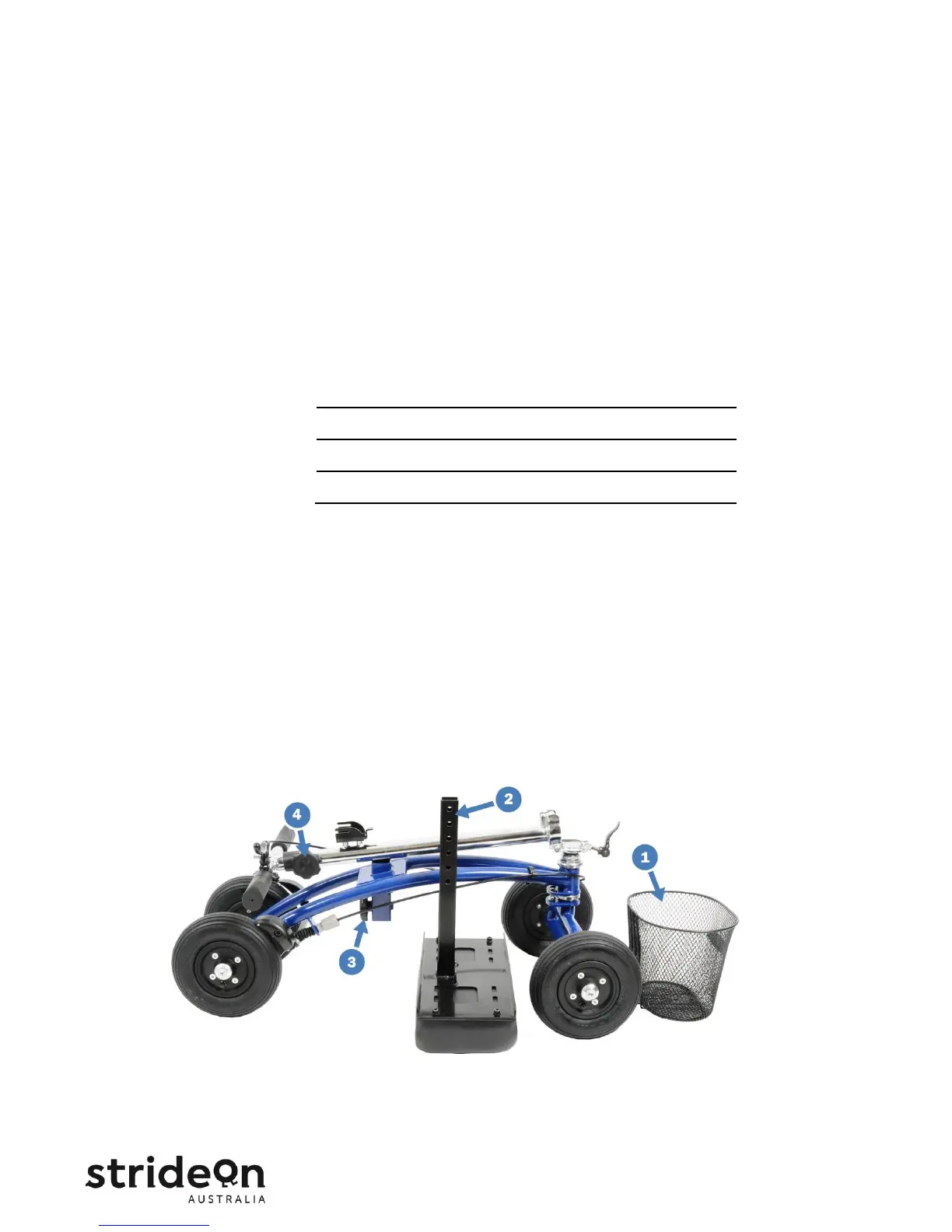
C. Verify the following parts are included in the Orthomate™ shipping box.


 To Next Page