Orthomate™ - User Manual Page 6 of 12
©2017 StrideOn Ltd
Step 3. Install the knee rest for RIGHT or LEFT Leg
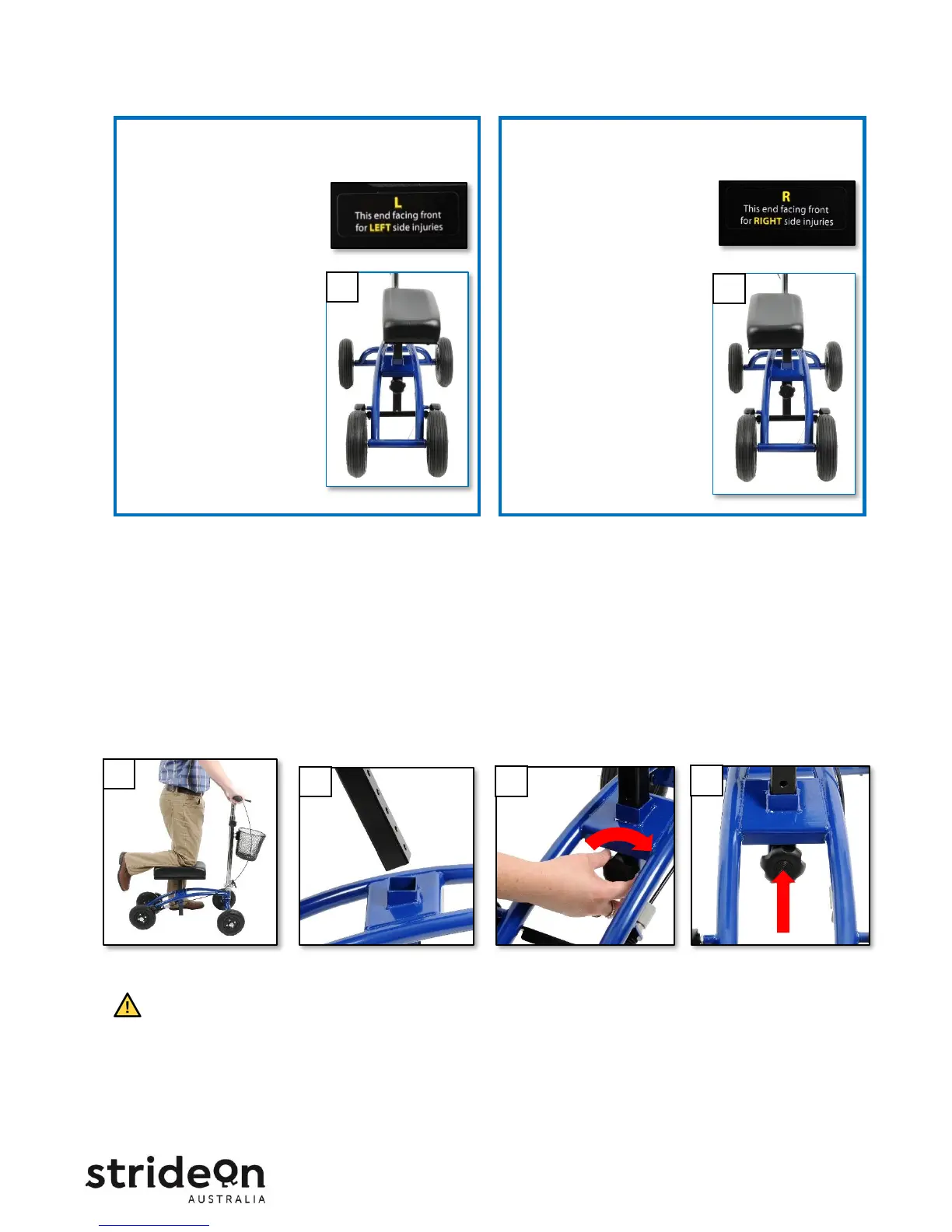
For LEFT LEG injury
A. Remove the Knee Rest Adjustment Bolt
Thumbscrew.
B. Insert the Knee Rest Post
into the Post Holder so the
“L” label on the underside
is facing toward the front.
C. When viewed from
behind, the Knee Rest
will be offset toward
the right (Figure 3A).
For RIGHT LEG injury
A. Remove the Knee Rest Adjustment Bolt
Thumbscrew.
B. Insert the Knee Rest Post
into the Post Holder so the
“R” label on the underside
is facing toward the front.
C. When viewed from
behind, the Knee Rest
will be offset toward
the left (Figure 3B).
D. Determine your desired Knee Rest Height. The knee rest height should be set at a level that allows you
to stand upright with your knee centered on the pad and your weight comfortably balanced (Figure 3C).
E. Insert the knee post into the post holder (Figure 3D) and then align the bolt with the knee rest post hole
at your desired height (Figure 3E).
F. Screw the knee rest knob on finger-tight (Figure 3E) all the way in (Figure 3F).
G. Once installed, the knee rest should not move up and down. If there is movement, the knee rest has
not been installed properly.
• Failure to install the knee rest properly may result in serious injury.
• Do not sit on the knee rest while the Knee Scooter is moving. Doing so may result in loss of balance and
serious injury.


 To Next Page