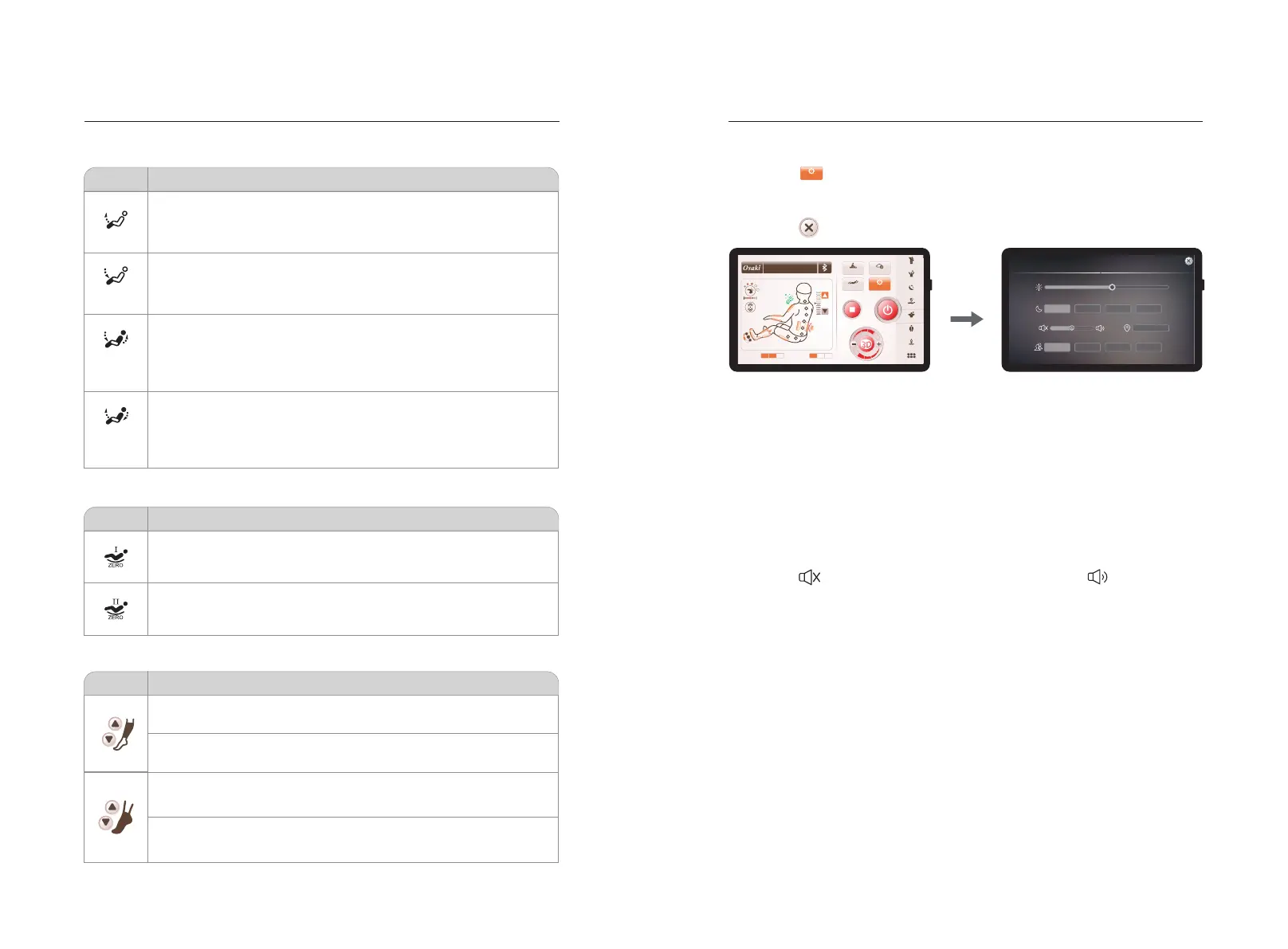
01)Lyingangleadjustment
02)Zerogravityadjustment
Method of usage Method of usage
Function
Description
Linkage
Rise
Linkage
Fall
Leg Up
Leg Down
Leg up: Press and hold to raise the calf unit independently of the
backrest, release to stop; After the calf rest up is completed, the calf
frame will automatically detect the length of the foot.
Leg down: Press and hold to lower the calf unit independently of the
backrest, release to stop; After the calf rest down is completed, the calf
frame will automatically detect the length of the foot.
Linkage Rise: Press and hold to raise both the backrest and calf unit
at the same time, release to stop. After the back rest & calf unit linked
up is completed, the calf frame will automatically detect the length of
the foot.
Linkage Fall: Press and hold to lower both the backrest and calf unit at
the same time, release to stop. After the back rest & calf unit linked
down is completed, the calf frame will automatically detect the length of
the foot.
Function
Description
Zero gravityⅠ: Automatically adjust the calf and backrest position to
zero gravityⅠposition.
Zero gravityⅡ: Automatically adjust the calf and backrest position to
zero gravityⅡposition.
03)Legextension
Function
Description
Up button: Press and hold to manually raise the calf massage assembly
to the knee position, release to stop.
Lower button: Press and hold to manually lower the calf massage
assembly to the calf position, release to stop.
Up button: Press and hold this button to manually adjust the foot
massage assembly to slowly shorten, release to stop.
Lower button: Press and hold this button to manually adjust the foot
massage assembly to slowly extend, release to stop.
8)Settings
02)Sleepoff
03)sound
04)Language
05)SerialNo.
201804150001
English
1Min 2Min 5M in 10 Min
Setting
Brightness
Sound
Sleep Off
Language
S/N
Chine se
· Click the “ ” button icon to enter the setting selection interface, including backlight
brightness adjustment, sleep time adjustment, button volume switch, serial number,
language selection and other settings.
·Click the “ ” icon to close the settings interface.
Setting
Setting interface
·Select the backlight brightness slider, slide left and right to adjust the backlight
brightness.
·Select the sleep time button and set it for 1 minute, 3 minutes, 10 minutes or
30 minutes.
·Click the “ ” icon to turn off the button volume, and click “ ” to turn on the
button volume.
·Language selection
·Displays information such as current equipment.
2322
01)Brightness
Setting selection interface
Manual
Customise
Ang le
Setting
2
06
Upper Air
Lower Air
Stress Relieving
Energy
Good-night Sleep
Joint Care
Frozen Shoulder
Spine Massage
Thai Massage
More
16min
Waist Care


 To Next Page