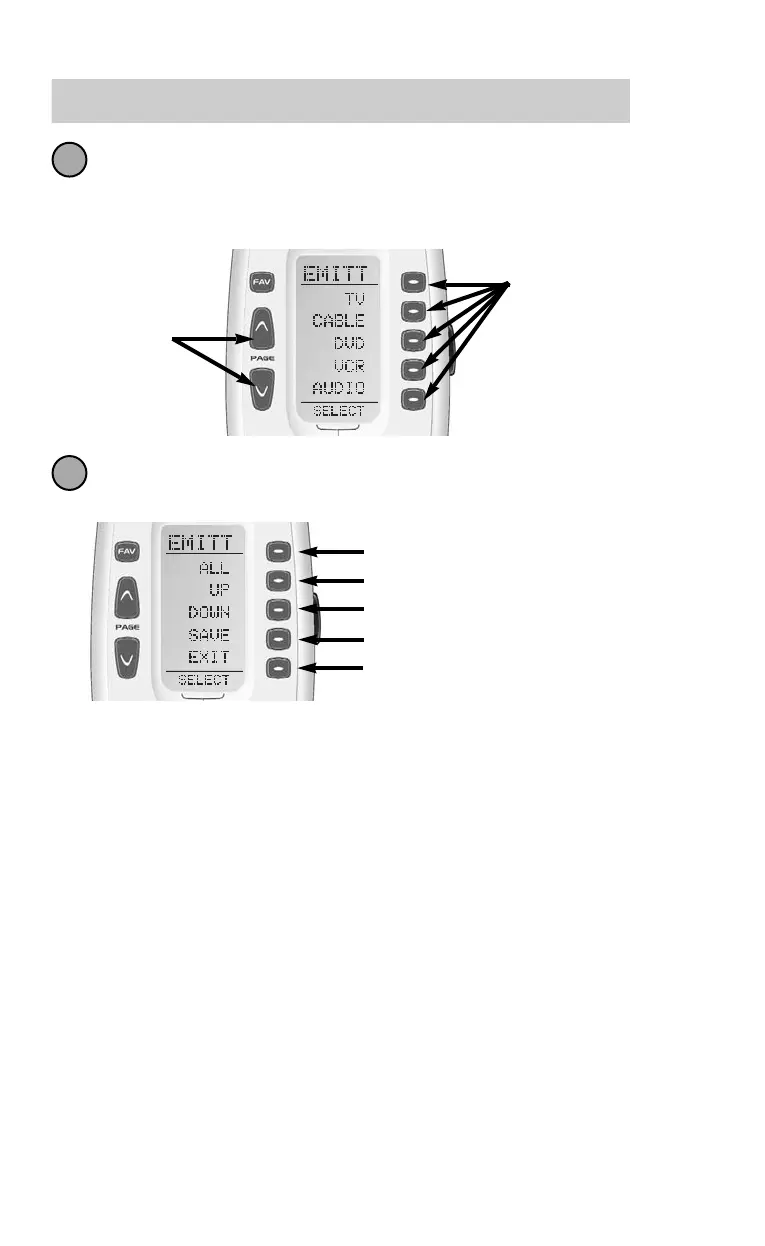
The display changes to a list of the names of your devices. If you have
two pages of devices, pressing either of the page buttons will display
the other page. Select the device you would like to change the
Emitter settings, then go to Step 4.
Select the new setting by pressing the desired button, then press
SAVE to save your new setting and return to the RF settings menu.
BLAST - Setting the Front Panel Blaster On or Off
The MRF-250 and MRF-300 Base Stations have a configurable
front panel high power IR LED or “blaster” for controlling compo-
nents in the same cabinet space without emitters attached to their
front panel. The front panel blaster can overpower or saturate the
sensors of some A/V components, so if intermittent operation
occurs, the blaster should be turned off.
The blaster is incompatible with a stack of identical components,
since all components will receive IR commands at once, no mat-
ter what device is selected. Turn off the front panel blaster by fol-
lowing the steps described on the next page:
Select the new setting by pressing the desired button, then press SAVE
to save your new setting and return to the RF settings menu.
EMITT - Setting IR Emitter Outputs
The MRF-250 and MRF-300 Base Stations enable you to route or
steer the IR commands from any Device to any or all of the IR
Line Outputs. This allows you to control identical devices using
the exact same IR commands (such as an array of television sets
in a media room or a stack of identical satellite receivers installed
in a central location with one satellite receiver dedicated to each
room with a television). Each button push (or macro step) is rout-
ed to the specific IR Line Output you’ve assigned to a device. In
the factory set default settings, the Osiris is set to route IR com-
mands from any device to ALL IR Line Outputs simultaneously. To
change the Osiris default settings follow these steps:
From the RF Settings Menu, select EMITT.
Decide whether you are changing the Emitter settings for all devices
or just one of the devices of the Osiris.
Select ALL to change the Emitter settings to
ALL devices in the Osiris. Then, go to Step 4.
Select DEVIC to change the Emitter settings to
just one of the devices in the Osiris. Then, go
to Step 3.
34 35
The Osiris
1
2
Displays the current ID#
Change the ID# to a higher number
Change the ID# to a lower number
Save the new setting
Exit this Menu without changing
the IR/RF settings
4
Universal Remote Control, Inc.
3
4
Select a device
Page
Buttons
display the
other page
of devices.
Displays the Line Output # or ALL
Change the Line Output upwards
Change the Line Output downwards
Save the new setting
Exit this Menu without changing
the EMITT settings



 To Next Page