User’s Manual (Confidential)
OsteoSys Co., Ltd.
Model Designation : SONOST 3000 DOC. No. : OT06-2R7124
55
3.4.5 Measurement of Bone Mineral Density
<Patient Registration>
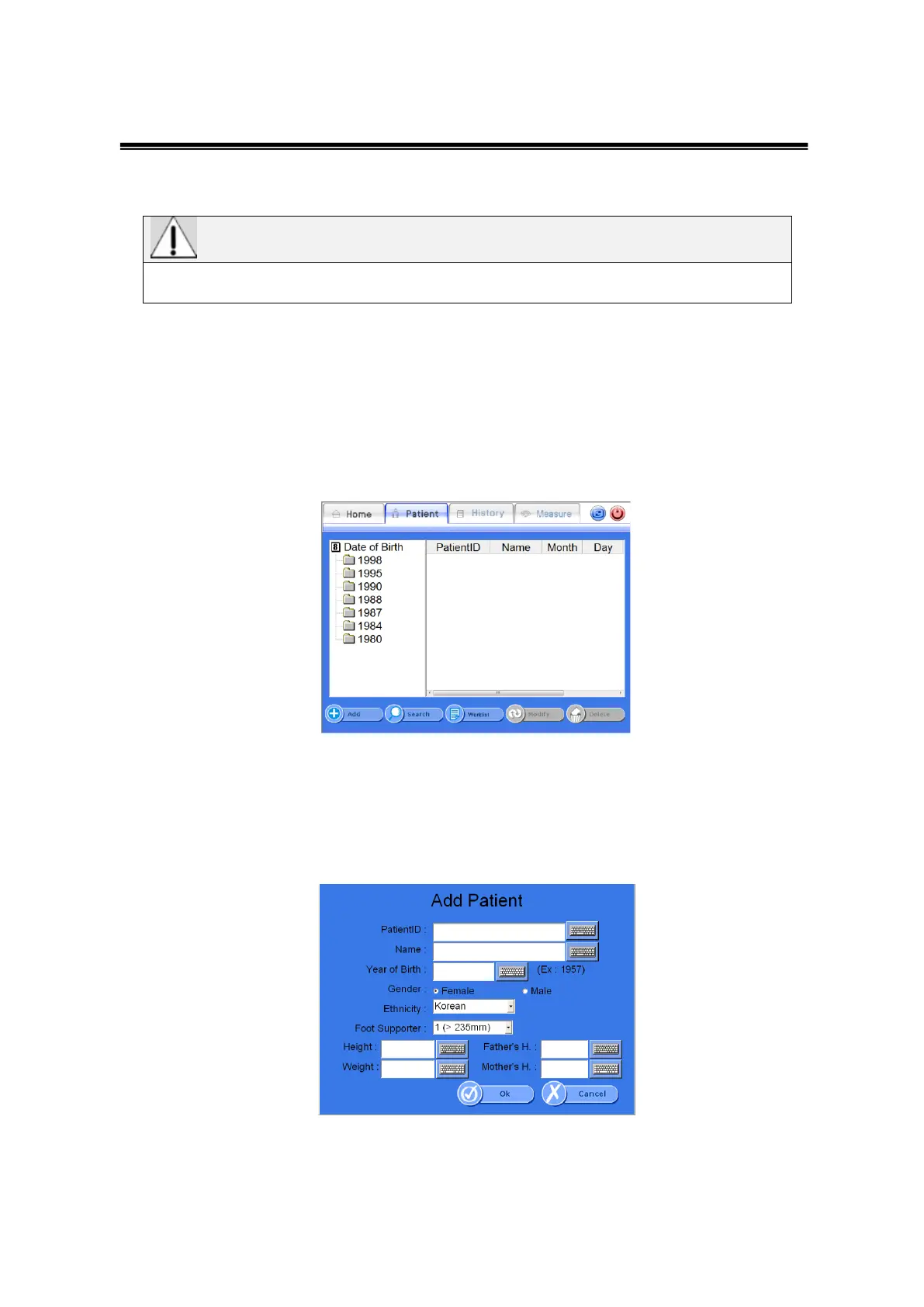
If you click <patient> from the top menu, you will be directed to “Patient List” which
displays and allows you to manage all the registered patients.
The list on the left indicates the year of birth for registered patients. If you click a
year, you can see the patients IDs and names who belong to the selected year of
birth.
Patient List Window
If you want to register a new patient, click <Add>from the bottom menu. Then “Add
Patient” window is displayed for you to insert the patient’s information.
If you insert and click <Ok>, then the patient is registered and displayed on the
screen.
Add Patient Window
- PatientID : Insert the ID which can identify the patient.(64 characters are MAX)
Measurements may not be accurate if patient information is entered incorrectly.



 To Next Page