English-5
TO USE THE TURBO CONVECTION BAKE
FUNCTION (TURBO CONVECCIÓN) “
”
The Turbo Convection Bake (Turbo Convección)
“
”Function
turns on a built in fan that circulates hot air in the oven chamber
cooking your food faster and more evenly. Preheat oven 5-7
minutes at desired temperature with oven rack in place.
Step 1. Place baking pan with food inside on wire rack.
Step 2. Close glass door completely.
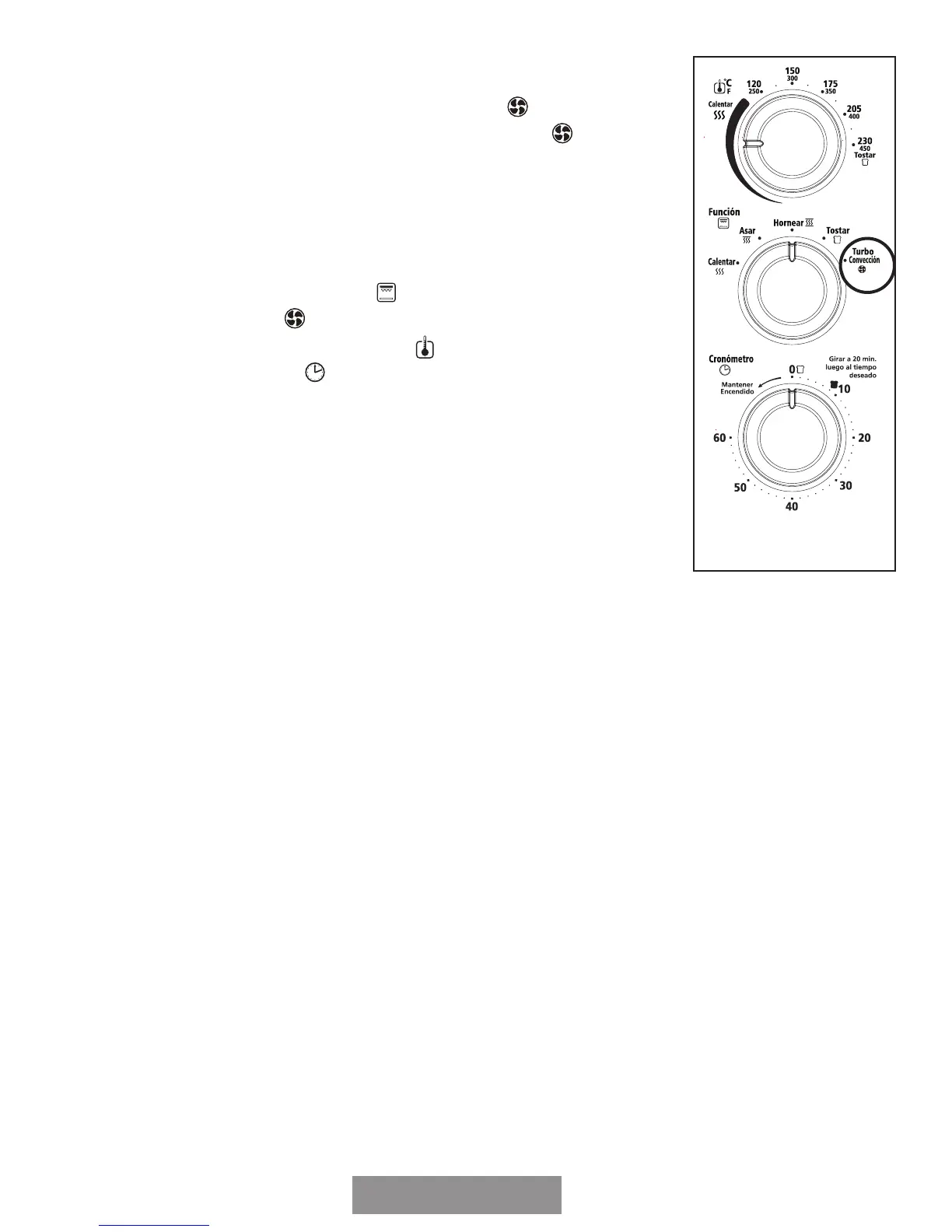
Step 3. Turn the Function dial
“
” to Turbo (Turbo
Convección)
“
”.
Step 4. Turn the Temperature dial
“
” to desired setting.
Step 5. Turn the Timer
“
” to desired cook time.*
Step 6. When baking is complete, open door completely and
remove food.**
FAQS ABOUT TURBO CONVECTION BAKE
What is Turbo Convection Bake?
Answer: In your Countertop Oven there is a built in fan that
circulates the hot air in the oven chamber cooking your food faster
and more evenly.
How do I adjust the time for Turbo Convection?
Answer: On average, the Turbo function will shorten the cooking time, but it varies by
food. It is suggested to go with a shorter cooking time to start with and then add
time if it is needed.
What are the best foods to use with Turbo?
Answer: While a shorter cook time is often desirable, baked goods in particular benefit
from Turbo cooking as the circulating air keeps oven temperature consistent throughout.


 To Next Page