English-6
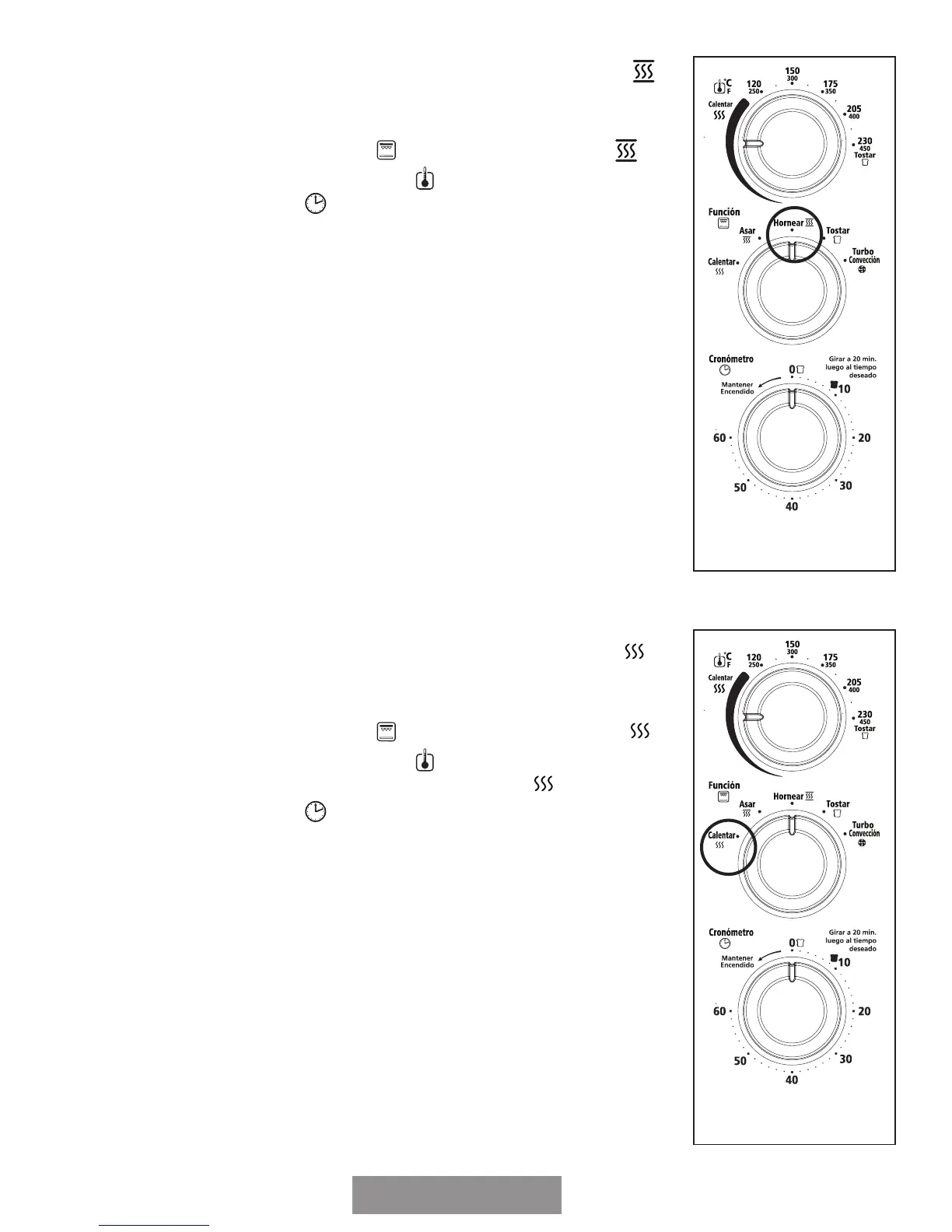
TO USE THE BAKE FUNCTION (
HORNEAR) “
”
Step 1. Place baking pan with food inside on wire rack.
Step 2. Close glass door completely.
Step 3. Turn the Function dial
“
” to Bake (Hornear)
“
”.
Step 4. Turn the Temperature dial
“
” to desired setting.
Step 5. Turn the Timer
“
” to desired cook time.*
Step 6. When baking is complete, open door completely and
remove food.**
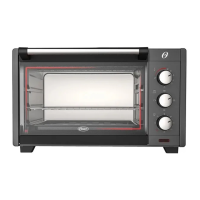
TO USE THE WARM FUNCTION (CALENTAR) “
”
Step 1. Place baking pan with food inside on wire rack.
Step 2. Close glass door completely.
Step 3. Turn the Function dial
“
” to Warm (Calentar)
“
”.
Step 4. Turn the Temperature dial
“
” and place it within the
warm range of temperature (Calentar)
“
”.
Step 5. Turn the Timer
“
” to desired warming time.*
Step 6. When Warming is complete, open door completely and
remove food.**


 To Next Page