Need help?
Do you have a question about the otometrics Madsen Xeta and is the answer not in the manual?
Explains the use of Warning, Caution, and Note statements in the manual for safe operation.
Step-by-step guide for installing the software and connecting the device.
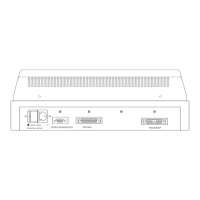
Details of the connection panel are referenced in the MADSEN Xeta Reference Manual.
Instructions on how to turn the MADSEN Xeta device on and off using the power switch.
Steps for the initial setup to connect MADSEN Xeta with OTOsuite software.
Steps to connect the device to OTOsuite software using the Configuration Wizard.
How to connect air conduction transducers like headphones and insert phones to the device.
Explains the various icons used within the Audiometry Module toolbar for different functions.
Step-by-step guide for correctly placing headphones on the patient's ears for accurate testing.
Guidance on selecting and inserting earphones for patients, ensuring a proper seal.
Lists type identification, channels, pure tone frequencies, modulation, and attenuator specifications.
Shows recommended separation distances between RF equipment and MADSEN Xeta by frequency.
Explains symbols like WEEE, caution, and information icons used in the manual.
Outlines the manufacturer's responsibility concerning equipment safety, reliability, and performance.
 General
| Type | Diagnostic Audiometer |
|---|---|
| Output Levels/Intensity Range | -10 dB HL to 120 dB HL |
| Transducer Types | Headphones, Bone Conductor, Insert Earphones, Free Field |
| Test Types | Pure Tone, Speech, Masking |
| Display | Color LCD |
| Connectivity | USB |
| Channels | 2 |

 To Next Page