S3 User Guide 74 PN 875-0196-000 Rev C1
Appendix C: S3 Screen Description Reference
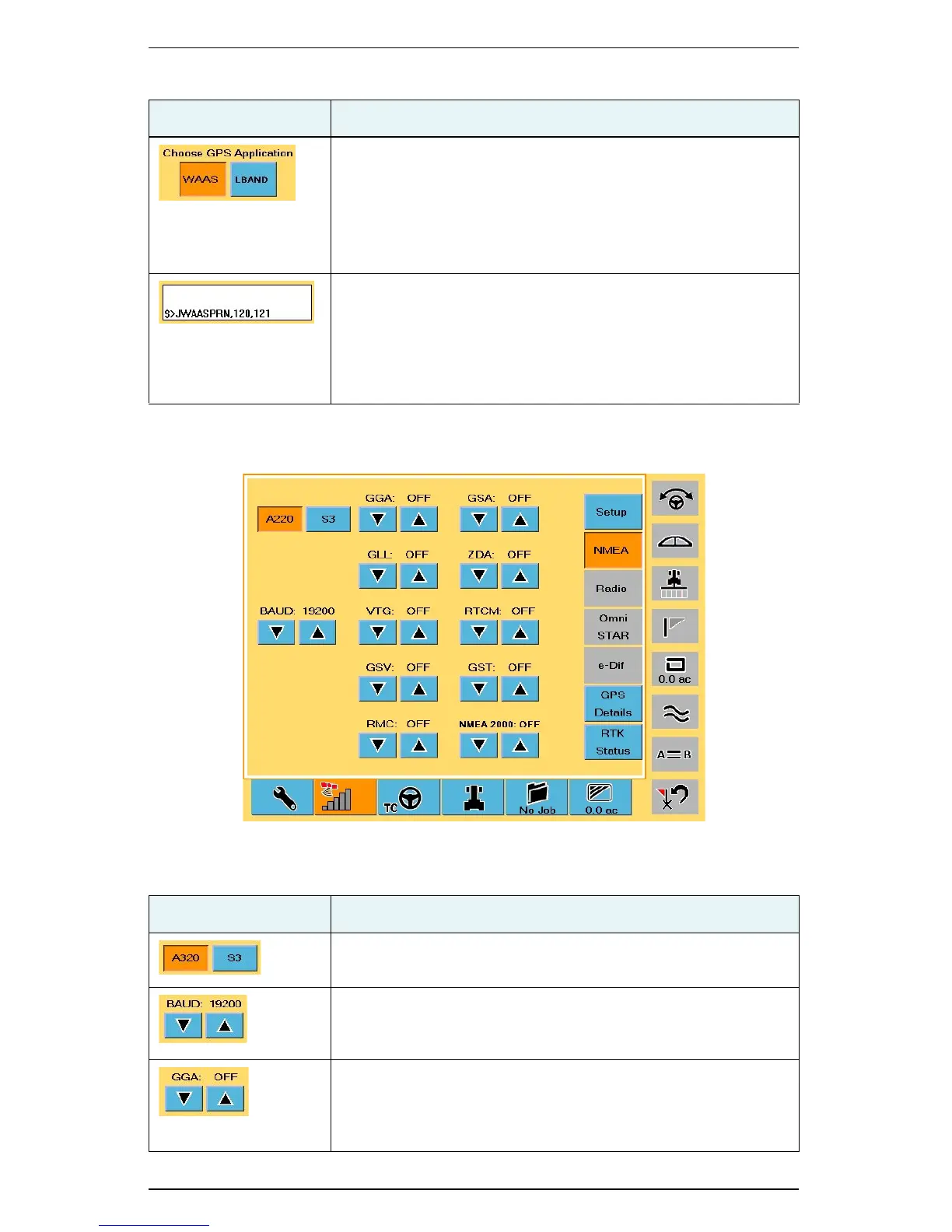
NMEA Screen
Choose GPS Application
Sets the differential correction type S3 uses to calculate a
position. Available options depend on what is installed on your
S3 (WAAS, SBAS, LBAND, RTK, etc.).
See Chapter 5, “Differential Correction Types” for more
information on differential corrections.
Message window
Displays system-generated messages. The system messages
are useful when performing diagnostics. Refer to the
Hemisphere GPS Technical Reference (go to
www.hemispheregps.com/support and click the GPS Reference
icon) has detailed information on system generated messages.
Table C-5: NMEA screen button and field descriptions
Button/Field Description
Device selection buttons
Select the device for which you want to set baud/message rates.
BAUD buttons
Adjust the baud rate up or down.
Message buttons (GGA buttons shown at left)
GGA,GLL,VTG,GSV,RMC,GSA,ZDA,RTCM,GST,NMEA 2000
Each message button allows you to turn that message on (and
select the rate) or off.
Table C-4: Setup screen button and field descriptions (continued)
Button/Field Description


 To Next Page
 Loading...
